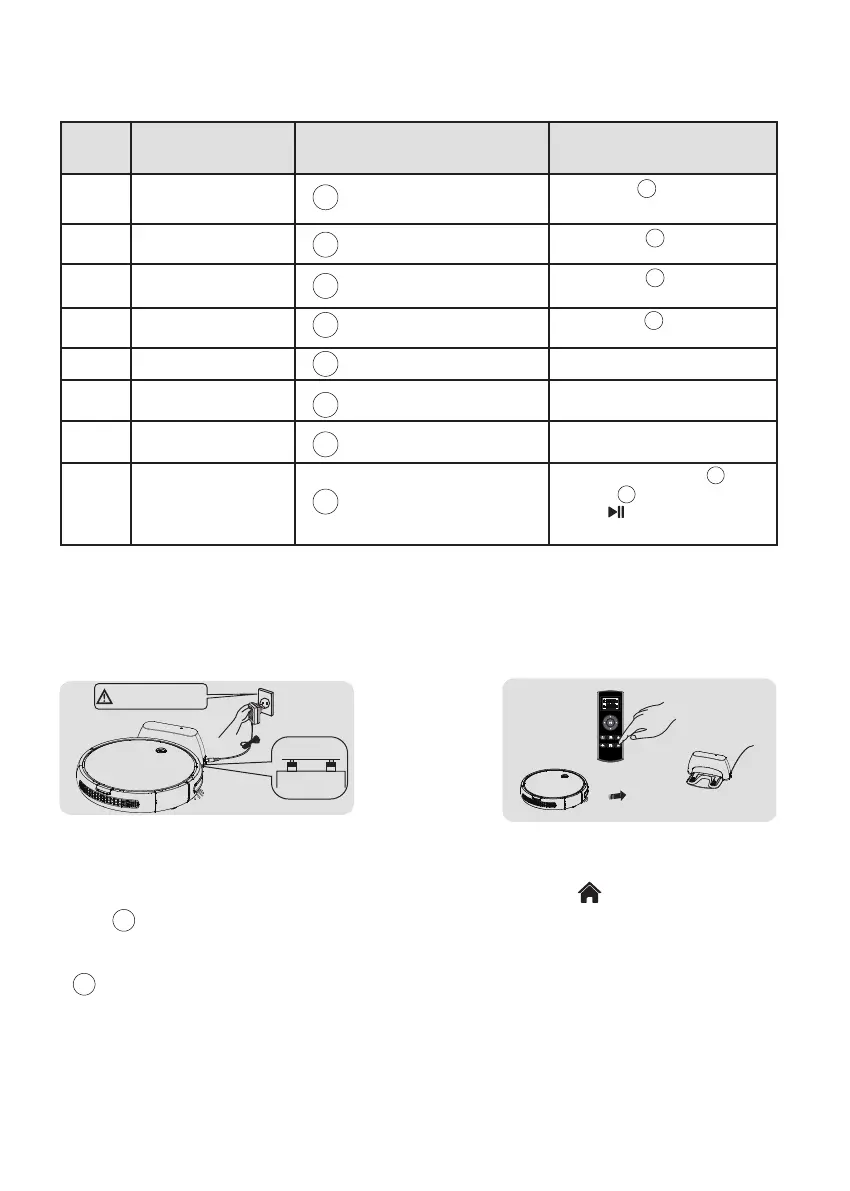
4.1.3 Operation guideline of indicators
4.2 Charging Methods
4.2.1 Manual Charging
2. Charging via the remote control:
When the cleaner is in standby mode,
press the " " button to have the machine
enter the recharge mode.
1. Charging with the docking station:
Connect the adapter to the docking station first, and
then insert to the power supply; Place the vacuum
cleaner on the docking station for charging. (The
green
" " indicator will flash when looking for
dock station,the green indicator on dock station will
be off when charge back successfully; The red
" " indicator will flash during charging and
keep on after fully charged).
CLEAN
CLEAN
CLEAN
CLEAN
CLEAN
CLEAN
CLEAN
CLEAN
CLEAN
CLEAN
CLEAN
CLEAN
CLEAN
CLEAN
CLEAN
CLEAN
Turn-off1
2
3
4
5
6
7
8
Light-off
Red Light-on
Green Light-on
Flash Green
Flash Red
Flash Orange
Flash red and beep
Light off
Long-press " "4S and enter the
OFF state.
Short-press " " and enter the
Auto Cleaning mode.
In standby,long-press " " 6S till
orange " " blinks, meanwhile
press " " on remote control,till
beep sound heard
Double click " " and it will enter
the Recharge mode.
Short-press " " and enter the
Standby state.
Turn-on
Cleaning
Recharge
Charging
Error
Fully Charged
Pairing mode
No. State Display Operation
- 11 -
Danger!
Electric shock.



 To Next Page