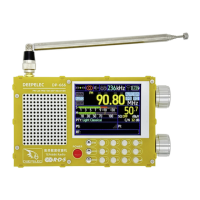
DP-666 High Sensitivity Color Screen Radio Deepelec Store : https://deepelec.aliexpress.com/store/1101363542
www.deepelec.com
How to Operate:
Basic Operations:
Main Switch: The main switch of the unit, the OFF position disconnects the battery,
and the ON position connects the battery.
Please turn this switch OFF when the unit is not used for a long time to prevent the
power from being turned on by mistake.
POWER: Power button, short press to switch the unit between on and off state.
TUNING Knob: Rotate to adjust the frequency, short press to switch the steps,
long press to turn on iMS and EQ
VOLUME Knob: Volume adjustment
SQL Gear: Squelch level adjustment
BW: Bandwidth selection
In FM mode, short press: Stereo/mono switch
In FM mode, long press: Bandwidth switch,switch between
56/64/72/84/97/114/133/151/168/184/200/217/236/254/287/287/311kHz/AUTO BW,
you can also press and hold the BW button and use the TUNING knob to select.
In AM mode, short press: Bandwidth switch, switch between 3/4/6/8kHz
MODE: Tuning Mode
Short press:MAN (Manual frequency tuning), AUTO (Automatic search), MEM (Store operation)
Long press:Open the menu page
BAND:
Band Selection
Short press: Band switch, switch between LW/MW/SW/OIRT/FM
In FM mode, long press: Open Advanced RDS view / Alternative Frequency view
Press and hold for more than 5 seconds: Sleep or turn off the screen
How to store a station:
(1)Tune to the station you want to store in a preset.
(2)Toggle the MODE button until you see "MEM" highlighted.
(3)Press the TUNING Knob button and "MEM" will turn red.
(4)Select the desired memory channel.
You will see colors on the preset numbers: red means there are frequencies stored on this preset,
green means there are no frequencies stored on this preset.
(5)Press the TUNING Knob button again to store the preset.
Advanced Operations:
Change the encoder direction: Press and hold the BW button when powering on.
Rotate the screen: Press and hold the MODE button when powering on.
Restore default settings: Press and hold the BW and TUNING Knob button when powering on.
Expanded keyboard:
Number keys 0-9: Input the corresponding frequency value
DX button: Start/Stop FMDX Scan
Enter key: Confirm Input


 To Next Page
 Loading...