5
Englishwww.defa.com
Congratulations. DEFA Home is made for you and your cabin/house.
CONTENTS:
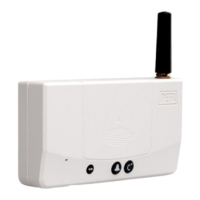
1 x Base Unit This is the main unit, which you place somewhere central in your house.
1 x Battery The back-up battery secures function in case of power outage.
1 x Power adapter For power supply and charging
1 x Antenna Can be unscrewed and replaced with an external antenna (sold separately)
1 set of fastening screws and adhesive pad
CONNECTING THE BASE UNIT
We've made it easy for you to start using your DEFA Home system. The SIM card is already
integrated and the GSM mobile subscription shall be registered when you purchased your
DEFA Home product or registration can be done post purchase at www.defahome.com and
the customer service page. To start using your Base Unit, you only need to do the following:
1. Slide off the battery cover on the front of the Base Unit.
2. Insert the battery.
3. Put the cover back on the battery.
4. Connect the power adapter to your Base Unit.
5. Connect the power adapter to a power outlet.
After you’ve plugged in the power adapter, the Base Unit will start up. This takes up to one
minute. The indicator will emit a constant green light when ready for use. You should wait an
hour before using the Base Unit to make sure the battery is fully charged.
Plug in, Set up, Use!


 To Next Page