8
Operation (continued)
7
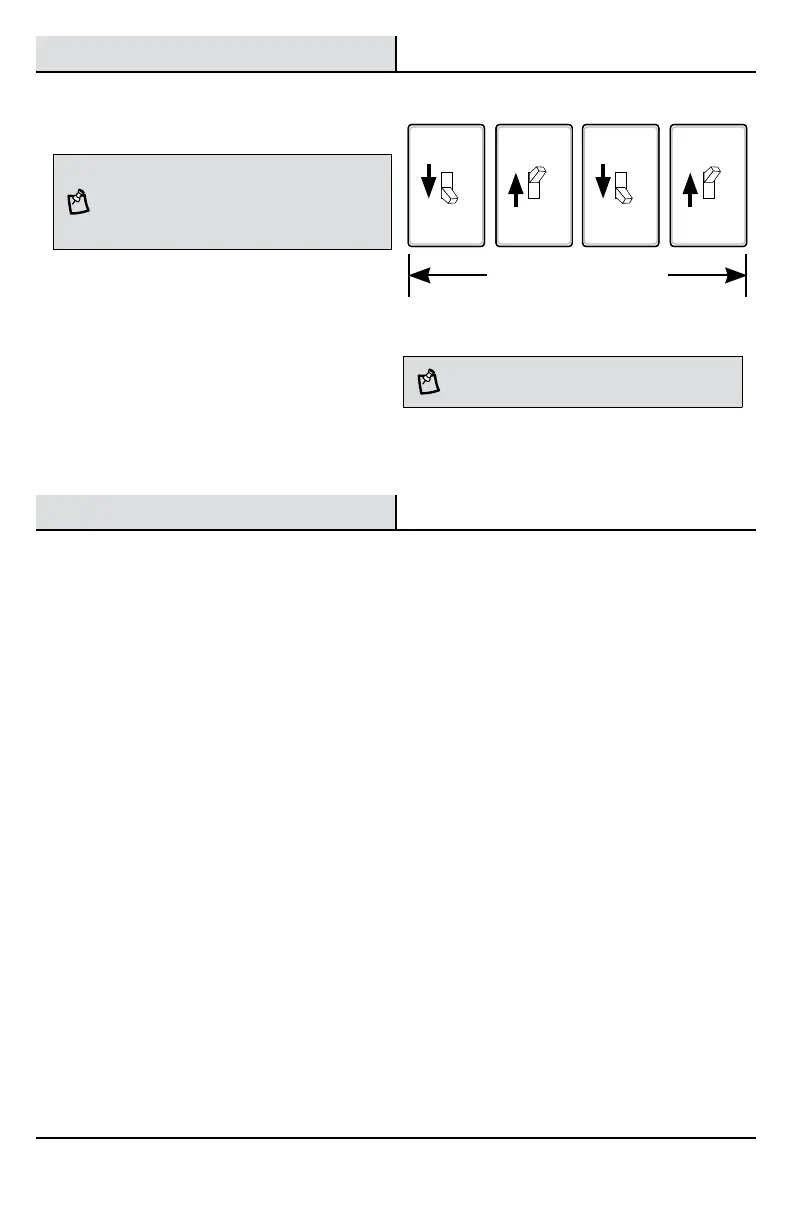
Using Manual Mode
NOTE: Manual mode overrides the motion sensor (C)
and “TIME” control so the light will operate full bright. This
feature only works at night and only for one night at a time.
The motion sensor (C) will reset to motion sensing mode
after 6 hours or sunrise, whichever comes first. Manual
mode can be toggled on and off using a wall switch.
□ Ensure the power to the light is ON and the
sensor has warmed up (approximately 60
seconds).
□ To turn manual mode on, switch the power
OFF–ON–OFF–ON at the wall switch within 3
seconds.
□ To turn manual mode off, switch the power
OFF–ON–OFF–ON at the wall switch within 3
seconds.
Care and Cleaning
□ To prolong the original appearance, clean with clear water and a soft, damp cloth only.
□ Do not use paints, solvents, or other chemicals on this motion sensor. They could cause a premature
deterioration of the finish. This is not a defect in the finish and will not be covered by the warranty.
□ Do not spray with a hose or power washer.
OFF OFFON ON
Less than 3 seconds
NOTE: If the power to the light fixture is off for more than
5 seconds, allow the motion sensor to warm up prior to
switching to manual mode.


 To Next Page