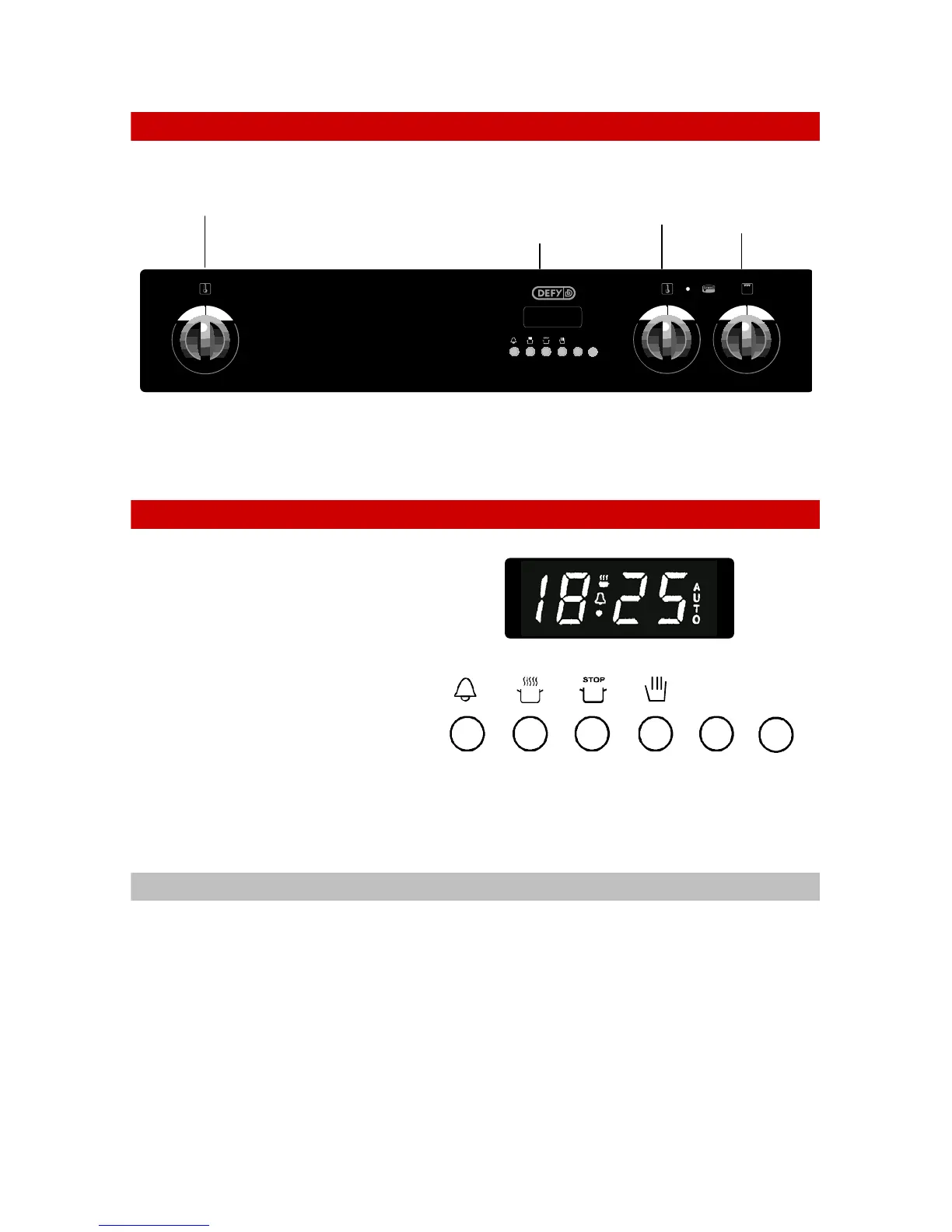
THE CONTROL PANEL
1
0
8
+
-
S
GEMINI CORDON BLEU
12:45
1
0
8
1
0
8
THE OVEN THERMOSTATS ARE MARKED DOWN TO 70°C.
WHEN SET TO THIS POSITION, THE OVENS MAY BE USED AS WARMERS
AUTOMATIC OVEN TIMER / CLOCK
BUTTON FUNCTIONS
1 = MINUTE MINDER
2 = COOKING PERIOD
3 = STOP TIME
4 = MANUAL CONTROL
5 = SUBTRACT
6 = ADD
SETTING THE TIME OF DAY
• When the power is first connected ( or after a power failure), the clock display will
flash 00.00.
• To set the clock, press buttons 1 and 2 and hold them down.
• Press button 5 or 6 until the correct time of day is displayed.
• Release the buttons. The clock is now set.
• Please note that the clock has a 24 hour display.
• For example 3.00 PM will be displayed as 15.00.
Bottom oven
thermostat
and indicator
light
Top oven
thermostat and
indicator light
Automatic
oven timer
and clock for
bottom oven
only
Bottom
oven
variable
grill
+
-
65 4321




 To Next Page