12
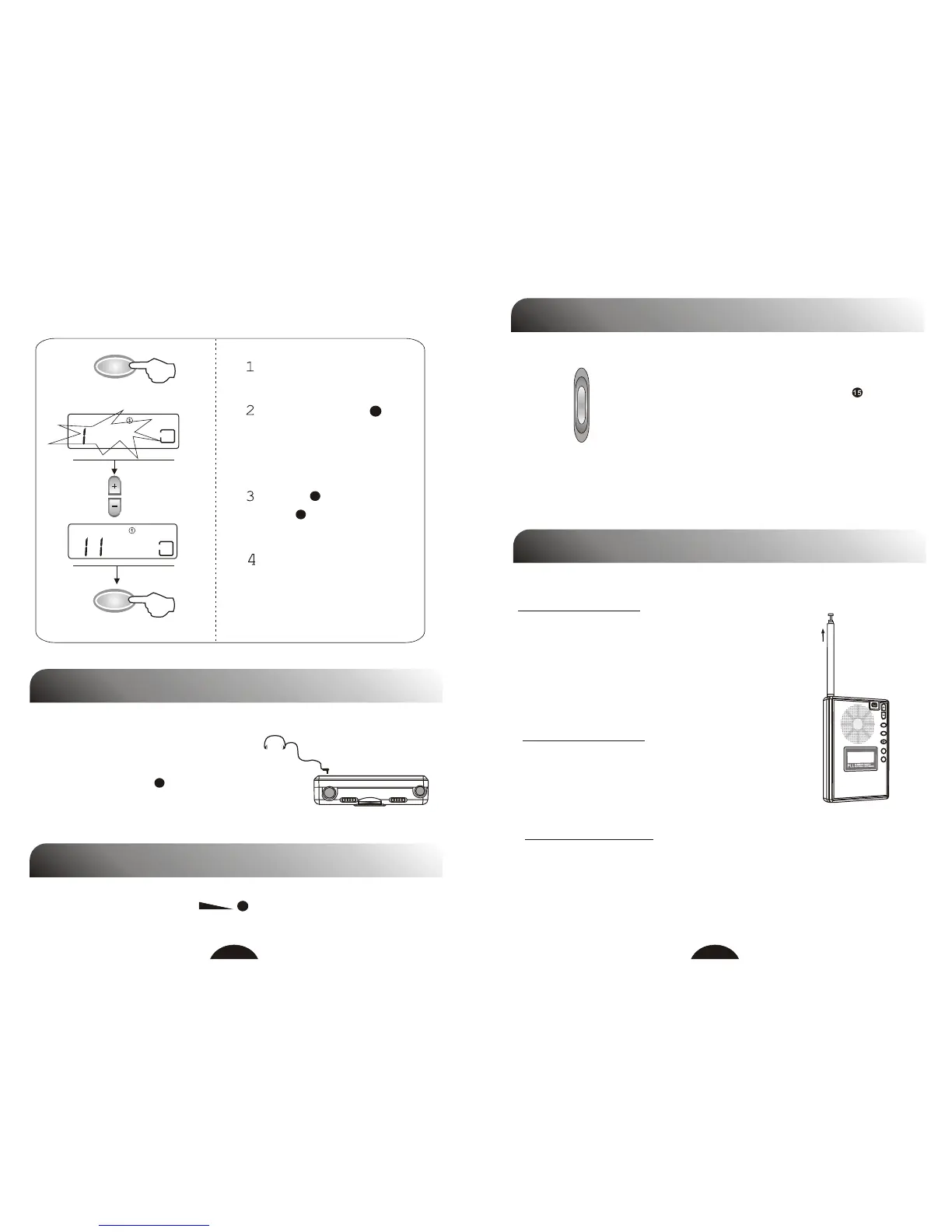
2. Set Clock Time
Select clock1 or clock2.
Press SET TIME ,
clock flashes in the
display.
Press + to adjust hour
and - to adjust minute.
Press SET TIME or
release all buttons for 3
seconds to store the
setting.
3
BAND
BAND
2
006
:
30
:
7
VOLUME CONTROL
Adjust volume using VOL , keep the volume at a moderate
level.
LISTENING WITH EARPHONES
When listening to stereo reception,
normally use earphones and set
MONO / STEREO to STEREO.
Speaker has MONO effect only.
15
16
13
MONO / STEREO
MONO / STEREO
When listening to a stereo reception,
normally set MONO / STEREO to
STEREO. If the stereo reception is too
weak or noisy, set the selector to MONO.
MONO: weak signal broadcast, voice program, mono broadcast.
STEREO: strong signal broadcast, music, FM Stereo broadcast.
USING ANTENNA
Telescopic antenna functions as FM antenna,
keep it extended and change its length and
direction to find the position which gives the
best reception.
Magnetic antenna inside the unit functions as MW antenna, it is
strongly effected by the reception direction.
When listening to MW broadcast, reorient the unit to find the
position which gives the best reception.
MW Reception
FM Reception
M+
M
Telescopic antenna functions as SW antenna.
Extending the antenna straight upward to get
the best reception.
SW Reception



 To Next Page