After Sales Care and Technical Support:
For the UK market only: Tel. 01491 821 821 - email: technical@delabie.co.uk
For all other markets: Tel. +33 (0)3 22 60 22 74 - email: sav@delabie.fr
The installation guide is available on: www.delabie.com
Product conforms to current European Directives.
MAINTENANCE
• Mixer: regularly check (as often as necessary) the temperature selector and the mixer's two internal
seats on which the mixing key turns. Replace as necessary.
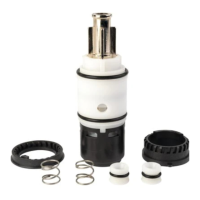
Replacing the solenoid valve
:
• Shut-off the hot and cold water supply.
• Deck-mounted models and wall-mounted TEMPOMATIC 4: loosen the screw
k (fig. E)
using
a 2.5mm Allen key without removing it totally, and remove the cap
m (fig. E)
by rotating slightly
downwards.
• Wall-mounted TEMPOMATIC 3: Loosen the screw
l (fig. F)
using a 2.5mm Allen key without
removing it totally, and remove the spout
(fig. F)
.
•
Remove the electronic unit
n (fig. E, F) and disconnect
the connector
o (fig. E, F)
and for mains
supply models, disconnect the electrical connectors
t then
(fig.
I
).
• Using a 17mm socket p (fig. E, F) for TEMPOMATIC 3, and 13mm for TEMPOMATIC 4, unscrew the
solenoid valve q (fig. E, F).
• Install the new solenoid valve and carefully tighten, ensuring that the thread is not damaged.
• Reconnect the connector o (fig. E, F) to the electronic unit without replacing the unit.
• Reconnect the water supply and check that the valve opens/closes by activating the electronic cell.
Check that the solenoid valve is watertight inside the mixer body. If there are any leaks, gently tighten
the solenoid valve.
• Replace the electronic unit and the cap.
• Deck-mounted models and wall-mounted TEMPOMATIC 4: Carefully t
ighten the screw k (fig. E)
.
• Wall-mounted TEMPOMATIC 3 mural: Carefully
tighten the screws l (fig. F) on the
wall-mounted
TEMPOMATIC 3.
Replacing the 6V Lithium battery 223 (CR-P2)
:
•
Using a 2.5mm Allen key: loosen the screws
k (fig. G, H) without fully removing them
and remove the cap
m (fig. G, H)
by rotating slightly downwards.
• Remove the electronic unit
n (fig. G, H)
.
• Loosen the screw/s s (fig. G, H) (1 screw on the TEMPOMATIC 3, 2 screws on the TEMPOMATIC 4)
to change the battery, leaving the washer in place.
• Replace the assembly, carefully tightening the screws k (fig. G, H) (taking care not to damage the sensor).
2
1
EN


 To Next Page