Your Dell Projector 5
About Your Projector
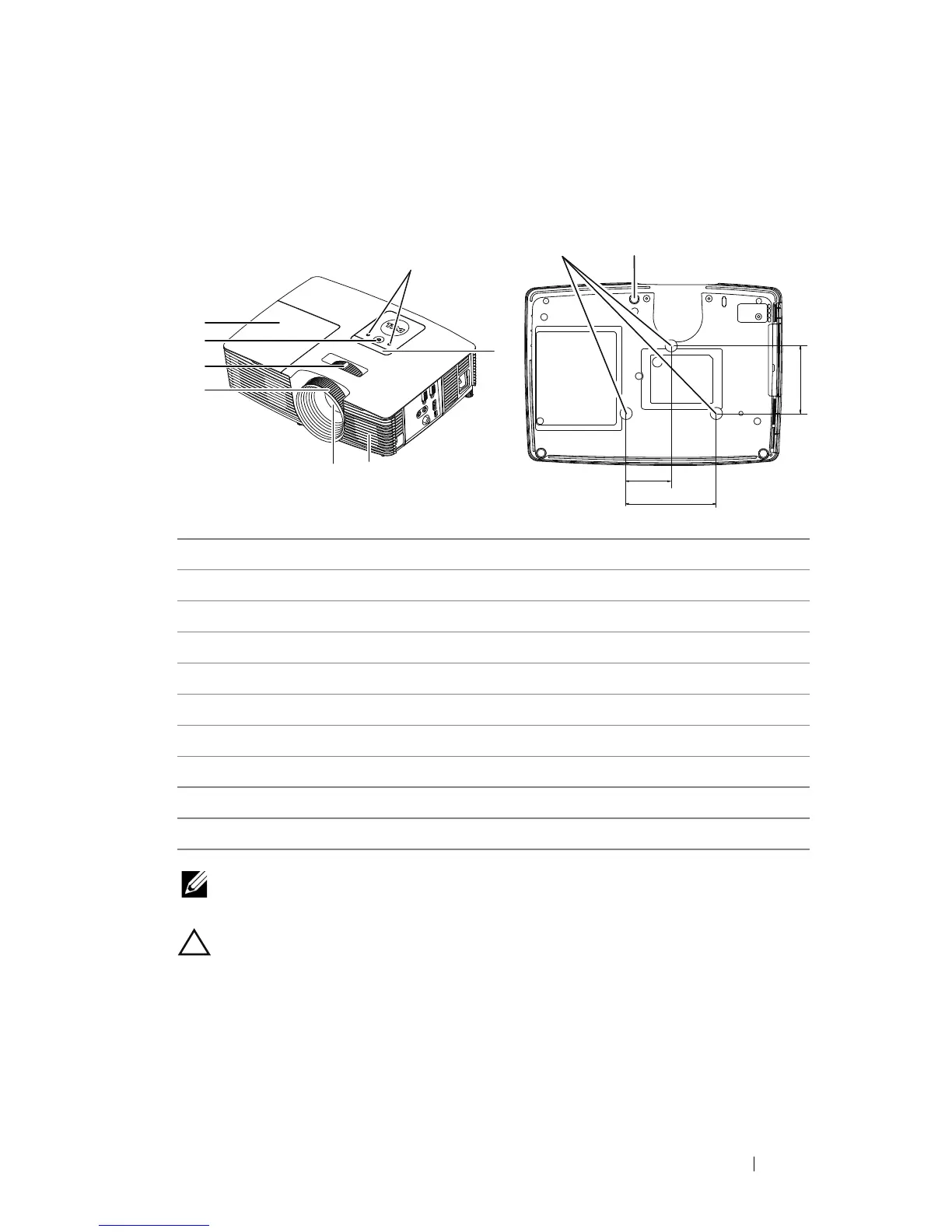
NOTE: Ceiling mount screw hole M3 x 6.5mm depth.
Recommended torque <15 kgf-cm.
CAUTION: Safety Instructions
1
Do not install near heat sources such as radiators, heaters, stoves or any
other apparatus such as amplifiers that emits heat.
2
Do not use the projector in a dusty environment. Excess dust can cause
system failures and eventually will shut down your projector.
3
Ensure that the projector is mounted in a well-ventilated area.
4
Do not block the ventilation slots and openings on the projector.
1 Status indicators
2IR receivers
3Speaker
4 Lens
5Focus ring
6 Zoom tab
7 Power button
8 Lamp cover
9 Mounting holes for ceiling mount
10 Tilt adjustment wheel
2
1
5
8
7
6
43
9
10
82.30
110.00
55.00



 To Next Page