EasyManua.ls Logo

Dell 1907FPc - Service Manual

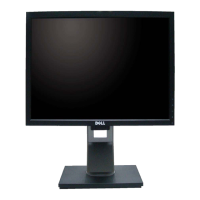
Dell 1907FPc
113 pages
Print Icon
To Next Page IconTo Next Page
Loading...
Dell 1907FPc
1
19” LCD MONITOR
DELL 1907FPc
THESE DOCUMENTS ARE FOR REPAIR SERVICE INFORMATION ONLY.EVERY REASONABLE EFFORT
HAS BEEN MADE TO ENSURE THE ACCURACY OF THIS MANUAL; WE CANNOT GUARANTEE THE
ACCURACY OFTHIS INFORMATION AFTER THE DATE OF PUBLICATION AND DISCLAIMS RELIABILITY FOR
CHANGES, ERRORS OR OMISSIONS.
Service Manual
www.ma163.com 电子技术资料网
Downloaded from Arrow.com.

Questions and Answers

  • M
    Martin MarshallAug 13, 2025
    How to fix a Dell Monitor with no power?
    • M
      Maria JohnsonAug 13, 2025
      If your Dell Monitor has no power, try reinserting the AC cable and ensure the AC power is within the normal range of 100-240V. Also, reinsert the power cable and check the power section. You can also measure CN601 PIN5/6 to see if it is 12V, and measure CN601 PIN9/10 to see if it is 5V. Check the power section, replace X301 or replace U401.
  • E
    Emily HarrellAug 16, 2025
    How to troubleshoot no power on Dell Monitor?
    • M
      masonkrystalAug 16, 2025
      If your Dell Monitor has no power, reinsert the AC and ensure it's within the normal range of 100-240. You can also reinsert or check the power section, check the power section, replace X301 or replace U401.
  • C
    Christina HaydenAug 20, 2025
    What to do if my Dell Monitor has no power?
    • M
      Michelle WoodsAug 20, 2025
      If your Dell Monitor has no power, check the AC line. Also, check F901, the bridge rectified circuit, the start voltage for pin3 of IC901, R903, R04, R905, T901, D901, and the D920, D921, ZD920 circuit.
  • J
    Jeremy LevineAug 25, 2025
    What to do if my Dell 1907FPc has no backlight?
    • A
      Amanda FernandezAug 25, 2025
      If your Dell Monitor has no backlight, check the following: C811 for 12V, the adapter, the ON/OFF signal, and the interface board. Also, check IC801 PIN2 for 5V+-0.25V and IC801 PIN10 for 5V. Examine the Q801, Q802, Q813, and ZD801 circuits. Additionally, verify that IC801 PIN13 triangular wave is normal. Check R817, C810, IC801 and Q805, Q806, PT801, PT802.
  • C
    Charles Nunez Jr.Aug 28, 2025
    What to do if Dell Monitor has no picture but the LED is orange?
    • A
      Amy HoodAug 28, 2025
      If your Dell Monitor shows no picture and the LED is orange, measure U601 PIN2 for 3.3V and U602 PIN2 for 1.8V. If necessary, replace U601 and U602. Also, replace X301 and U401. Confirm that the sync signal from the computer is being output and that the video cable is properly connected. Try inputting the sync signal from the computer or changing the cable.
  • A
    Amy ButlerAug 31, 2025
    How to fix unstable or not working OSD on Dell 1907FPc?
    • A
      Adrian MooreAug 31, 2025
      If the OSD (On-Screen Display) on your Dell Monitor is unstable or not working, check if the keypad board is connected normally; if not, connect it. Check if the button switch is working normally; if not, replace it. If the keypad board is not working normally, replace it. Also, check the main board.
  • R
    Ricky ArmstrongSep 4, 2025
    What to do if my Dell 1907FPc has no picture and the LED is orange?
    • D
      Desiree LongSep 4, 2025
      If your Dell Monitor shows no picture and the LED is orange, replace U601 and U602. Alternatively, try replacing X301 or U401.
  • N
    nbrownSep 8, 2025
    How to fix a white screen on a Dell Monitor?
    • G
      George SmithSep 8, 2025
      If your Dell Monitor screen is white, consider replacing X301, U401, or the PANEL.

Summary

Important Safety Notice

Monitor Specifications

Operation Instructions

3.1 General Instructions

Basic steps for powering on and connecting the monitor. Includes power cord and video cable setup.

3.2 Control Buttons

Identifies and explains the function of each button on the monitor's front panel.

3.3 Adjusting the Picture

Guide to adjusting picture settings via the On-Screen Display (OSD) menu.

3.4 Connect Your Monitor

Step-by-step instructions for connecting the monitor to a computer and power source.

Input;Output Specification

4.1 Input Signal Connector

Details the pin assignments for VGA and DVI input connectors.

Schematic Diagram

6.1 Main Board

Detailed circuit diagram for the monitor's main logic board.

Mechanical Instruction

Maintainability

9.2 Trouble shooting

Guides for diagnosing and resolving common monitor issues.

White Balance, Luminance adjustment

ISP Instruction

Definition Of Pixel Defects

Dell 1907FPc Specifications

General IconGeneral
BrandDell
Model1907FPc
CategoryMonitor
LanguageEnglish

Related product manuals