Operating the Monitor:Dell 1908FP-BLK Flat Panel Monitor User's Guide
file:///T|/htdocs/monitors/1908WFP/1908FPBL/en/ug/operate.htm[11/8/2012 12:10:47 PM]
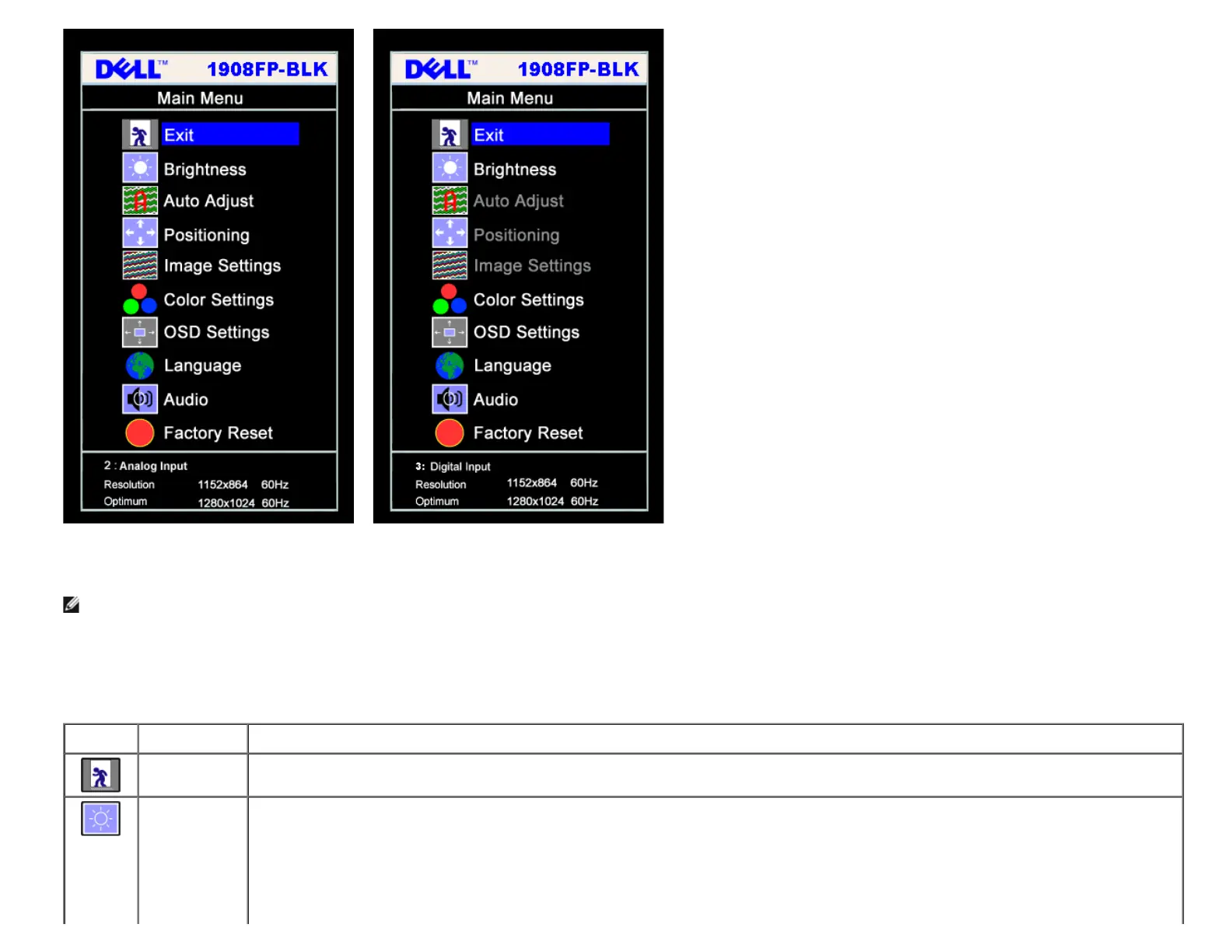
or
NOTE: Auto Adjust, Positioning and Image Settings are only available when you are using the analog (VGA) connector.
2. Push the - and + buttons to move between the setting options. As you move from one icon to another, the option name is highlighted. See the table below for a complete list of all the options
available for the monitor.
3. Push the MENU button once to activate the highlighted option.
4. Push - and + button to select the desired parameter.
5. Push MENU to enter the slide bar and then use the - and + buttons, according to the indicators on the menu, to make your changes.
6. Push the MENU button once to return to the main menu to select another option or push the MENU button two or three times to exit from the OSD menu.
Icon Menu and
Submenus
Description
Exit Select to exit the Main menu.
Brightness/
Contrast
Brightness adjusts the luminance of the backlight.
Adjust Brightness first, then adjust Contrast only if further adjustment is necessary.
Push the + button to increase luminance and push the - button to decrease luminance (min 0 ~ max 100).
Contrast adjusts the degree of difference between darkness and lightness on the monitor screen.
Push the + button to increase the contrast and push the - button to decrease the contrast (min 0 ~ max 100).











 To Next Page