Great user manuals database on UserManuals.info
Operating the Monitor:Dell 1908FP-BLK Flat Panel Monitor User's Guide
file:///T|/htdocs/monitors/1908WFP/1908FPBL/en/ug/operate.htm[11/8/2012 12:10:47 PM]
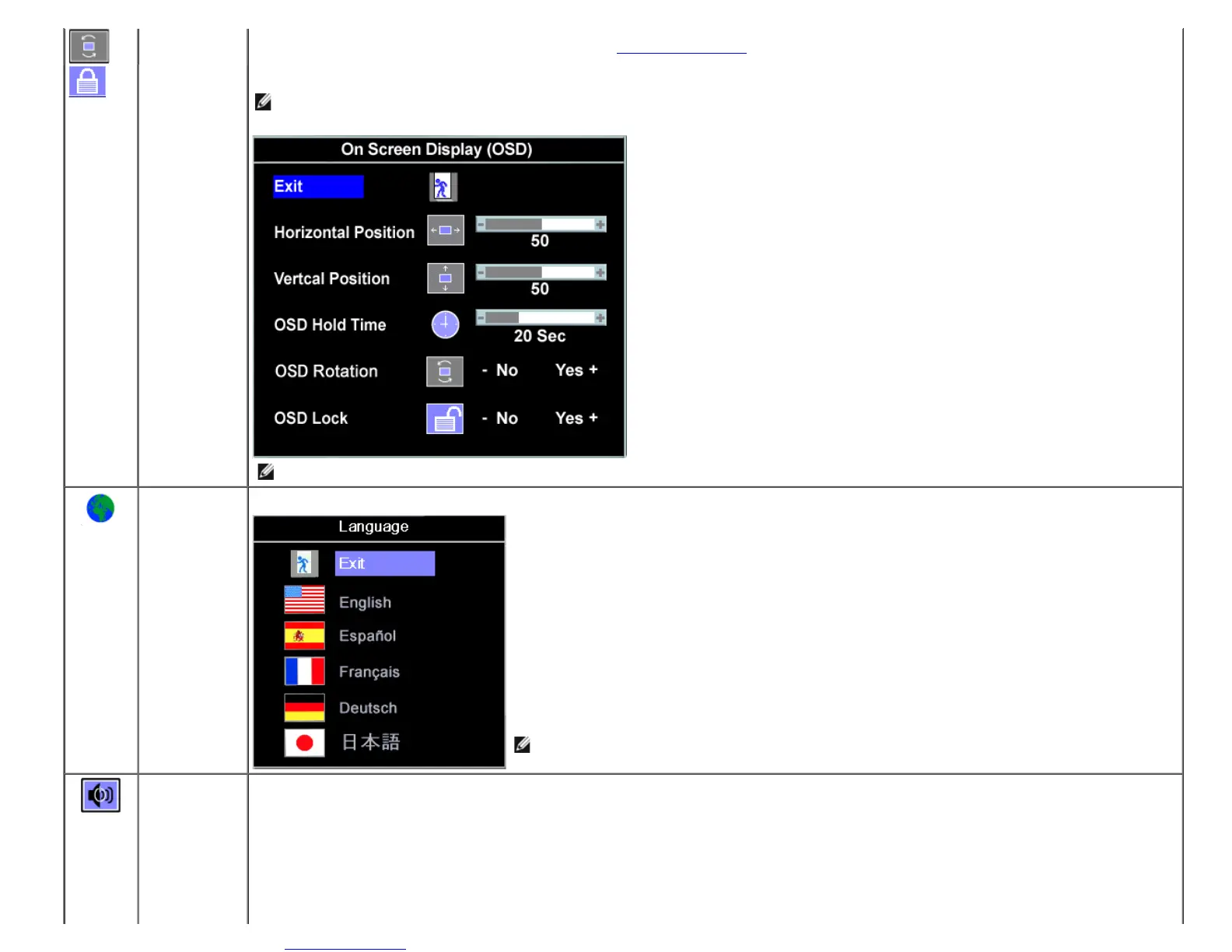
OSD Rotation
OSD Rotation:
Rotates the OSD by 90 ° counter-clockwise. Adjust according to Rotating Your Monitor setction
OSD Lock OSD Lock:
Controls user access to adjustments. When Yes (+) is selected, no user adjustments are allowed. All buttons are locked except the menu button.
NOTE: When the OSD is locked, pressing the menu button takes the user directly to the OSD settings menu, with OSD Lock selected. Select No (-) to unlock
and allow user access to all applicable settings.
NOTE: You can also lock or unlock the OSD by pushing and holding the Menu button for 15 seconds.
Language Select to have the OSD display in one of five languages (English, French, Spanish, German, or Japanese).
NOTE: The change only affects the OSD. It has no effect on any software running on the computer.
Audio
(optional)
You can select to have the audio on or off when the monitor is in power saving mode.
Yes — enables audio
No — disables audio (default)











 To Next Page