Great user manuals database on UserManuals.info
About Your Monitor:Dell 1908FP-BLK Flat Panel Monitor User's Guide
file:///T|/htdocs/monitors/1908WFP/1908FPBL/en/ug/about.htm[11/8/2012 12:10:24 PM]
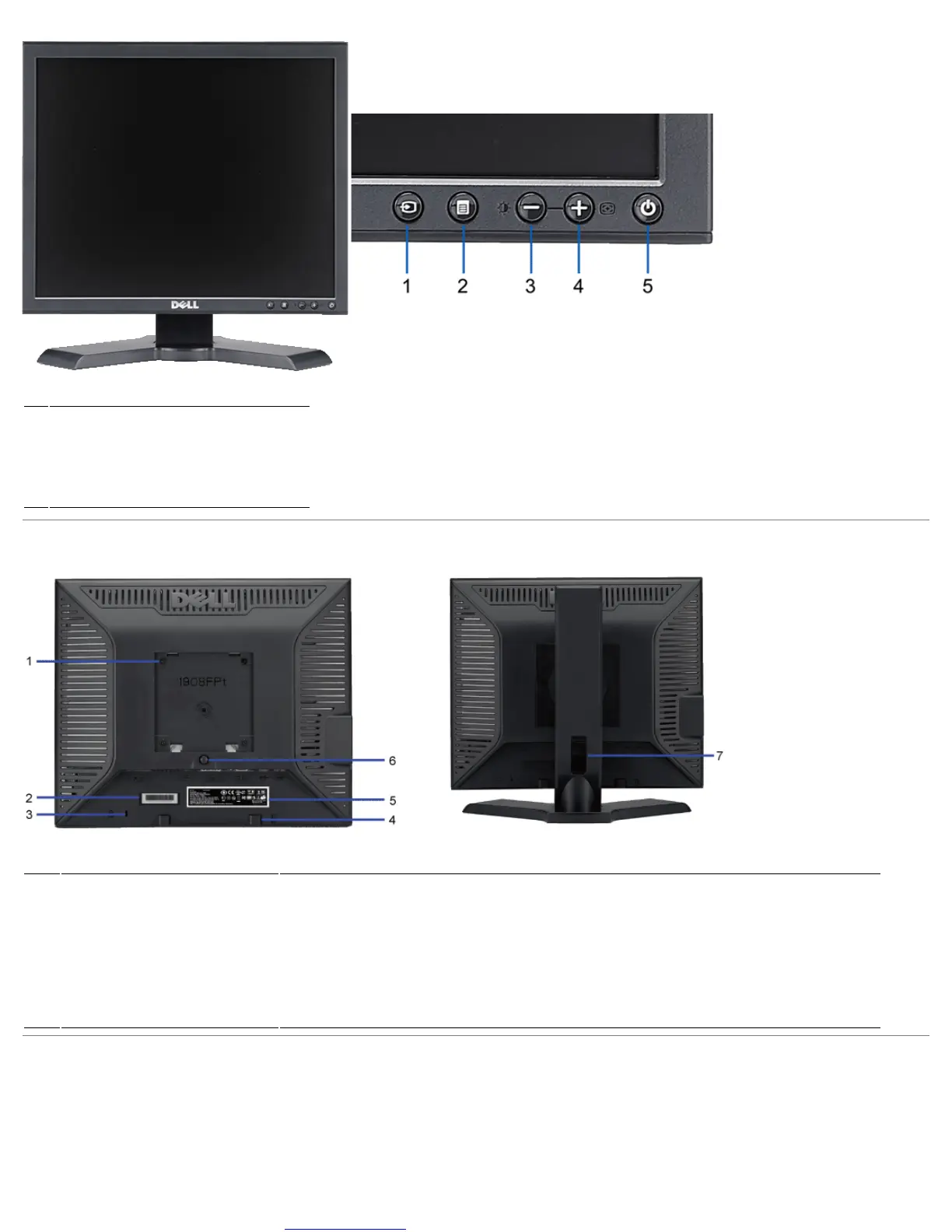
Front View Front panel controls
1 Video input select
2 OSD menu / select button
3 Brightness & Contrast / Down (-) button
4 Auto-Adjust / Up (+) button
5 Power button (with power light indicator)
Back View
Back view Back View with monitor stand
1
VESA mounting holes (100mm)
(Behind attached VESA plate)
Use to mount the monitor.
2 Barcode serial number label Refer to this label if you need to contact Dell for technical support.
3 Security lock slot Use a security lock with the slot to help secure your monitor.
4 Dell Soundbar mounting brackets Attach the optional Dell Soundbar.
5 Regulatory rating label Lists the regulatory approvals.
6 Stand removal button Press to release the stand.
7 Cable management slot Help organize cables by placing them through the slot.
Side View











 To Next Page