5
Getting Started With Your System
|
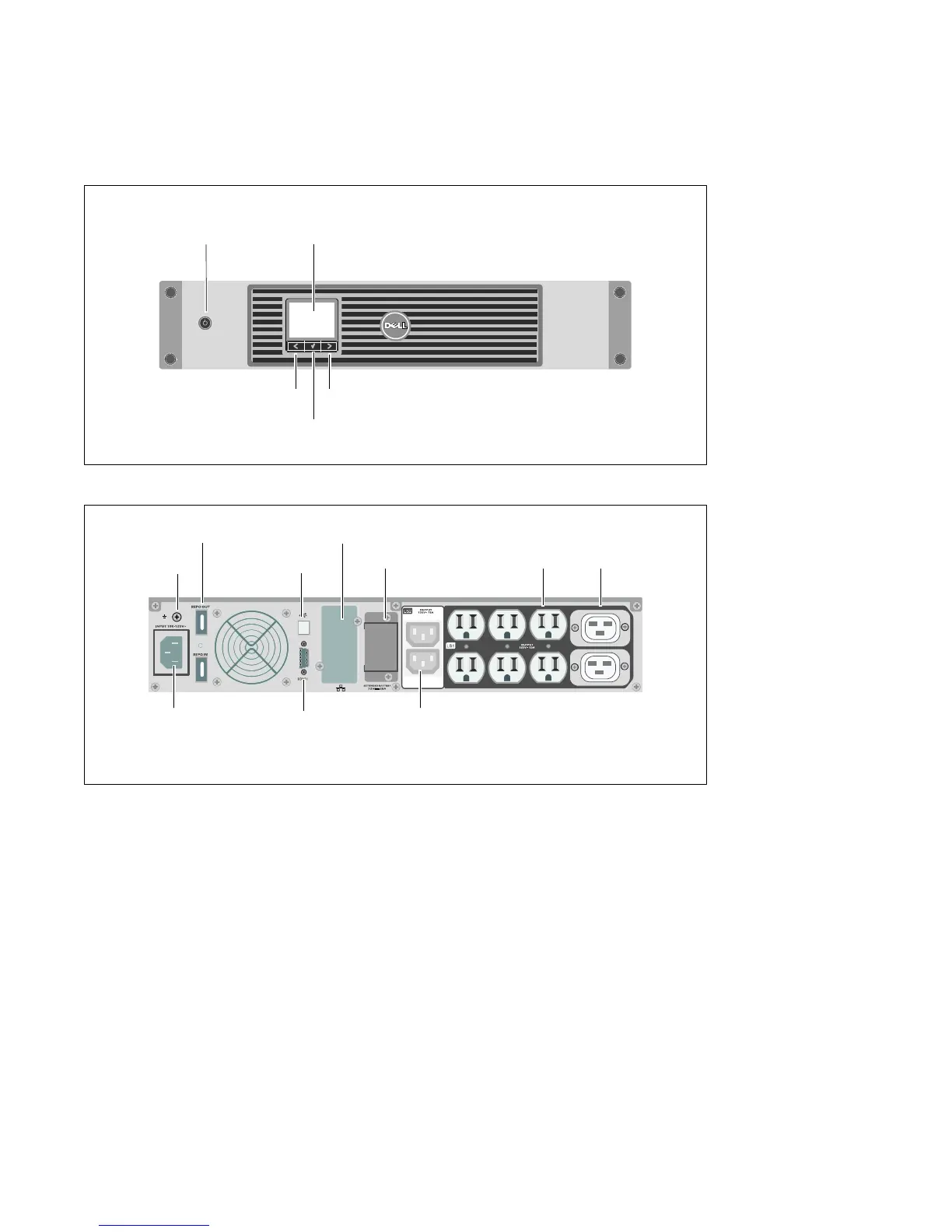
Identifying the UPS
This section shows a front and rear panel of the Dell Line-Interactive Rack UPS. Refer to the Dell
Line-Interactive Rack UPS 1000W, 1920/1500W, and 2700/2300W User's Guide for all rear panel details.
On/Off Button
LCD Panel
Scroll Button (Down or Forward)
Select Button
Scroll Button (Up or Back)
Figure 1. The Dell Line-Interactive Rack UPS Front Panel
UPS Communication Bay
IEC-C14 Input
Connector
USB Port
Two IEC 320-C13 Receptacles
(Load Segment 2)
REPO Ports
RS-232 Port
Ground Screw
Six 5-20 and Two IEC 320-C19
Receptacles
(Load Segment 1)
EBM Connector Cover/Strain
Relief Bracket
Figure 2. UPS Rear Panel (1920W/120V, 1500W/120V Shown)
Setting Up the UPS
If you are installing the UPS in a rack, continue to the following section, “Rackmount Setup.”
To install the 2700W UPS as a standalone cabinet, continue to “Tower Setup” on page 12.



 To Next Page