EasyManua.ls Logo

Dell 5821E - User Manual

Dell 5821E
6 pages
Print Icon
To Next Page IconTo Next Page
Loading...
Installing your SIM card and activating your mobile
broadband Service
Dell Wireless 5821E Qualcomm Snapdragon
X20 Global Gigabit LTE Install Guide
WARNING: The module’s RF function
is locked by default. Contact
Dell support or a Dell authorized
technician to enable the module.
WARNING: Before performing any of
the steps in this document, read and
follow the safety information that
shipped with your computer.
CAUTION: Do not install or remove
the Dell Mobile Broadband card or
Subscriber Identity Module (SIM)
card when your computer is
powered on.
NOTE: To access the Internet, you need
a Subscriber Identity Module SIM card
and an account with a mobile broadband
service provider.
2019 - 01
© 2019 Dell Inc. or its subsidiaries.
Question and Answer IconNeed help?

Do you have a question about the Dell 5821E and is the answer not in the manual?

Overview

This document is an install guide for the Dell Wireless 5821E Qualcomm Snapdragon X20 Global Gigabit LTE module. It provides instructions for installing a SIM card, connecting to a Windows 10 network, and installing the necessary drivers for the mobile broadband module.

Function Description:

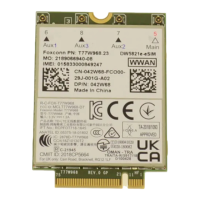
The Dell Wireless 5821E Qualcomm Snapdragon X20 Global Gigabit LTE module is a mobile broadband card designed to provide cellular data connectivity to a computer. It allows users to access the internet via a mobile broadband service provider using a Subscriber Identity Module (SIM) card. The module supports Gigabit LTE, indicating high-speed cellular data capabilities.

Important Technical Specifications:

  • Module Name: Dell Wireless 5821E Qualcomm Snapdragon X20 Global Gigabit LTE
  • Manufacturer: DELL
  • Model: DW5821e Snapdragon X20 LTE
  • Firmware: T77W968.F0.0.0.1.0.GC.002
  • Network Type: GSM
  • Data Class: UMTS, HSDPA, HSUPA, LTE
  • IMEI: 355446090016797 (Example provided in the document)
  • IMSI: 466891003616414 (Example provided in the document)
  • SIM ICCID: 89886891000029114137 (Example provided in the document)
  • Connectivity: Requires a Subscriber Identity Module (SIM) card and an account with a mobile broadband service provider for internet access.
  • RF Function: The module's RF function is locked by default and requires activation by Dell support or an authorized Dell technician.

Usage Features:

  • SIM Card Installation: The guide details the process of inserting a SIM card into the computer. It notes that the SIM card slot location varies by computer model and advises consulting the computer's documentation for specific instructions.
  • Network Connection (Windows 10):
    • Accessing Cellular Settings: Users can connect to the network by navigating to "View Available Networks" and selecting "cellular" to turn on the cellular radio.
    • Activating Mobile Broadband Service: To activate the service, users need to contact their service provider and provide specific information, including the International Mobile Equipment Identity (IMEI) and Integrated Circuit Card Identifier (ICCID) of the module.
    • Windows 10 Interface: The guide illustrates the steps within the Windows 10 Network & Internet settings, showing how to select the Network icon from the taskbar, choose "cellular," and then access "Advanced Options" to view module properties like IMEI and ICCID.
    • Manual Connection Option: The interface allows users to choose whether Windows manages the connection automatically or if they prefer to connect manually each time they want to use cellular data.
  • Driver Installation:
    • Dell Support Website: Drivers are to be downloaded from Dell.com/support.
    • Identification: Users can find the correct drivers by entering their computer's Service Tag or selecting their product.
    • Driver Category: The mobile broadband card driver is located under the "Modem/Communications" group.
    • Installation Process: After downloading, users are instructed to run the installer and follow the on-screen instructions.

Maintenance Features:

  • Safety Information: Before performing any installation steps, users are warned to read and follow the safety information that shipped with their computer.
  • Electrostatic Discharge Precaution: A caution is issued to avoid touching the SIM card connectors during installation or removal to prevent damage from electrostatic discharge.
  • Hot-Swapping Precaution: Users are cautioned not to install or remove the Dell Mobile Broadband card or SIM card when the computer is powered on.
  • Regulatory Compliance: For regulatory information and safety best practices, users are directed to the Regulatory Compliance homepage on Dell.com.
  • RF Function Activation: The module's RF function is locked by default and requires contact with Dell support or an authorized Dell technician for enablement, which can be considered a maintenance or initial setup step.

Dell 5821E Specifications

General IconGeneral
BrandDell
Model5821E
CategoryNetwork Hardware
LanguageEnglish

Related product manuals