2 Dell PowerEdge 63xx Systems—Installing a Microprocessor or Terminator Card
1. Turn off the system, including any attached peripherals, and disconnect the AC
power cable from its power source.
NOTICE: See "Protecting Against Electrostatic Discharge" in the safety
instructions at the front of your computer’s Installation and Trouble-
shooting Guide.
2. Remove the computer cover.
See “Checking Inside the Computer” in your system’s Installation and Trouble-
shooting Guide for more information.
3. Remove the cooling shroud.
See “Checking Inside the Computer” in your system’s Installation and Trouble-
shooting Guide for more information.
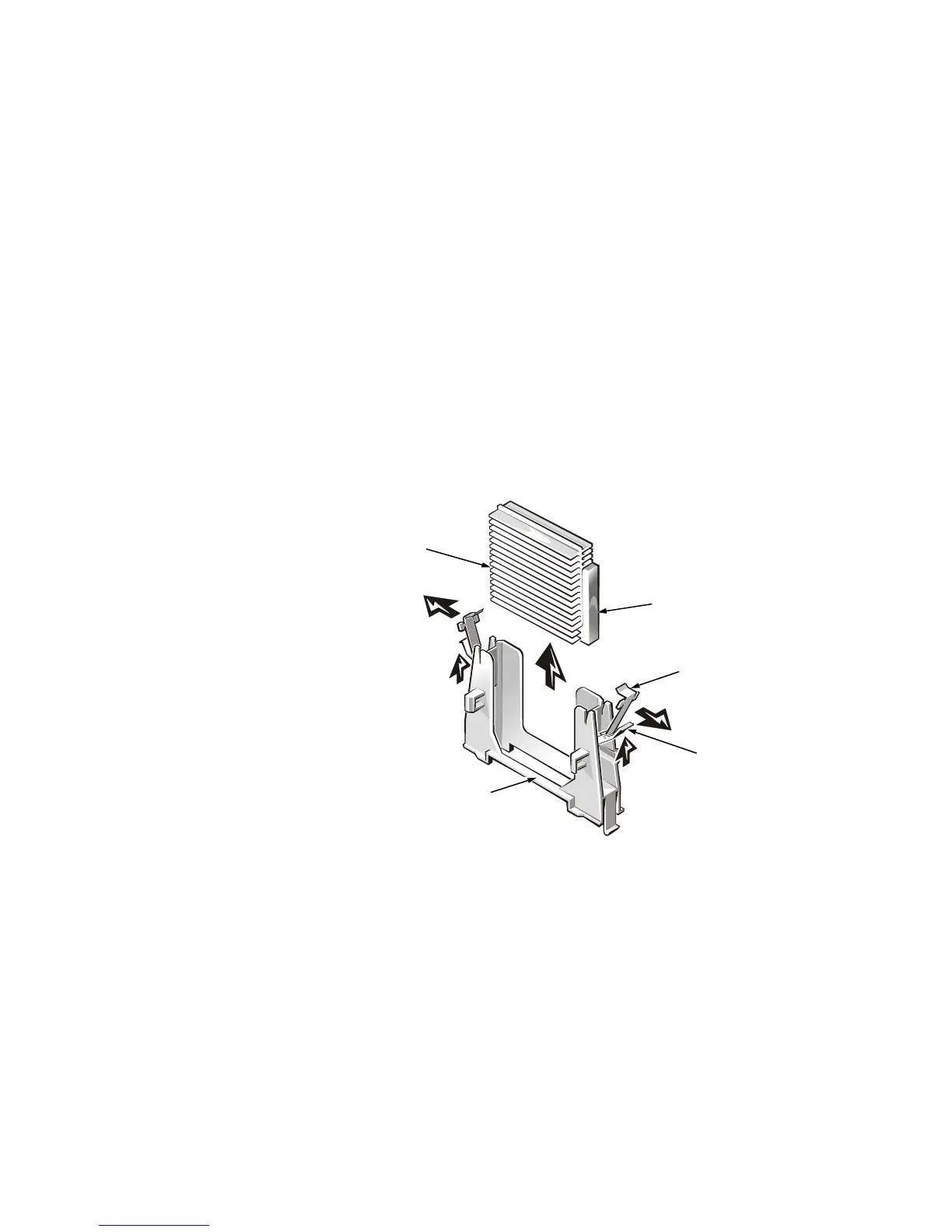
4. Lift the latches on each end of the guide bracket assembly (see Figure 1). Pivot
the retention clips away from the guide bracket assembly, then slide the SEC car-
tridge or terminator card out of the guide bracket assembly.
Figure 1. Removing a Microprocessor or Terminator Card
latches (2)
guide-bracket assembly
retention clips (2)
heat sink
SEC cartridge









 To Next Page