support.dell.com Dell PowerEdge 63xx Systems—Installing a Microprocessor or Terminator Card 3
Installing a Microprocessor or Terminator
Card
To install a microprocessor or terminator card, perform the following steps:
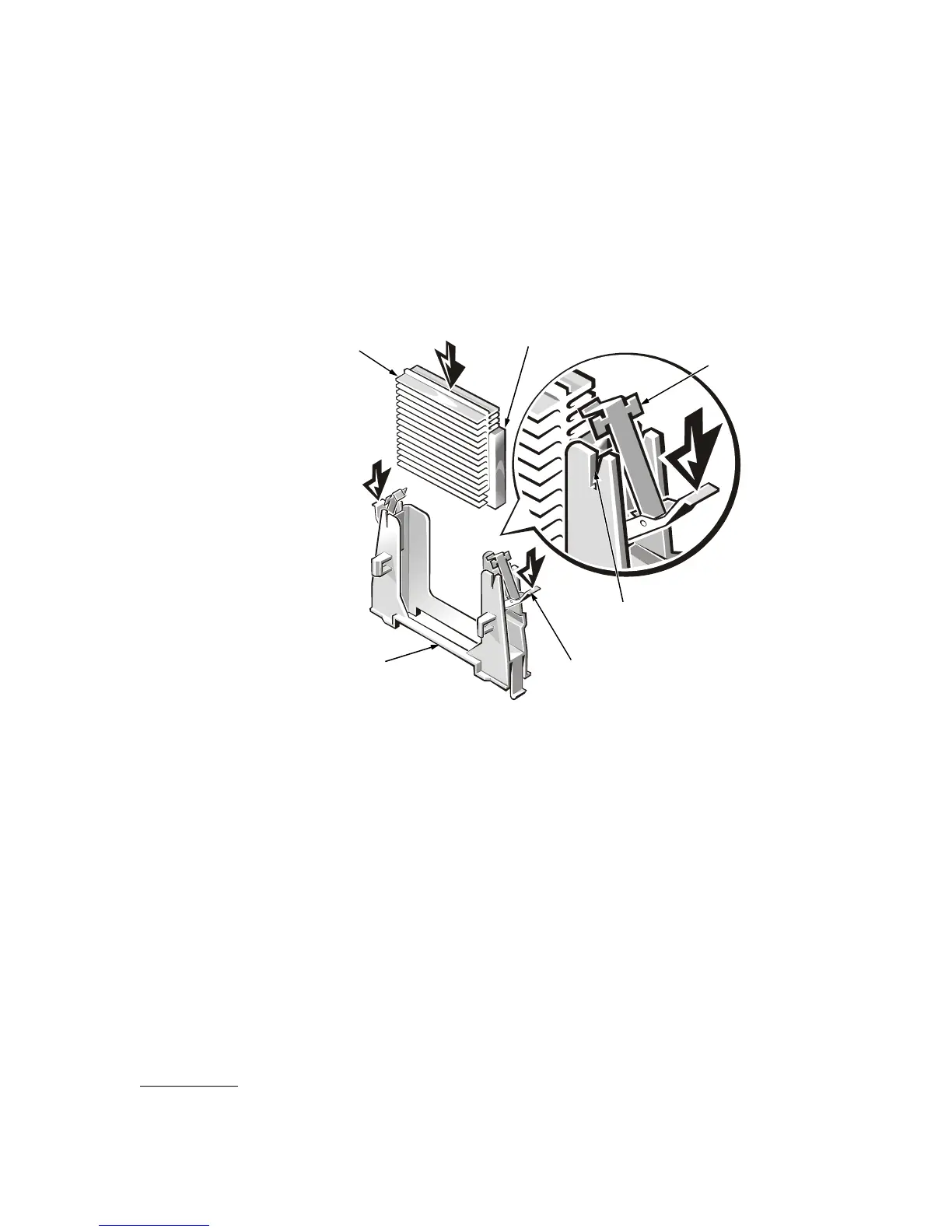
1. Slide the microprocessor or terminator card into the guide-bracket assembly until
the edge connector on the SEC cartridge or terminator card is firmly seated in the
connector on the system board.
Figure 2. Installing a Microprocessor or Terminator Card
2. Place the retention clips on each end of the guide bracket in the notches on the
ends of the guide bracket (see Figure 2), then close the two latches to secure the
microprocessor or terminator card in the bracket.
3. Replace the cooling shroud and computer cover.
See “Checking Inside the Computer” in your system’s Installation and Trouble-
shooting Guide for more information.
This completes the installation of your microprocessor or terminator card.
latches (2)
guide-bracket
assembly
retention clips (2)
notches (2)
heat sink
SEC cartridge









 To Next Page