
 Need help?
Do you have a question about the Dell Alienware 17 R4 and is the answer not in the manual?
 General
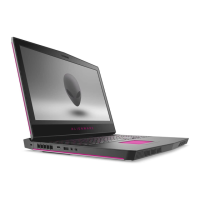
| Graphics | NVIDIA GeForce GTX 1070 |
|---|---|
| Display | 17.3-inch FHD (1920 x 1080) |
| RAM | Up to 32GB DDR4 |
| Storage | 1TB HDD |
| Operating System | Windows 10 Home |
| Weight | 9.74 lbs (4.42 kg) |
| Battery | 6-cell 99 Whr battery |
| Dimensions | 424 x 332 mm |
| Ports | Thunderbolt 3, HDMI, Mini DisplayPort, Ethernet, Alienware Graphics Amplifier Port |
| Wireless | Killer 802.11ac 2x2 WiFi and Bluetooth 4.1 |
| Processor | Up to Intel Core i7-7820HK |
Steps to prepare before working inside the computer.
Key safety measures for protecting yourself and the device.
List of tools needed for component maintenance.
Details of screws used for various computer components.
Detailed steps for detaching the computer's base cover.
Detailed steps for reattaching the computer's base cover.
Step-by-step instructions for removing the hard drive.
Step-by-step instructions for replacing the hard drive.
Procedure to remove the computer's battery.
Procedure to install a new computer battery.
Steps to remove the main system board assembly.
Steps to install the main system board assembly.
Procedure to remove the entire display assembly.
Procedure to install the display assembly.
How to enter the computer's BIOS setup utility.
Description of available BIOS configuration settings.
Steps to reset BIOS settings to default.
Information on hardware diagnostics and error indicators.
How to obtain help and contact customer service.








 To Next Page
