System setup
145
3. Useful Setting Menus
To change the menu options:
• Press (Menu) > System Setup > Paper Setup on the control panel.
8
Sound / Volume
Some menus may not appear in the display depending on options or
models. If so, it is not applicable to your machine (see "Menu overview" on
page 25).
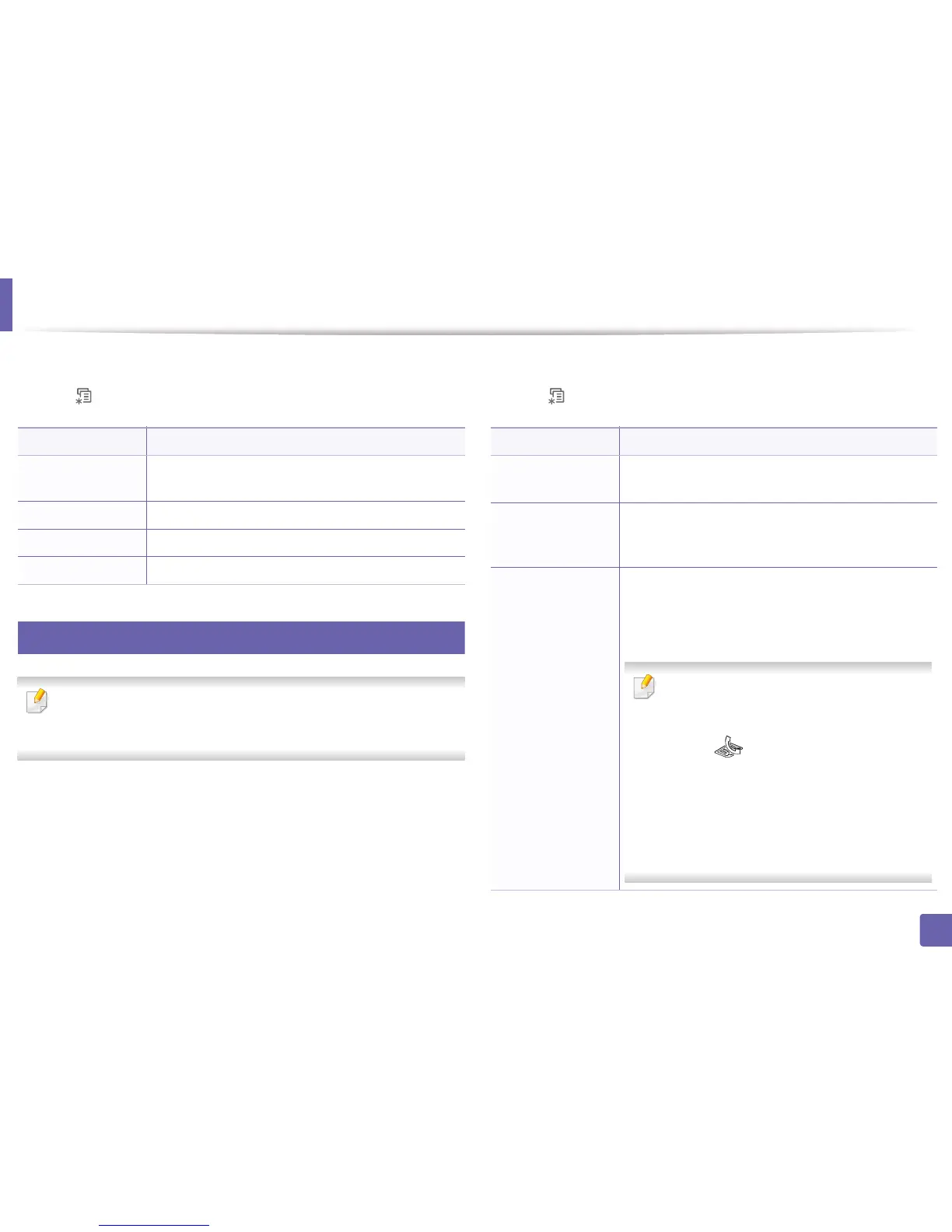
To change the menu options:
• Press (Menu) > System Setup > Sound/Volume on the control panel.
Item Description
Paper Size
Sets the paper size as A4, Letter, or other paper sizes,
according to your requirements.
Paper Type Chooses the type of the paper for each tray.
Paper Source Selects from which tray the paper is used.
Margin Sets the margins for the document.
Item Description
Key Sound
Turns the key sound on or off. With this option set to on,
a tone sounds each time a key is pressed.
Alarm Sound
Turns the alarm sound on or off. With this option set to
on, an alarm tone sounds when an error occurs or fax
communication ends.
Speaker
Turns on or off the sounds from the telephone line
through the speaker, such as a dial tone or a fax tone.
With this option set to Comm. which means the speaker
is on until the remote machine answers.
You can adjust the volume level using On Hook
Dial. You can adjust the speaker volume only
when the telephone line is connected.
a Press (fax) on the control panel.
b Press On Hook Dial. A dial tone sounds from
the speaker.
c Press the arrows until you hear the volume you
want.
d Press On Hook Dial to save the change and
return to ready mode.















 To Next Page