18
1. Introduction
Control panel overview
12
Control panel
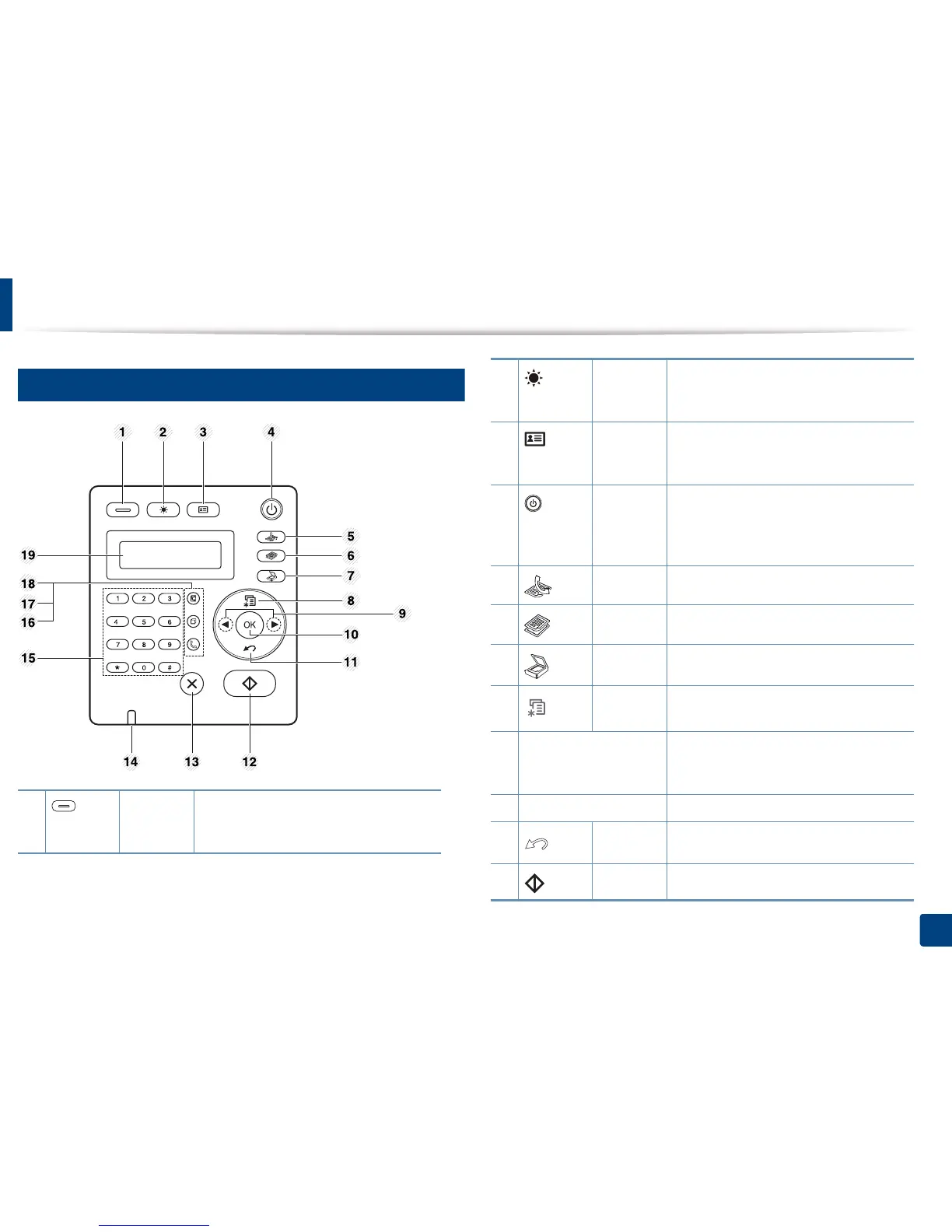
1 Eco Turn into eco mode to reduce toner
consumption and paper usage (see"Eco
printing" on page 48).
2 Darkness Adjust the brightness level to make a copy
for easier reading, when the original
contains faint markings and dark images.
3 ID Copy Allows you to copy both sides of an ID card
like a driver’s license on a single side of
paper (see "ID card copying" on page 53).
4 Power Turns the power on or off, or wakes up the
machine from the power save mode. If you
need to turn the machine off, press this
button for more than three seconds.
5 Fax Switches to Fax mode.
6 Copy Switches to Copy mode.
7 Scan Switches to Scan mode.
8 Menu Opens Menu mode and scrolls through the
available menus.
9 Left/Right Arrows Scrolls through the options available in the
selected menu and increases or decreases
values.
10 OK Confirms the selection on the screen.
11 Back Sends you back to the upper menu level.
12 Start Starts a job.















 To Next Page