Allows you to set the time for which the OSD remains active after you press a key on the monitor.
Use the and keys to adjust the slider in 1 second increments, from 5 to 60 seconds.
Controls user access to adjustments. When Lock is selected, no user adjustments are allowed.
When the OSD is locked, press the first OSD control above the Power On/Off control for 15 seconds to unlock it.
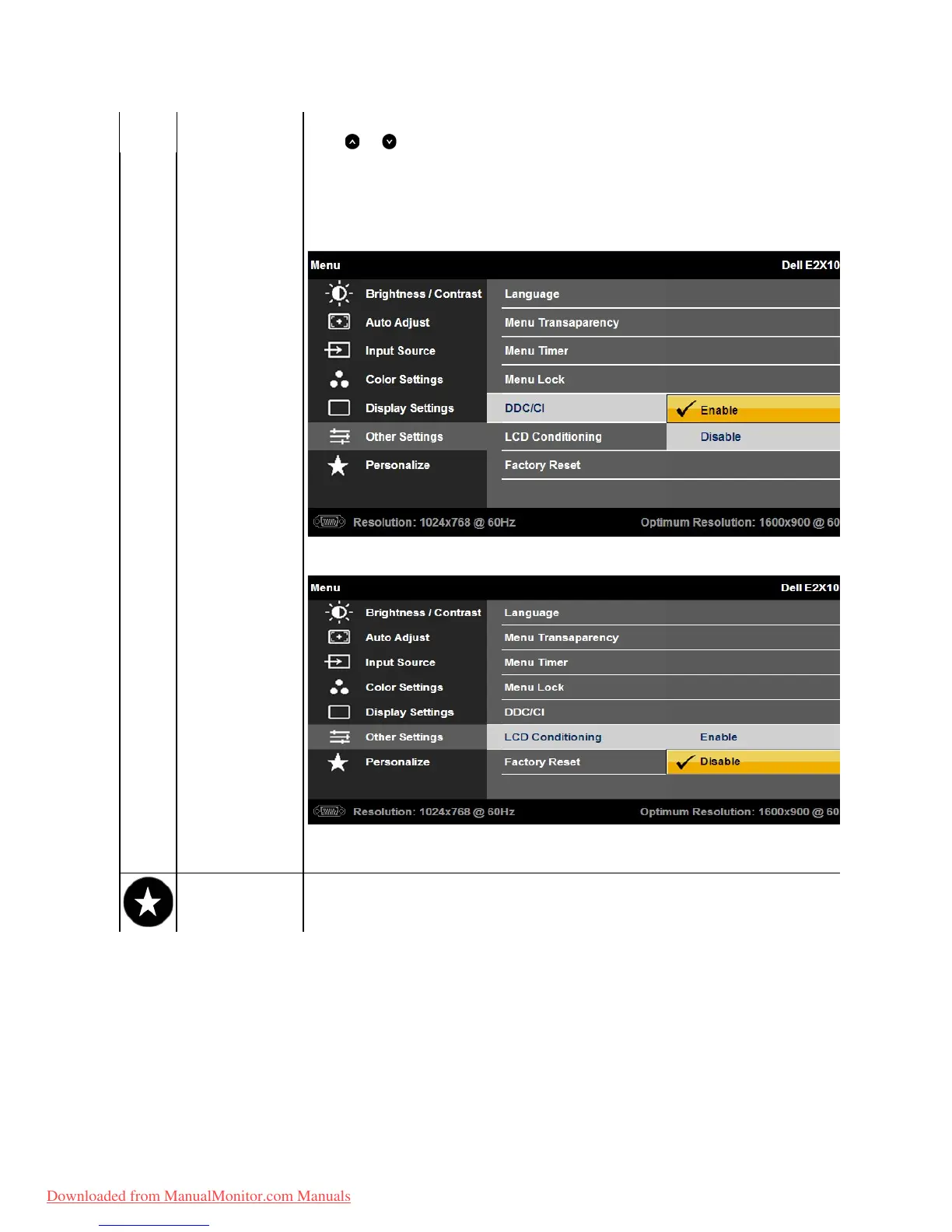
DDC/CI (Display Data Channel/Command Interface) allows a software on your computer to adjust the monitor display settings like the brightness, color
balance etc.
Enable (Default): Optimizes the performance of your monitor and provides a better customer experience.
Disable: Disables the DDC/CI option and the following message appears on the screen.
Helps reduce minor cases of image retention. Depending on the degree of image retention, the program may take some time to run. You can enable this
feature by selecting "Enable".
ResetsallOSDsettingstothefactorypresetvalues.
Allows you to adjust shortcut key for: 1. Preset modes, 2. Brightness / Contrast, 3. Auto Adjust, 4. Input Source
Downloaded from ManualMonitor.com Manuals



 To Next Page