About your monitor │ 11
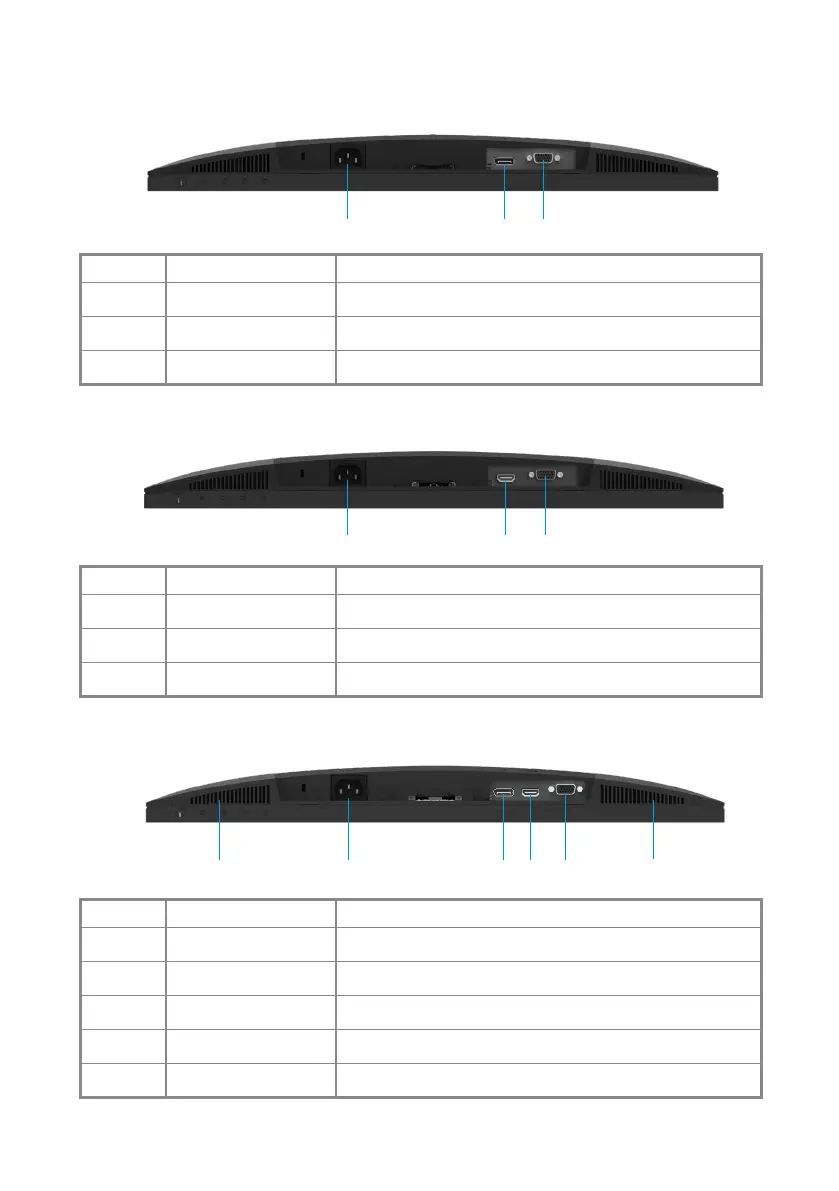
Bottom view, without monitor stand
E2422H
1 32
Label Description Use
1
Power port To connect the monitor power cable.
2
DP port For connection to your computer using DP cable.
3
VGA port For connection to your computer using VGA cable.
E2422HN
1 32
Label Description Use
1
Power port To connect the monitor power cable.
2
HDMI port For connection to your computer using HDMI cable.
3
VGA port For connection to your computer using VGA cable.
E2422HS
1 3 4
5
5 2
Label Description Use
1
Power port To connect the monitor power cable.
2
DP port For connection to your computer using DP cable.
3
HDMI port For connection to your computer using HDMI cable.
4
VGA port For connection to your computer using VGA cable.
5
Speakers To produce audio output.



 To Next Page