Operating your monitor │ 39
Icon Menu and
submenus
Description
Input
Source
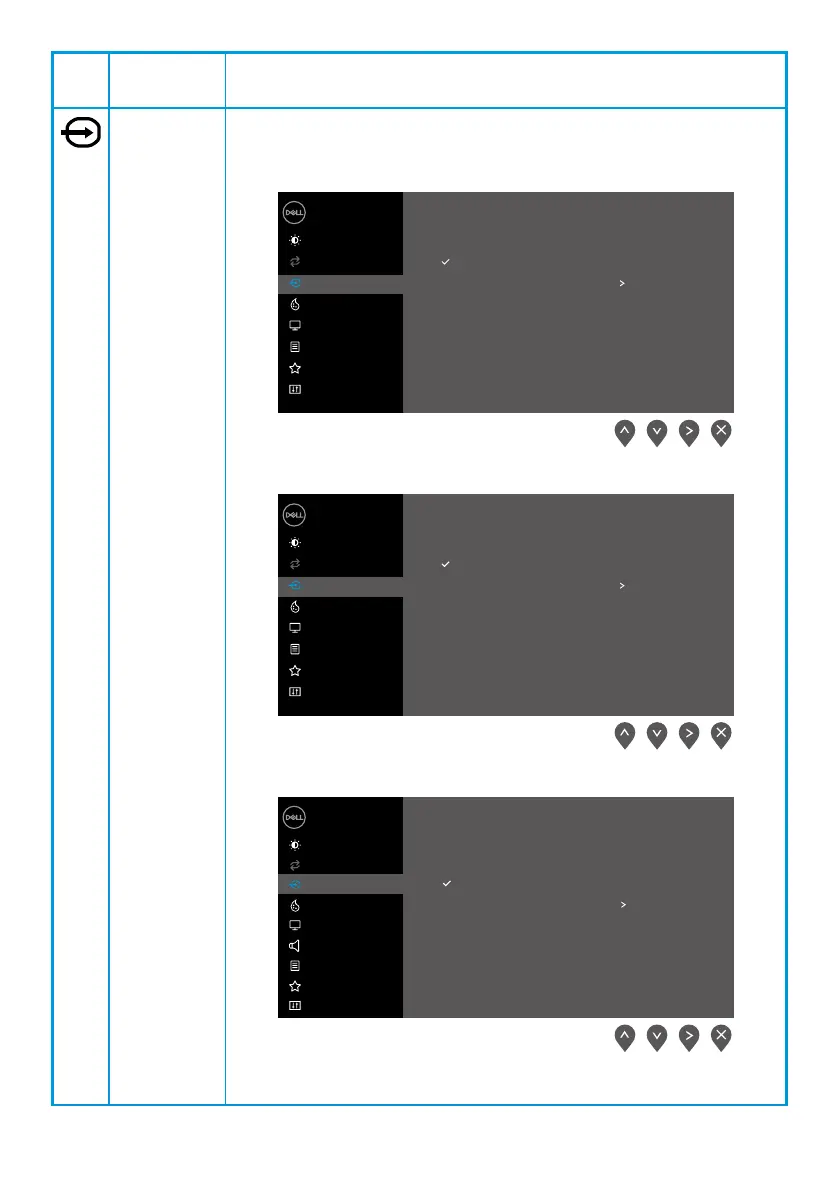
Use the Input Source menu to switch between the different video
signals that may be connected to your monitor.
E2422H: one VGA and one DP input
Dell 24 Monitor
Brightness / Contrast
Auto Adjust
Input Source
Color
VGA
DP
Auto Select
Reset Input Source
Display
Menu
Personalize
Others
On
E2422HN: one VGA and one HDMI input
Dell 24 Monitor
Brightness / Contrast
Auto Adjust
Input Source
Color
VGA
HDMI
Auto Select
Reset Input Source
Display
Menu
Personalize
Others
On
E2422HS: VGA and DP and HDMI input
Dell 24 Monitor
Brightness / Contrast
Auto Adjust
Input Source
Color
Display
Menu
Audio
Personalize
Others
VGA
DP
HDMI
Auto Select
Reset Input Source
On



 To Next Page