46 │ Operating your monitor
Icon Menu and
submenus
Description
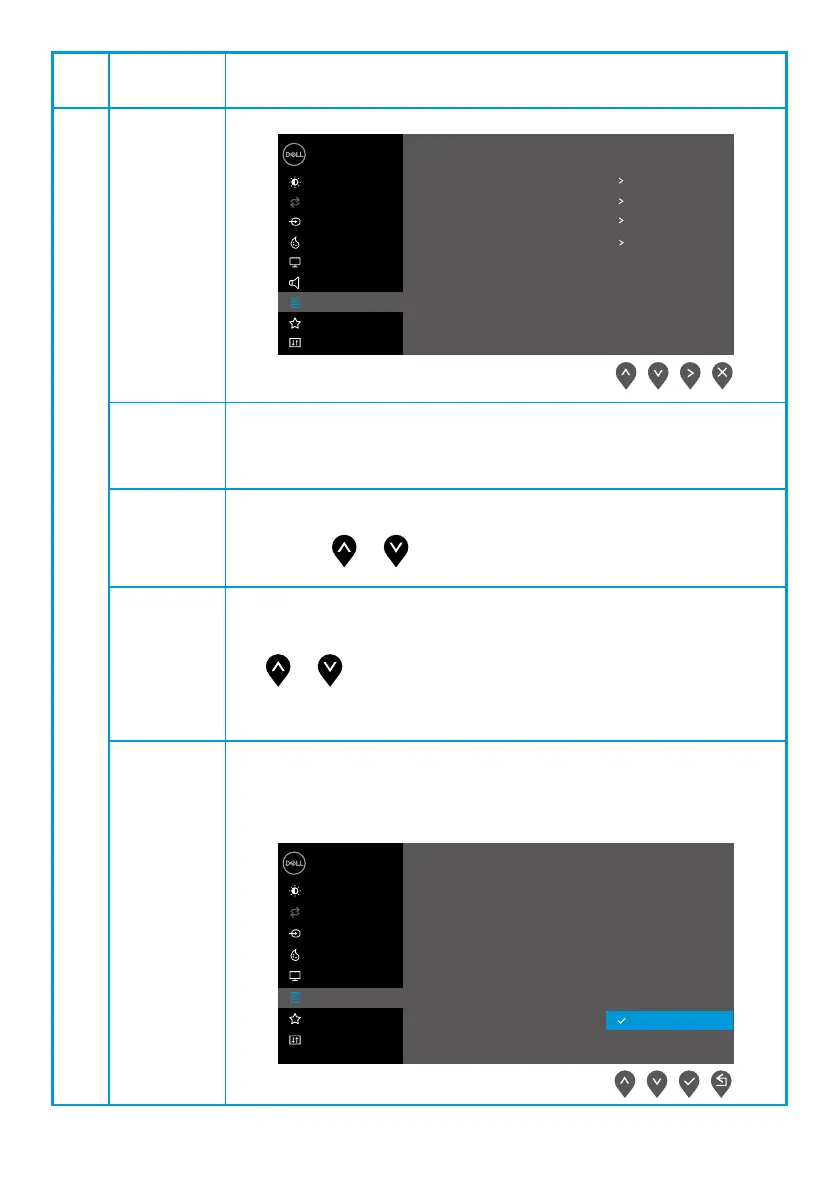
E2422HS
Dell 24 Monitor
Brightness / Contrast
Auto Adjust
Input Source
Color
Display
Menu
Audio
Personalize
Others
Language
Transparency
Timer
Lock
English
20
20 s
Reset Menu
Disable
Language Language options set the OSD display to one of the eight languages:
English, Spanish, French, German, Brazilian Portuguese, Russian,
Simplified Chinese, or Japanese.
Transparency
Select this option to change the menu transparency by
pressing the or buttons from 0 to 100.
Timer OSD hold time: sets the length of time , the OSD will remain active
after the last time you pressed a button.
Use or to adjust the slider in 1 second increments, from 5 to
60 seconds.
Lock With the control buttons on the monitor locked, you can prevent
people from accessing the controls. It also prevents accidental
activation in multiple monitors side-by-side setup.
E2422H/E2422HN
Dell 24 Monitor
Brightness / Contrast
Auto Adjust
Input Source
Color
Display
Menu
Personalize
Others
Language
Transparency
Timer
Lock
Reset Menu
Menu Buttons
Power Button
Menu + Power Buttons
Disable



 To Next Page