54 │ Operating your monitor
OSD warning messages
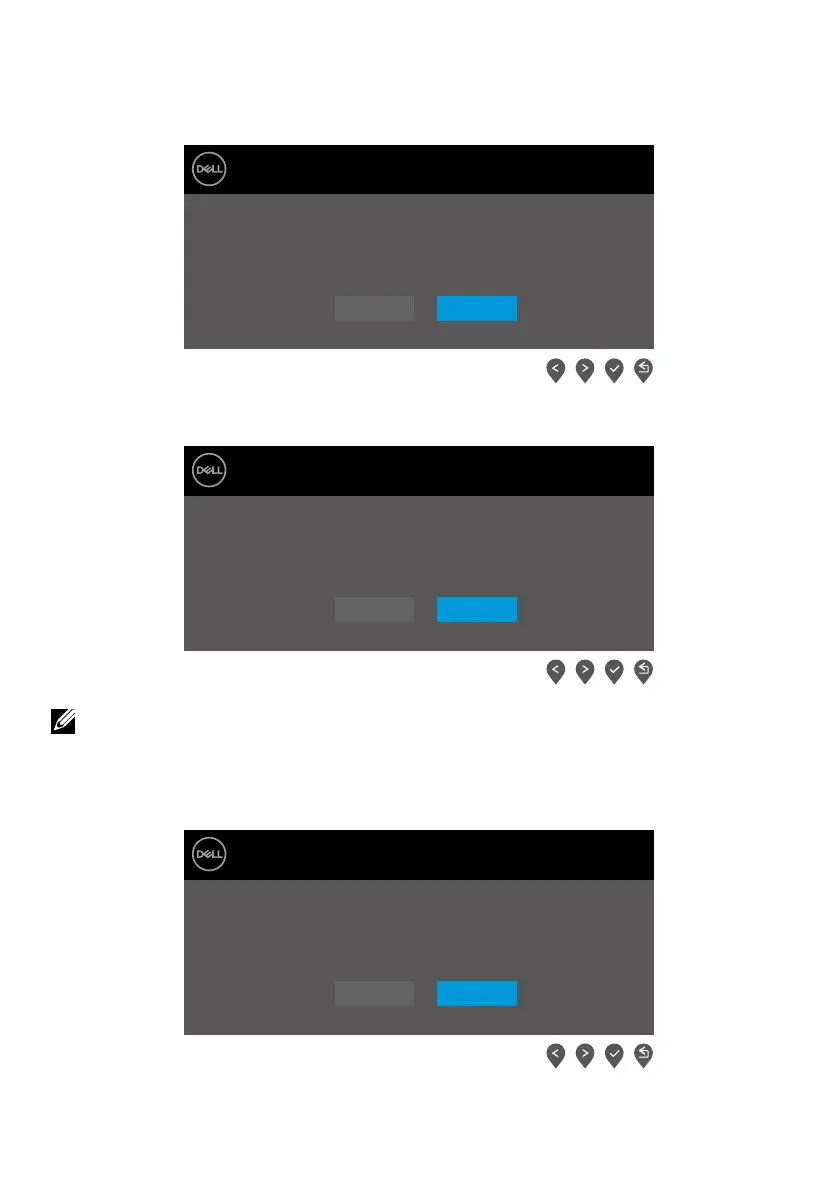
The following Power Warning Message box applies to Brightness functions for the first time
when you adjust the Brightness level above the default level.
Dell 24 Monitor
Adjusting to this value will increase power consumption above the
default level. Do you want to continue?
E2422Hx
No
Yes
E2422H/E2422HN/E2422HS
Before the Lock function is activated, the following message is displayed.
Dell 24 Monitor
Are you sure you want to lock the Menu Buttons?
To unlock the Buttons, refer to the User’s Guide.
E2422Hx
No
Yes
E2422H/E2422HN/E2422HS
NOTE: The message may be slightly different according to the selected
settings.
Before the DDC/CI function is disabled, the following message is displayed.
Dell 24 Monitor
The function of adjusting display setting using PC application
will be disabled.
Do you wish to disable DDC/CI function?
E2422Hx
No
Yes
E2422H/E2422HN/E2422HS



 To Next Page