Setting up the monitor │ 23
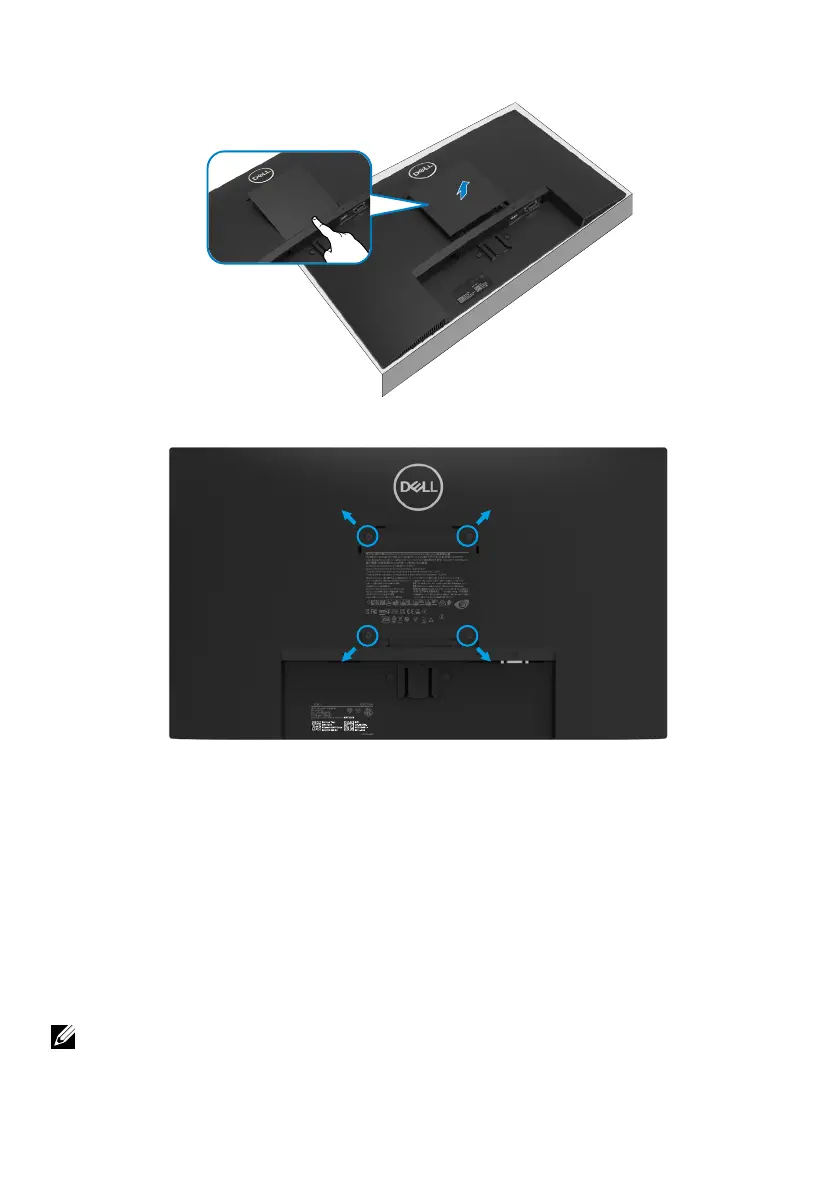
To remove the VESA cover:
Press the dimple on the VESA cover to release it from the back of the display.
Wall Mounting (Optional)
E2423HNDELL
3C018BA00-XXX-G(B)XX
220010-15
02922
XU100100-22130
인증번호: R-R-E2K-E2423HNf
신청인: DELL INC.(for Korea)
HONGFUJIN Precision Electronics
(Chong Qing) Co.,Ltd.
제조자: HONGFUJIN Precision
Electronics (Chong Qing) Co.,Ltd.
전기용품안전관리법에 의한 표시
A/S연락처: 080-854-0066 제조국: China
デル・テクノロジーズ
ID 0000100000
ID 1111240129
www.tuv.com
ID 1111240125
ID 1111240127
IS 13252
(
Part 1
)
/
IEC 60950-1
R
-
41055611
www.bis.gov.in
(Screw dimension: M4 x 10 mm).
Refer to the instructions that come with the VESA-compatible base mounting kit.
1. Place the monitor panel on a soft cloth or cushion on a stable flat table.
2. Remove the stand.
3. Use a screwdriver to remove the four screws securing the plastic cover.
4. Attach the mounting bracket from the wall mounting kit to the LCD.
5. Mount the LCD on the wall by following the instructions that came with the base
mounting kit.
NOTE: For use only with UL or CSA or GS-listed wall-mount bracket with
minimum weight/load bearing capacity of 12.44 kg (27.43 lb) for E2423H and
E2423HN.



 To Next Page