PS4210 Hardware Owner's Manual
3 Maintaining Control Modules
Only one control module is active (providing disk access and serving network traffic) at one time. The secondary
(redundant) control module mirrors cache data from the active control module. If the active control module fails,
all functions of the primary controller transfer to the secondary.
Dual Controller Configuration
A dual control module configuration eliminates a single point of failure in the array. If the active control module
fails, the secondary control module takes over automatically with no interruption of service. This automatic
transition gives you time to replace the failed control module while your volumes and data remain accessible.
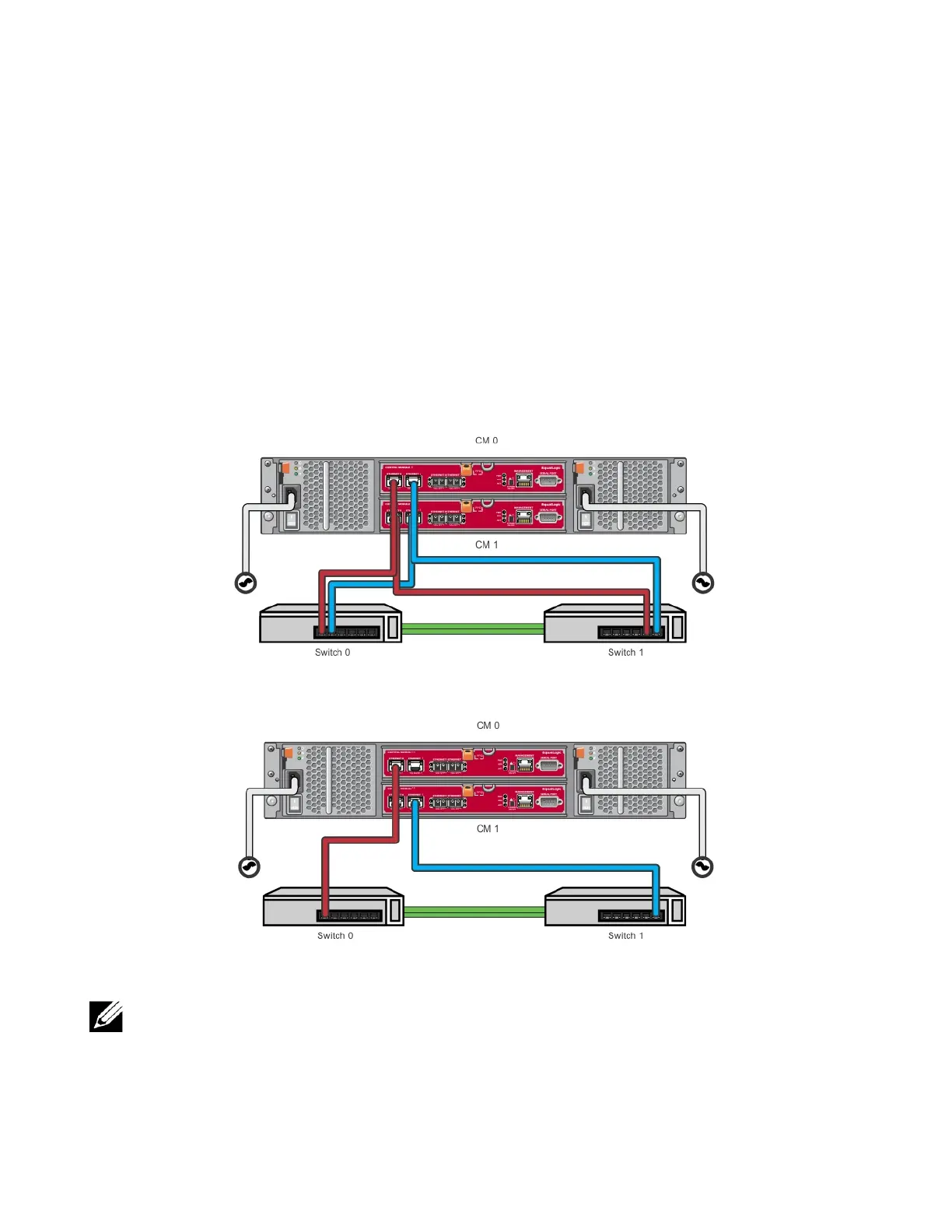
In addition, a dual control module configuration supports a feature called vertical failover. An Ethernet port on
the active control module can fail over to the same Ethernet port on the secondary control module if a network
path fails. Figure 14 shows a recommended configuration for vertical failover.
Figure 14: Recommended Network Configuration to Support Vertical Failover
• If a network port is available for failover on either control module, but is not currently in use, its LEDs will
not be lit.
• Vertical failover is transparent to applications.
Interpreting Control Module LEDs
Control modules have the following LEDs:
16


 To Next Page