PS4210 Hardware Owner's Manual
3 Maintaining Control Modules
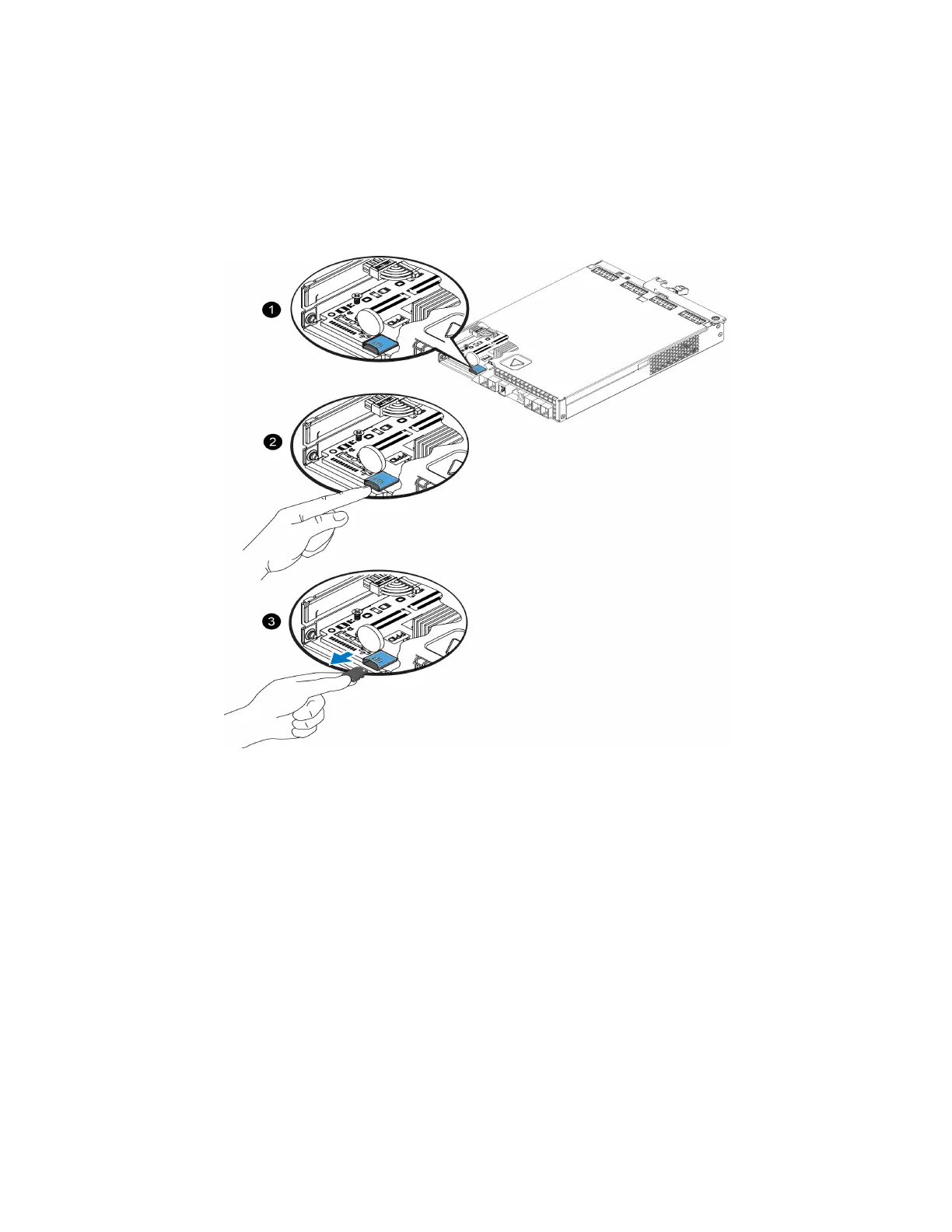
1. Firmly push the card into its housing to release the spring mechanism (callout 2 in Figure 20). The microSD
card is partially ejected from the housing.
2. Gently pull the card straight out of the housing (callout 3 in Figure 20).
3. Place the microSD card on a flat surface where it will be protected from electrostatic discharge.
Figure 20: Ejecting the MicroSD Card
Inserting the MicroSD Card
1. Align the replacement microSD card so the arrow on the card points towards the housing (Figure 21). When
correctly positioned, the gold contacts will be facing downward, and inward toward the housing.
2. Firmly press the card into the housing until it clicks into place. Confirm that the card is securely seated by
pressing to ensure the release spring mechanism is engaged and ejects the SD card. Then reinsert the SD
card and ensure it is seated securely by pulling gently on the SD card.
25


 To Next Page