
 Need help?
Do you have a question about the Dell Inspiron 14 Plus 7420 and is the answer not in the manual?
Details the ports and indicators on the left side of the computer.
Details the ports and indicators on the right side of the computer.
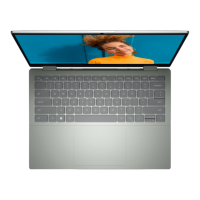
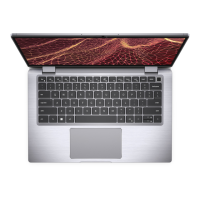
Identifies components on the top of the computer, including the power button and touchpad.
Details the front-facing components such as microphones, camera, and status lights.
Identifies the bottom components, including speakers and the service tag label.
Provides detailed height, width, depth, and weight information for the laptop.
Details the supported processor types, wattage, core count, speed, and cache.
Lists chipset details and the operating systems supported by the Inspiron 14 Plus 7420.
Details memory slots, type, speed, and supported configurations for the device.
Describes available external ports like USB, HDMI, Thunderbolt, and audio jacks.
Details internal expansion slots (M.2) and wireless module specifications.
Covers audio controller, speaker output, and available storage configurations.
Details media card reader support and keyboard specifications like layout and key pitch.
Specifies camera resolution, touchpad dimensions, and power adapter types and ratings.
Provides details on battery type, voltage, weight, dimensions, and operating temperatures.
Details display type, resolution, luminance, color gamut, and viewing angles.
Covers specifications for the optional fingerprint reader and both integrated and discrete GPUs.
Lists environmental specifications including temperature, humidity, vibration, and altitude ranges.
Software for clear visuals, offering color profiles to optimize settings for content.
Always-on, low blue light solution for eye comfort, certified by TÜV Rheinland.
Details F1-F12 key functions for multimedia control and system actions.
Explains secondary functions accessed using the Fn key with other keys.
Provides links to online resources like the My Dell app and Dell Support website.
Information on how to contact Dell for sales, technical support, and customer service.
The Dell Inspiron 14 Plus 7420 is a versatile laptop designed for everyday use, offering a blend of performance, user-friendly features, and connectivity options. This manual provides a comprehensive guide to setting up, using, and maintaining your device.
The Inspiron 14 Plus 7420 serves as a personal computer, capable of handling a wide range of tasks from basic web browsing and document creation to more demanding applications like video editing and gaming, depending on its configuration. It runs on the Windows 11 operating system, available in Pro, Pro National Education, and Home editions, all in 64-bit. The device is powered by 12th Generation Intel Core i5 or i7 processors, ensuring efficient performance. Memory configurations can range up to 40 GB of DDR5 RAM, with an integrated 8 GB memory module and an additional SODIMM slot for expansion. Storage is handled by M.2 solid-state drives, offering fast boot times and data access.
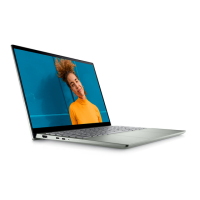
The laptop's design focuses on enhancing the user experience. On the left side, you'll find a power-adapter port for charging, an HDMI 2.0 port for connecting to external displays, a USB 3.2 Gen 1 port for data transfer, and a Thunderbolt 4 port with Power Delivery and DisplayPort capabilities. The Thunderbolt 4 port is particularly versatile, supporting USB4, DisplayPort 1.4, and Thunderbolt 4 devices, with data transfer rates up to 40 Gbps. It also allows connection to Dell Docking Stations and supports two 4K displays or one 8K display with an appropriate adapter. A power and battery-status light indicates the charging status, glowing solid white when charging and solid amber when the battery is low or critical. On the right side, there's a universal audio jack for headphones or headsets, a microSD-card slot for expanding storage or transferring files, and another USB 3.2 Gen 1 port.
The top view of the laptop reveals the keyboard and touchpad. The power button, optionally integrated with a fingerprint reader, allows for quick and secure login. The precision touchpad supports multi-finger gestures for intuitive navigation, with dedicated left-click and right-click areas. The display features a camera, left and right microphones for audio input, and a privacy shutter to cover the camera lens when not in use, ensuring user privacy. A camera-status light indicates when the camera is active. The bottom of the laptop houses left and right speakers for audio output and a Service Tag label, which is crucial for identifying your computer and accessing warranty information.
The Inspiron 14 Plus 7420 incorporates Dell ComfortView technology, designed to reduce eye strain during prolonged use. This feature, certified by TÜV Rheinland, optimizes eye comfort by reducing blue light emissions from the display. ComfortView can be configured through the Dell CinemaColor (DCC) application, which offers various color profiles including Movie, ComfortView, Sports, and Animation. ComfortView Plus, an optional hardware feature, is a built-in, always-on low blue light solution that further enhances visual comfort.
Keyboard shortcuts are provided for quick access to various functions. These include multimedia controls like mute audio, volume adjustment, and play/pause, as well as system functions like brightness control, switching to an external display, and toggling the keyboard backlight. The fn key, in combination with other keys, enables secondary functions such as toggling power and battery-status light, scroll lock, system request, opening application menus, and controlling page navigation.
To ensure optimal performance and longevity of your Inspiron 14 Plus 7420, several maintenance aspects are highlighted. The manual emphasizes the importance of connecting the power adapter when turning on the computer for the first time, especially if the battery is in power-saving mode from shipment. Regular Windows updates are recommended for security and performance enhancements. Connecting to a network during initial setup facilitates these updates and allows for Microsoft account integration.
Dell provides several applications to assist with maintenance and support. "My Dell" serves as a centralized hub for Dell applications, help articles, warranty status, and software updates. "SupportAssist" proactively identifies hardware and software issues, prevents security threats, and monitors for hardware failures, streamlining the engagement process with Dell Technical support. "Dell Update" ensures your computer receives critical fixes and the latest device drivers. "Dell Digital Delivery" allows you to download software applications purchased but not preinstalled.
For battery health, Dell recommends regularly charging the battery for optimal power consumption. If the battery is completely depleted, connecting the power adapter and restarting the computer is advised to reduce power consumption. The Dell Power Manager application can be used to control charging time, duration, and start/end times.
The device is designed to operate within specific temperature and humidity ranges. It's important to avoid operating or storing the device outside these ranges, as it may impact the performance of specific components.
For any issues or questions, Dell offers extensive self-help resources. The Dell support website (www.dell.com/support) provides information on products, services, and a knowledge base with articles, videos, manuals, and diagnostic tools. Your computer's unique Service Tag or Express Service Code can be used to access relevant support resources. If an active internet connection is unavailable, contact information can be found on your purchase invoice or Dell product catalog.
 General
| Processor | 12th Gen Intel Core i5-12500H or i7-12700H |
|---|---|
| Audio | Stereo speakers with Waves MaxxAudio Pro |
| Display | 14.0-inch 2.2K (2240 x 1400) Anti-Glare, Non-Touch, 300 nits |
| Storage | Up to 1TB M.2 PCIe NVMe SSD |
| Graphics | Intel Iris Xe Graphics or NVIDIA GeForce RTX 2050 |
| Operating System | Windows 11 Home or Windows 11 Pro |
| Battery | 4-cell, 64Wh |
| Ports | HDMI 2.0 |
| Wireless | Wi-Fi 6 (802.11ax), Bluetooth 5.2 |
| Webcam | 720p HD with privacy shutter |
| Keyboard | Backlit keyboard |
| Dimensions | 15.64 mm x 314.00 mm x 227.50 mm (0.62 in x 12.36 in x 8.96 in) |




 To Next Page