
 Need help?
Do you have a question about the Dell Inspiron 15 5502 and is the answer not in the manual?
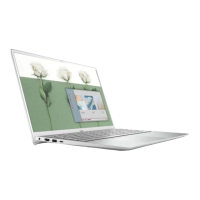
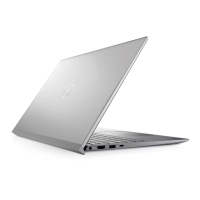
Details components and ports located on the right side of the Inspiron 5502 laptop.
Details components and ports located on the left side of the Inspiron 5502 laptop.
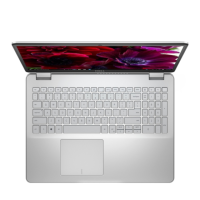
Details components located on the base and keyboard area of the Inspiron 5502 laptop.
Details components located on the display bezel of the Inspiron 5502 laptop.
Details components located on the bottom of the Inspiron 5502 laptop.
Provides physical dimensions and maximum weight specifications for the Inspiron 5502.
Lists the available processor types, wattage, core count, speed, and cache for the Inspiron 5502.
Details the chipset, processor compatibility, DRAM bus width, Flash EPROM, and PCIe bus.
Lists the operating systems compatible with the Inspiron 5502, including Windows and Ubuntu.
Details memory slots, type, speed, maximum configuration, and supported memory sizes.
Lists and describes the available USB ports, audio port, video port, media-card reader, and power-adapter port.
Details the internal slots available for storage devices like M.2 SSDs.
Provides specifications for the Wireless Local Area Network (WLAN) modules, including transfer rate and standards.
Details the audio controller, speaker output, microphone, and other audio hardware features.
Outlines the available storage types, interface, and capacity for M.2 SSDs and Intel Optane memory.
Details specifications for the optional Intel Optane Memory H10 with Solid State Storage.
Lists the types of media cards supported by the Inspiron 5502's media-card reader.
Provides details on keyboard type, layout, number of keys, and key pitch.
Details the number of cameras, type, resolution, and viewing angle of the Inspiron 5502 camera.
Provides specifications for the touchpad resolution, dimensions, and gestures.
Lists specifications for the power adapter, including type, input/output voltage, and temperature range.
Details battery type, voltage, weight, dimensions, operating temperature, and charging time.
Provides details on display type, panel technology, dimensions, resolution, luminance, and color gamut.
Details the specifications for the optional fingerprint reader sensor technology and resolution.
Lists specifications for the integrated Graphics Processing Unit (GPU) supported by the Inspiron 5502.
Lists specifications for the discrete Graphics Processing Unit (GPU) supported by the Inspiron 5502.
Details the operating and storage environmental conditions like temperature, humidity, and vibration.
Lists Dell's online resources for product information, tips, and technical support.
Provides information on how to contact Dell for sales, technical support, or customer service issues.
The Dell Inspiron 15 5502 is a versatile laptop designed for everyday use, offering a blend of performance and user-friendly features. This manual provides comprehensive guidance on setting up, using, and maintaining your device.
The Inspiron 15 5502 serves as a personal computer capable of handling a wide range of tasks, from basic web browsing and document creation to more demanding applications. It comes pre-installed with either Ubuntu or Windows operating systems, providing flexibility for different user preferences. The laptop is equipped with a variety of ports for connecting external devices, including USB 3.2 Gen 1 ports for high-speed data transfer, a USB 3.2 Gen 2 Type-C port with Power Delivery and DisplayPort capabilities for enhanced connectivity and charging, and an HDMI port for video and audio output to external displays. A headset port allows for audio input and output, supporting both headphones and microphone combos.
For storage, the Inspiron 15 5502 offers multiple options, including M.2 solid-state drives, and can optionally feature Intel Optane Memory H10 with Solid State Storage for accelerated performance. The integrated media-card reader supports various microSD card types, making it easy to transfer photos and files.
The laptop features an integrated camera and dual microphones, enabling video conferencing, photo capture, and voice calls. The camera-status light indicates when the camera is active, ensuring privacy. Audio output is provided by two bottom-firing speakers, delivering clear sound for multimedia consumption.
Setting up your Inspiron 15 5502 is straightforward. After connecting the power adapter, simply press the power button to initiate the operating system setup. The on-screen instructions guide you through the process, including connecting to a network for updates and setting up your user account. Dell recommends connecting to a network during Windows setup to ensure all necessary updates are installed.
The laptop's keyboard features a standard QWERTY layout with function keys (F1-F12) that double as multimedia controls. These keys can be used to adjust volume, control media playback, toggle keyboard backlight (if available), and adjust screen brightness. The primary behavior of these function keys can be customized in the BIOS setup program. Additionally, several keyboard shortcuts are available using the fn key, allowing for quick access to features like toggling scroll lock, system request, opening the application menu, locking the fn key, turning on/off wireless connection, activating emoji input, and controlling Ultra performance mode.
The touchpad provides intuitive navigation with left-click and right-click areas, and supports various gestures for enhanced interaction with the operating system. For users who prefer biometric security, an optional fingerprint reader integrated into the power button allows for quick and secure login.
Dell provides several pre-installed applications to enhance your user experience. "My Dell" serves as a centralized hub for key Dell applications, help articles, and warranty information. "SupportAssist" proactively checks the health of your computer's hardware and software, and includes an OS Recovery tool for troubleshooting. "Dell Update" ensures your computer has the latest critical fixes and device drivers, while "Dell Digital Delivery" allows you to download purchased software applications.
The Inspiron 15 5502 is designed for ease of maintenance. The manual provides information on how to identify your computer using the Service Tag label located on the bottom of the device. This unique alphanumeric identifier is crucial for Dell service technicians to access hardware components and warranty information, facilitating efficient support and repairs.
For self-help and troubleshooting, Dell offers a comprehensive suite of resources. The Dell support website (www.dell.com/support) provides access to top solutions, diagnostics, drivers, downloads, videos, manuals, and documents specific to your computer model. You can search the knowledge base for articles related to various computer concerns by entering keywords, topics, or model numbers.
The "Contact Support" application, accessible through Windows search, allows you to get in touch with Dell for sales, technical support, or customer service issues. If you do not have an active internet connection, contact information can be found on your purchase invoice, packing slip, bill, or Dell product catalog.
The laptop's battery is a crucial component, and the manual provides details on its specifications and charging behavior. The Dell Power Manager application allows you to control charging time, duration, and start/end times, helping to optimize battery life. The power and battery-status light on the left side of the laptop indicates the current power state and battery charge level, providing a quick visual cue for monitoring.
Regular updates through "Dell Update" are essential for maintaining the security and performance of your system. These updates include critical fixes and the latest device drivers, ensuring your Inspiron 15 5502 operates smoothly and securely.
 General
| Bluetooth | Bluetooth 5.1 |
|---|---|
| Processor | 11th Gen Intel Core i3/i5/i7 |
| Display | 15.6-inch FHD (1920 x 1080) Anti-Glare LED Backlight Non-Touch Narrow Border |
| RAM | 8GB DDR4 |
| Storage | 512GB SSD |
| Graphics | Intel UHD Graphics / NVIDIA GeForce MX330 |
| Operating System | Windows 10 Home |
| Battery | 4-cell, 53Whr |
| Weight | 1.71 kg (3.79 lbs) |
| Ports | 1 x HDMI 1.4, 1 x headphone/microphone combo |
| Webcam | 720p HD Webcam |




 To Next Page