EasyManua.ls Logo

Dell Latitiude E6500 - Removing the Battery; Replacing the Battery

Dell Latitiude E6500
72 pages
Print Icon
To Next Page IconTo Next Page
To Previous Page IconTo Previous Page
Loading...
5. Remove any installed cards.
6. Turn the computer over.
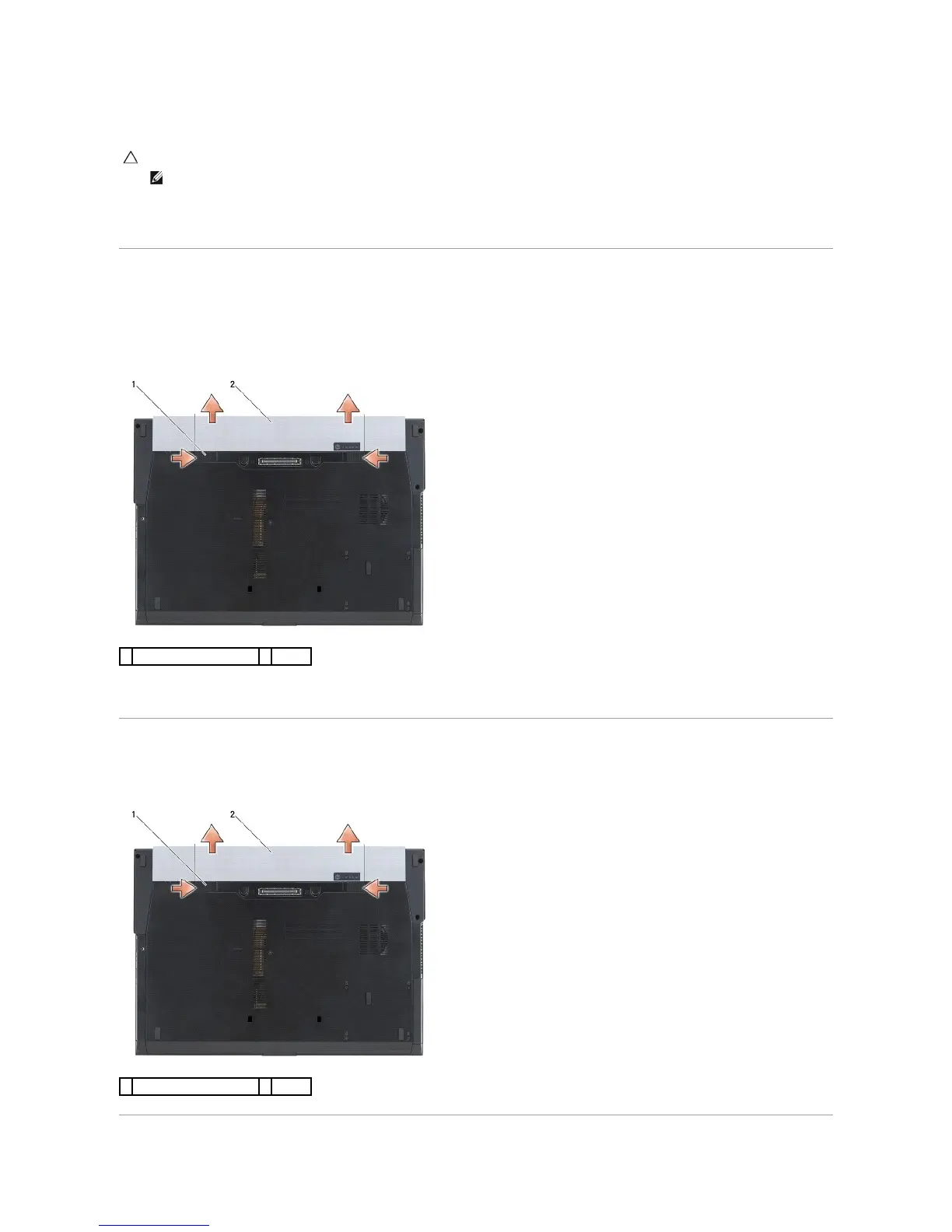
Removing the Battery
1. Slide the battery release latches to the open position. (The latches lock into place).
2. Grip the battery and slide it out of the battery bay.
3. Turn the computer top-side up, open the display, and press the power button to ground the system board.
Replacing the Battery
To replace a battery, slide it into the battery bay until it clicks into place.

CAUTION: To help prevent damage to the system board, remove the battery from the battery bay before you service the computer.
NOTE: To avoid damage to the computer, use only the battery designed for this particular Dell computer. Do not use batteries designed for other
Dell computers.
1
battery release latches (2)
2
battery
1
battery release latches (2)
2
battery

Table of Contents

Related product manuals