support.dell.com Dell Latitude LS Family Advanced Port Replicator User’s Guide 1-5
!"#$%
Use the following instructions to connect your computer to the APR.
1. Save all your work, and exit all application programs.
2. Shut down the computer.
3. If you have not already done so, connect the AC adapter to the connector on the
APR (see Figure 1-1), and plug the AC power cable into an AC power source.
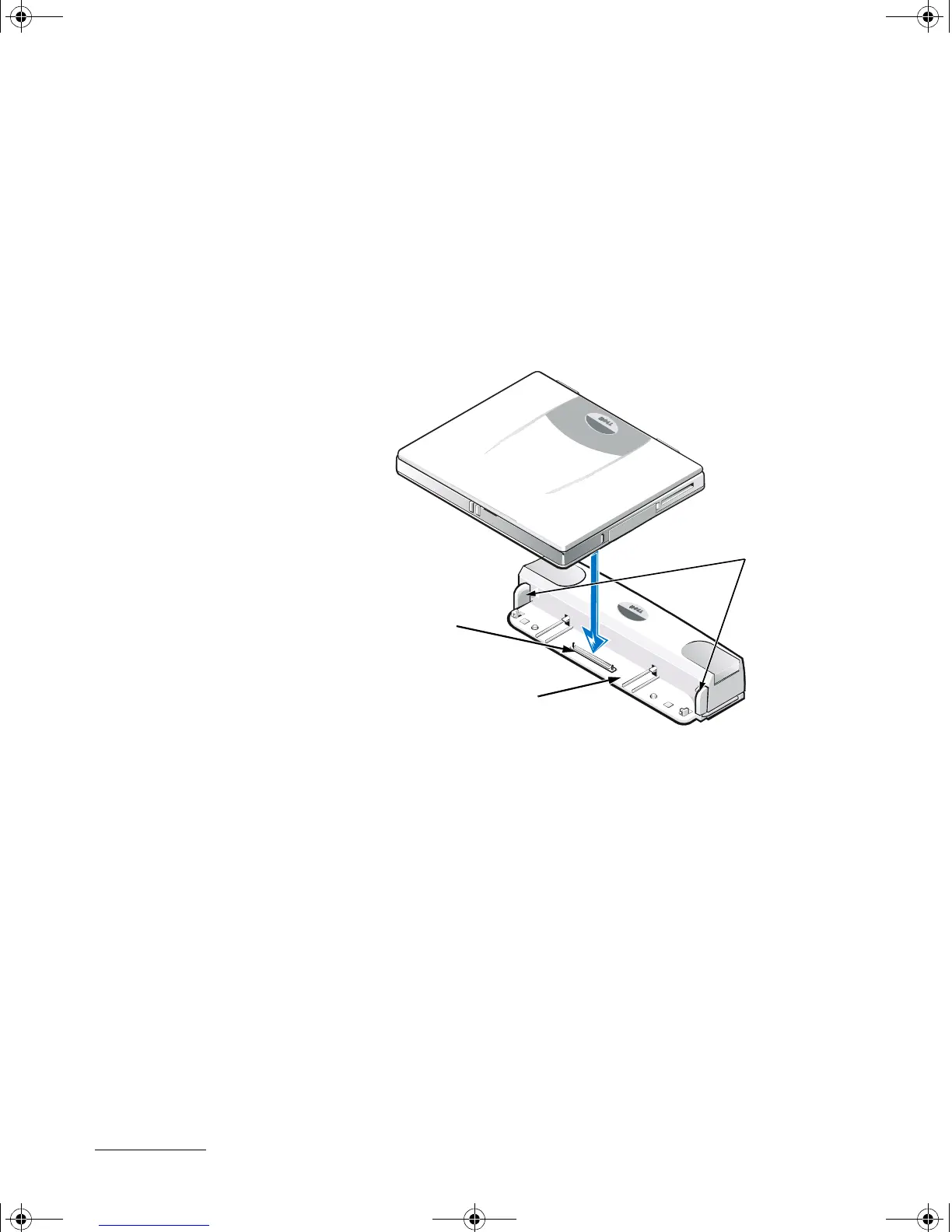
4. Place the back of the computer over the APR platform, aligning the sides of the
computer between the platform wings (see Figure 1-2).
5. Carefully lower the computer onto the APR platform, as shown in Figure 1-2, until
the APR and computer docking connectors engage.
When you feel or hear a click, the computer is latched to the APR and the docking
connectors are fully engaged.
6. Turn on the computer.
Use the following procedure to disconnect the computer from the APR:
1. Save all your work, and exit all application programs.
2. Shut down the computer.
APR docking
connector
platform wings
APR platform
7538u1.book Page 5 Thursday, June 29, 2000 4:00 PM











 To Next Page