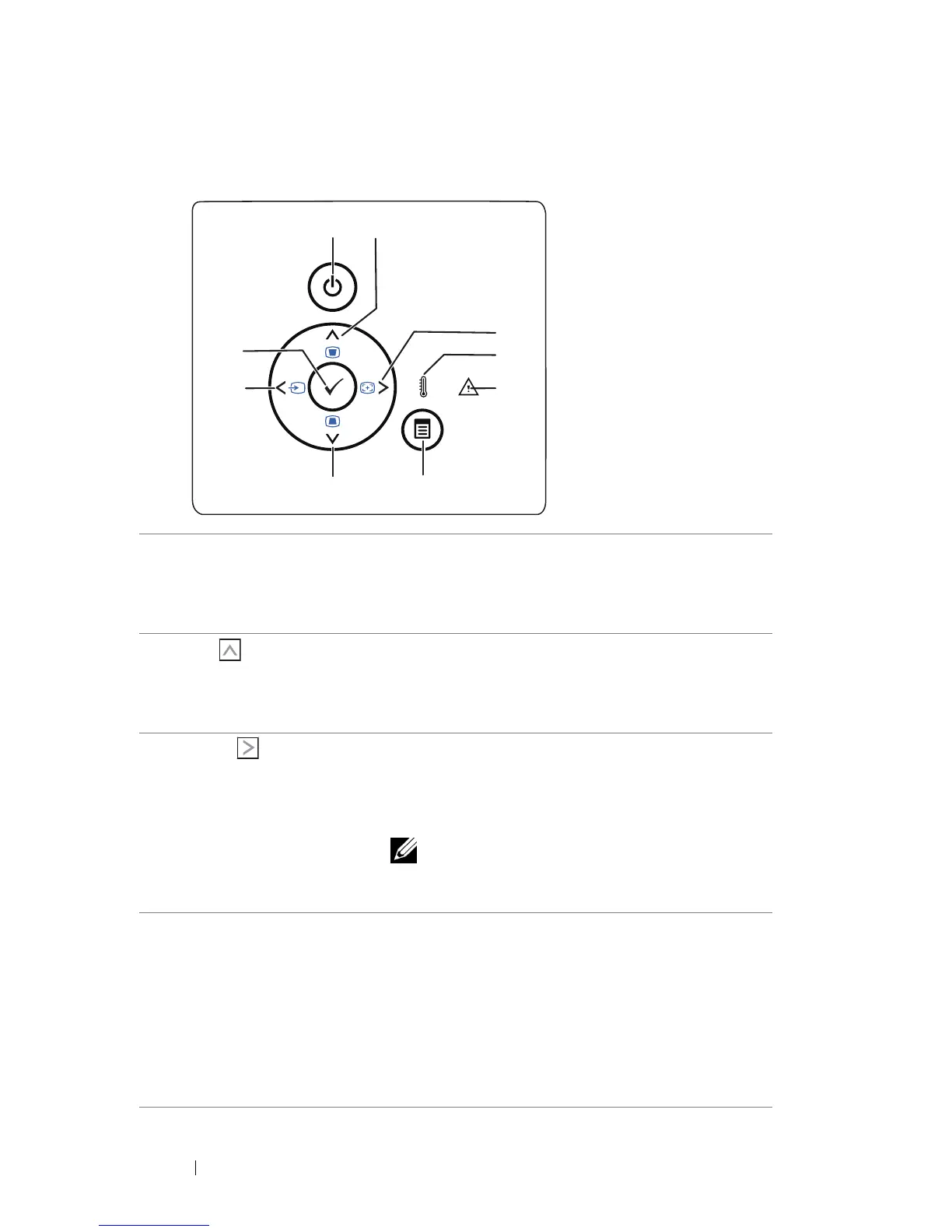
Using the Control Panel
3
5
2
4
6
7
8
9
1
1 Power Turns the projector on or off. For more
information, see "Turning Your Projector On"
on page 15 and "Turning Your Projector Off"
on page 15.
2 Up / Keystone
adjustment
Press to navigate through the On-Screen
Display (OSD) Menu items.
Press to adjust image distortion caused by
tilting the projector (+/-40 degrees).
3 Right
Adjust
/ Auto Press to navigate through the On-Screen
Display (OSD) Menu items.
Press to synchronize the projector to the
input source.
NOTE: Auto Adjust does not operate if
the on-screen display (OSD) is
displayed.
4 TEMP LED If the TEMP amber indicator is on or blinking,
one of the following problems could be
occurring:
• Internal temperature of the projector is too
high
For more information, see "Troubleshooting
Your Projector" on page 50 and "Guiding
Signals" on page 53.
Using Your Projector 20



 To Next Page