● M.2 slot one: One PCIe Gen3 x4 NVMe solid-state drive (M.2 2230 or M.2 2280).
● M.2 slot two: One PCIe Gen3 x4 NVMe or SATA solid-state drive (M.2 2230 or M.2 2280) or one Intel Optane Memory
H10 with solid state storage.
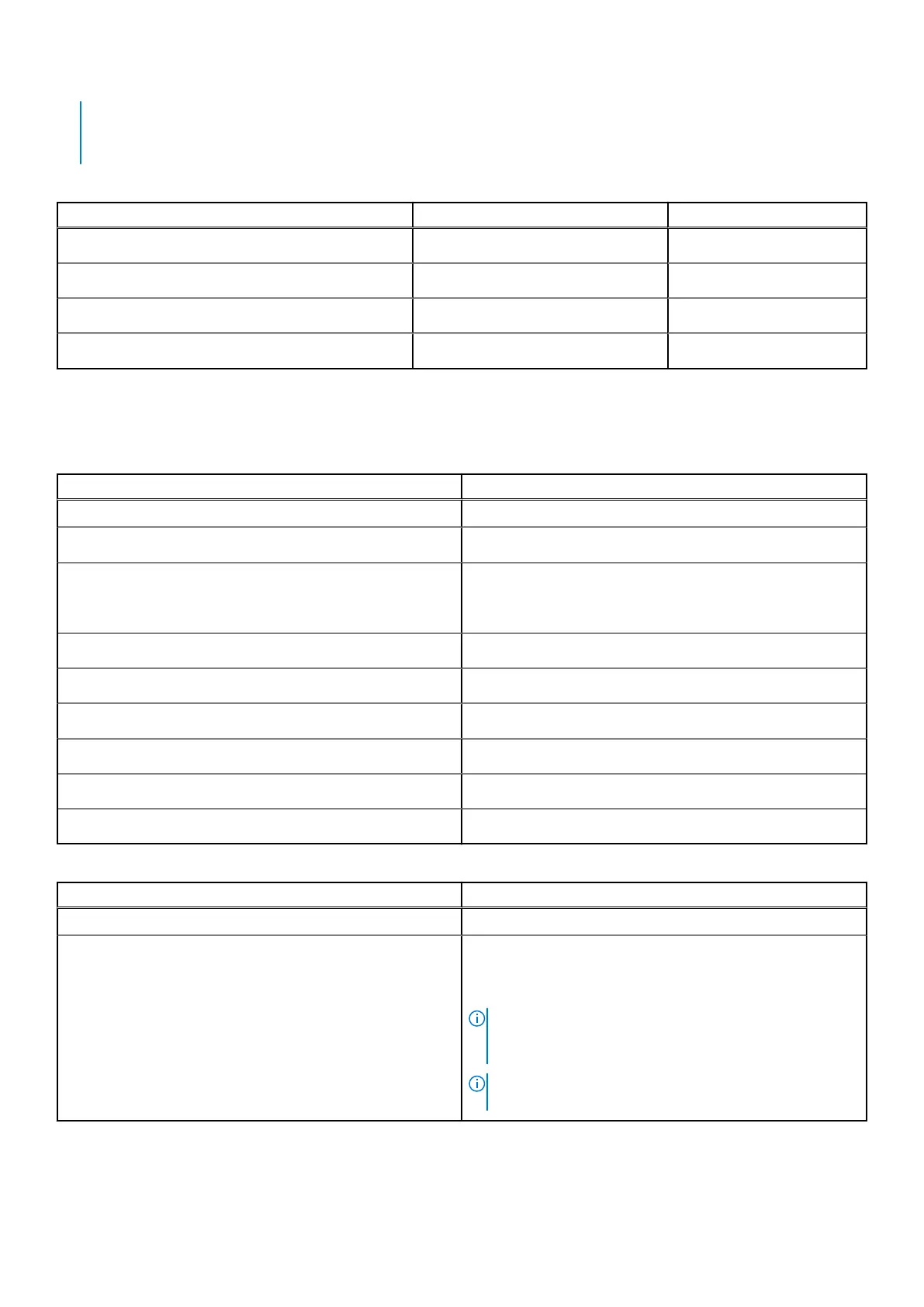
Table 6. Storage specifications
Storage type Interface type Capacity
M.2 2230 solid-state drive Gen 3 PCIe x4 NVMe 128 GB, 256 GB, 512 GB
M.2 2280 solid-state drive Gen 3 PCIe x4 NVMe 256 GB, 512 GB, 1 TB, 2 TB
M.2 2280, PCIe QLC NVMe, solid-state drive Gen 3 PCIe x4 NVMe 512 GB
M.2 2280, PCIe NVMe, Intel Optane Storage Gen 3 PCIe x4 NVMe 512 GB
Ports and connectors
Table 7. External ports and connectors
Description Values
External:
Network
One RJ-45 port 10/100/1000 Mbps
USB
● One USB 3.2 Gen 2 Type-C port with DisplayPort alt
mode/Power Delivery
● Two USB 3.2 Gen 1 Type-A ports
Audio
One Universal Audio Jack
Video
One HDMI 1.4b port
Media card reader
One microSD card reader
Docking port
Not supported
Power adapter port
One DC-in port
Security
One wedge-shaped lock
Table 8. Internal ports and connectors
Description Values
Internal:
M.2
● One M.2 2230 slot for Wi-Fi and Bluetooth card
● One M.2 2230/2280 slot for solid-state drive/Intel Optane
● One M.2 2280 slot for solid-state drive/Intel Optane
NOTE: To learn more about the features of different
types of M.2 cards, see the knowledge base article
SLN301626.
NOTE: Hybrid Optane SSD can only be installed in SSD
slot two and does not support dual TG.
14 System specifications



 To Next Page