Steps
1. Remove the screw (M2x3) that secures the M.2 thermal shield to the system board.
2. Slide and lift the M.2 thermal shield off the M.2 2280 solid-state drive.
3. Slide and lift the M.2 2280 solid-state drive off the system board.
Installing the M.2 2280 solid-state drive
Prerequisites
If you are replacing a component, remove the existing component before performing the installation process.
About this task
NOTE: This procedure applies if you are installing an M.2 2280 solid-state drive.
NOTE: The M.2 solid-state drive installed on your computer depends on the configuration ordered. The M.2 slot supports
one of the following solid-state drives:
● M.2 2230 solid-state drive
A mounting bracket for the M.2 2230 solid-state drive is required. The mounting bracket is provided if the M.2 2230
solid-state drive is shipped with the computer.
If you are replacing the M.2 2230 solid-state drive with a new M.2 2230 solid-state drive, use the existing mounting
bracket to install the latter.
● M.2 2280 solid-state drive
If you are replacing the M.2 2280 solid-state drive (shipped with the computer) with an M.2 2230 solid-state drive, a
mounting bracket for the M.2 2230 solid-state drive is required. Please contact Dell support to purchase the mounting
bracket for the M.2 2230 solid-state drive.
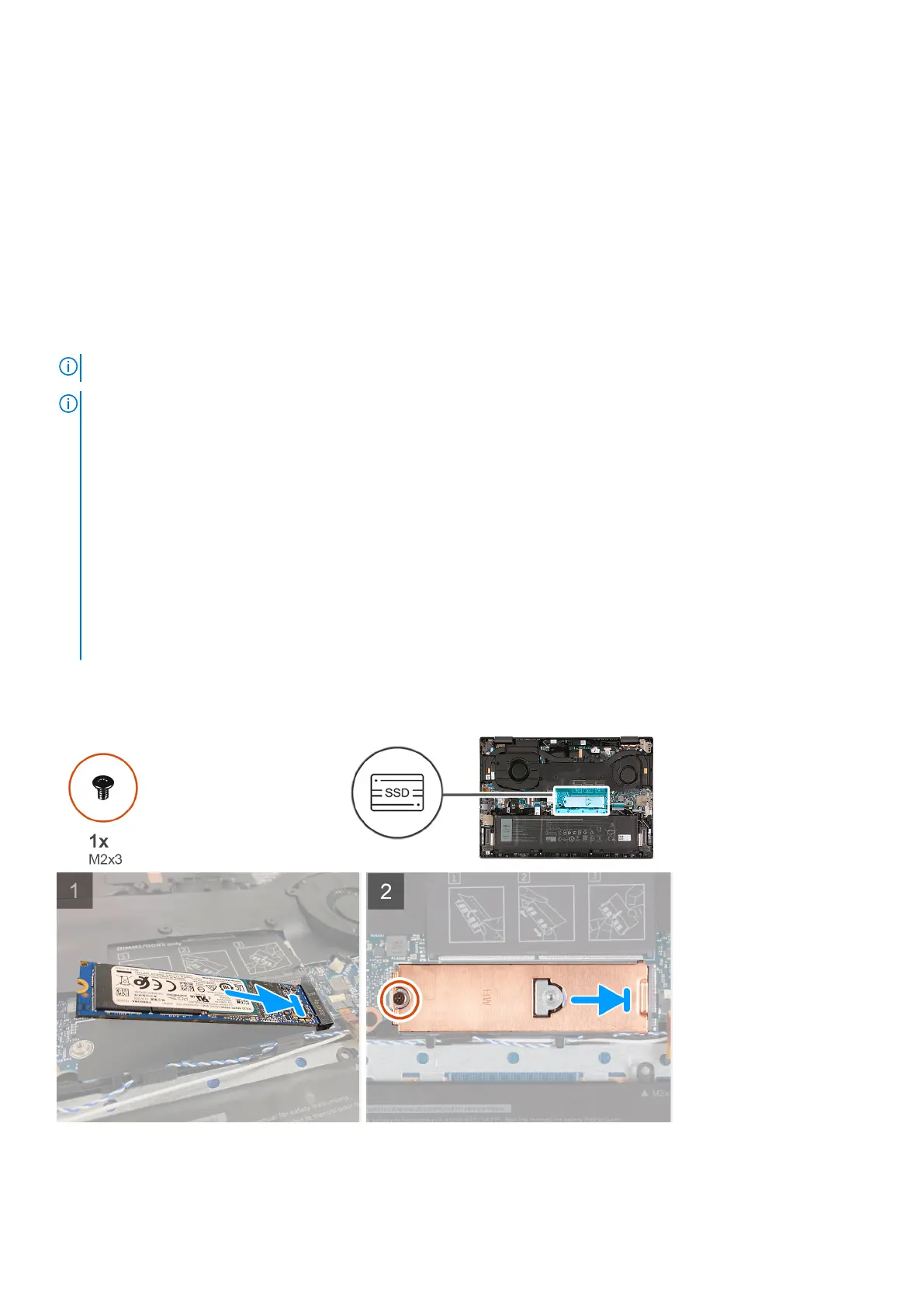
The following image(s) indicate the location of the M.2 2280 solid-state drive and provides a visual representation of the
installation procedure.
Steps
1. Align the notch on the M.2 2280 solid-state drive with the tab on the solid-state drive slot.
Removing and installing components
23



 To Next Page