Steps
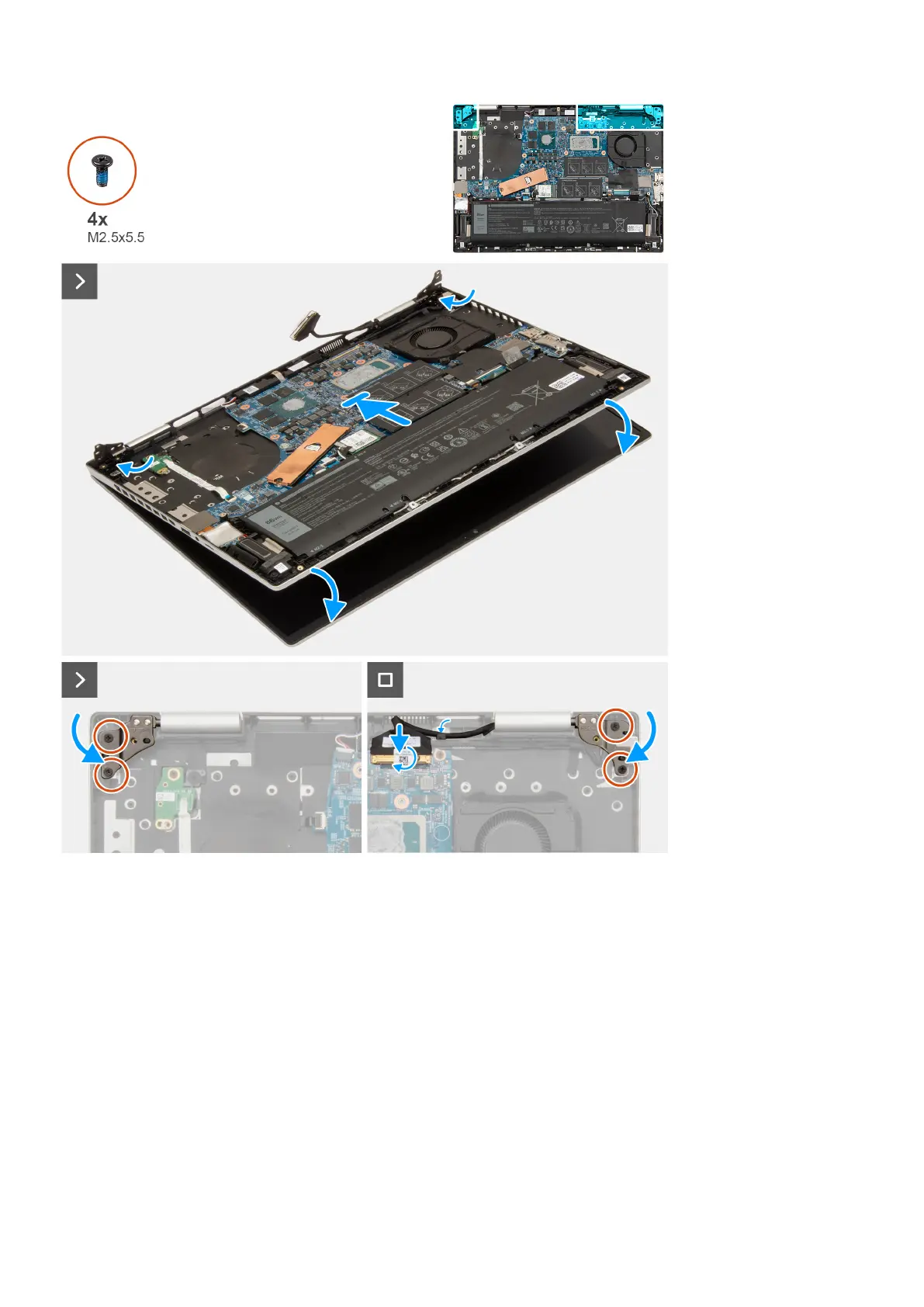
1. Place the display assembly on a clean and flat surface with the display panel facing up.
2. Gently place the palm-rest and keyboard assembly on the display assembly.
3. Close the left display-assembly hinge and align its screw holes with the screw holes on the palm-rest and keyboard assembly.
4. Close the right display-assembly hinge and align its screw holes with the screw holes on the palm-rest and keyboard
assembly.
5. Replace the two screws (M2.5x5.5) that secure the left display-assembly hinge to the palm-rest and keyboard assembly.
6. Replace the two screws (M2.5x5.5) that secure the right display-assembly hinge to the palm-rest and keyboard assembly.
7. Connect the display-assembly cable to its connector on the system board and close the latch.
8. Adhere the tape to secure the display-cable latch to its connector to the system board.
Next steps
1. Install the base cover.
2. Follow the procedure in After working inside your computer.
60
Removing and installing Field Replaceable Units (FRUs)



 To Next Page