Lock function – Either soft lock (through the OSD menu) or hard lock (press and hold the button above the power button for 10 seconds)
Unlock function– Only hard unlock (press and hold the button above the power button for 10 seconds)
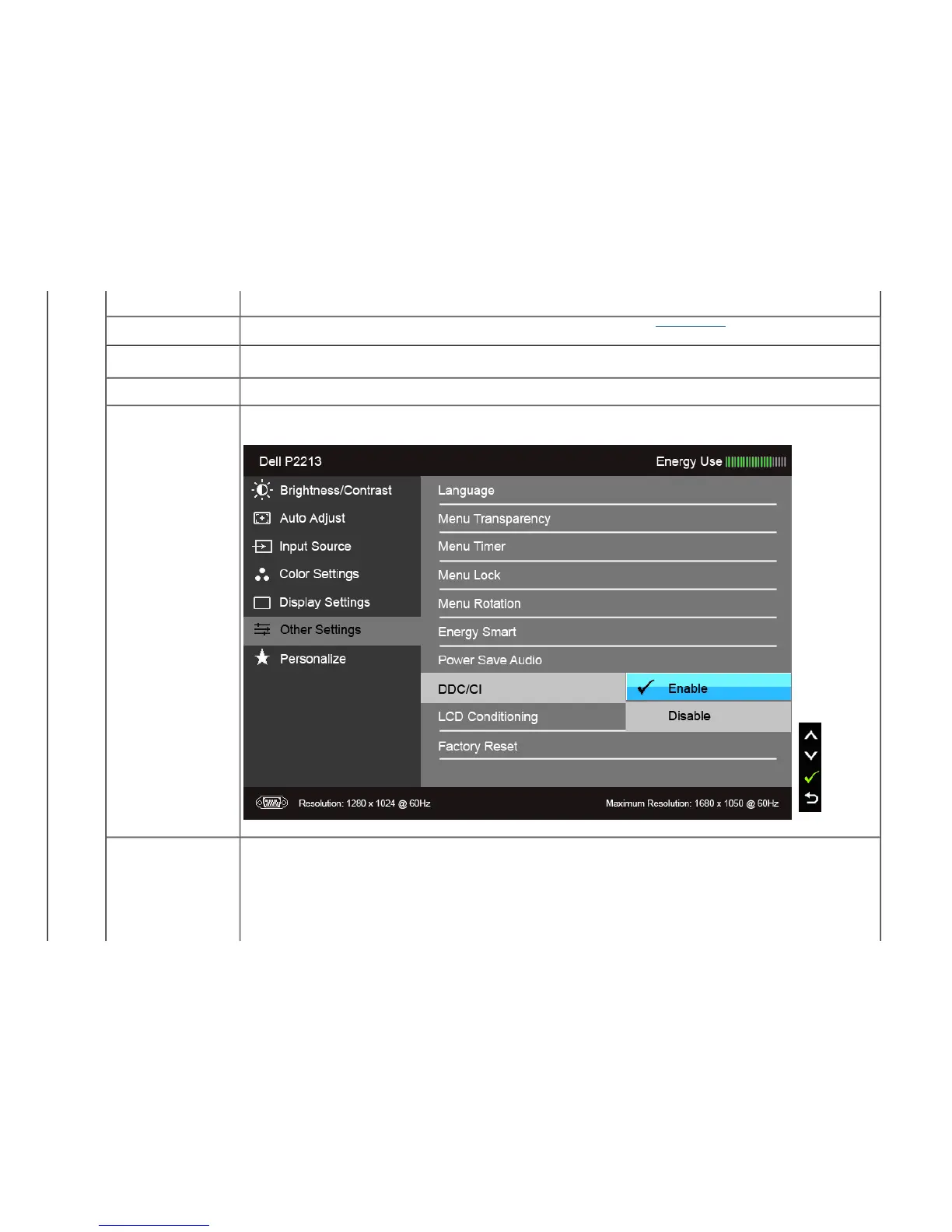
Menu Rotation Rotates the OSD by 90 degrees counter-clockwise. You can adjust the menu according to your Display Rotation
.
Energy Smart To turn on or off dynamic dimming.
The dynamic dimming feature automatically reduces the screen's brightness level when the displayed image contains a high proportion of bright
areas.
Power Save Audio To turn on or off Audio Power during Power Save mode.
DDC/CI DDC/CI (Display Data Channel/Command Interface) allows your monitor parameters (brightness, color balance, and etc.) to be adjustable via the
software on your computer. You can disable this feature by selecting "Disable".
Enable this feature for best user experience and optimum performance of your monitor.
LCD Conditioning Helps reduce minor cases of image retention. Depending on the degree of image retention, the program may take some time to run. You can
enable this feature by selecting "Enable".



 To Next Page