• On-Screen Display (OSD) adjustments for ease of set-up and screen optimization.
• Software and documentation media includes an Information File (INF), Image Color
Matching File (ICM), and product documentation.
• Dell Display Manager Software included (comes in the CD shipped with the
monitor).
• Energy Saver feature for Energy Star compliance.
• Security lock slot.
• Stand lock.
• Capability to switch from wide aspect to standard aspect ratio while maintaining
the image quality.
• EPEAT Gold Rating.
• P2214H/P2414H monitor is BFR/PVC-free (Halogen-free) excluding external cables.
• TCO-Certified Displays.
• Arsenic-Free glass and Mercury-Free for the panel only.
• High Dynamic Contrast Ratio (2,000,000:1).
• 0.3 W standby power when in the sleep mode.
• Energy Gauge shows the energy level being consumed by the monitor in real time.
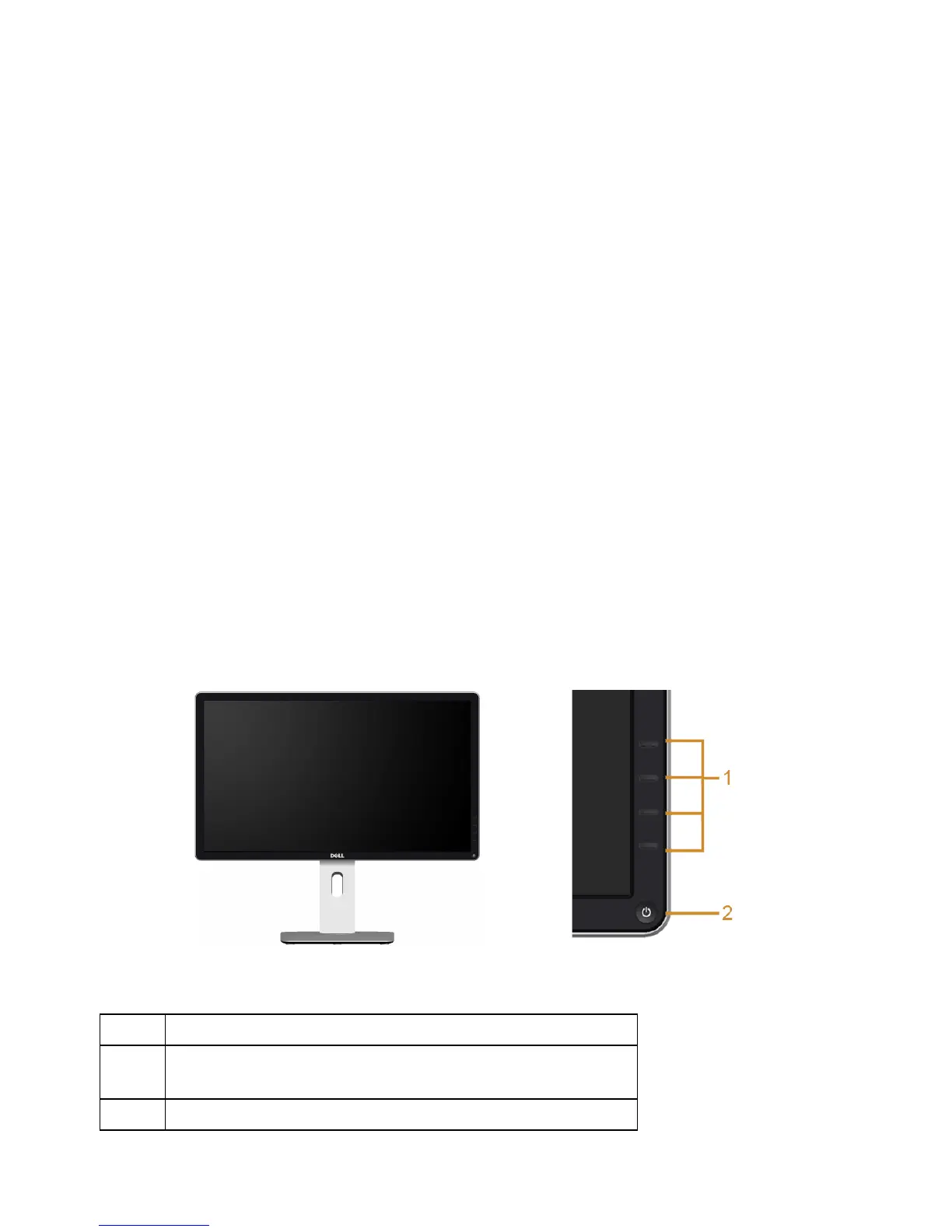
Identifying Parts and Controls
Front View
Front panel controls
Label Description
1 Function buttons (For more information, see
Operating the Monitor
)
2 Power On/Off button (with LED indicator)
About Your Monitor | 7



 To Next Page