About your monitor │ 15
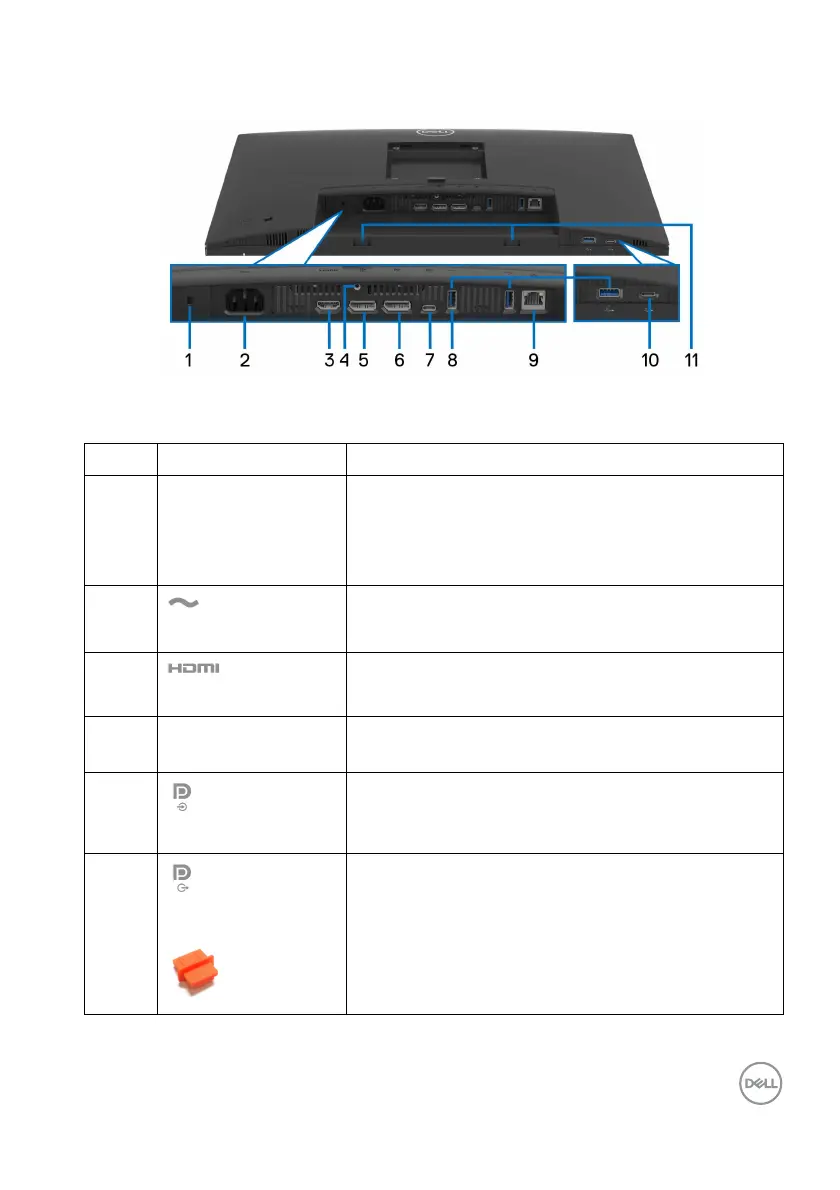
Rear and bottom view
Rear and bottom view without monitor stand
Label Description Use
1 Security-lock slot
(based on
K
ensington Security
Slot)
Secure your monitor using a security lock (to be
pur
chased separately) to prevent unauthorized
movement of your monitor.
2
Power connector
Connect the power cable (shipped with your
monit
or).
3
HDMI port
Connect your computer with the HDMI cable.
4 Stand-lock feature Lock the stand to the monitor using a M3x6 mm
scr
ew (screw not included).
5
DisplayPort (in)
Connect your computer with the DisplayPort
cab
le (shipped with your monitor).
6
DisplayPort (out)
DisplayPort output for MST (multi-stream
transport) capable monitor. To enable MST, see
Connecting the monitor for DP Multi-Stream
Transport (MST) function.
NOTE: R
emove the rubber plug when using
DisplayPort out connector.



 To Next Page