30 │ Setting up the monitor
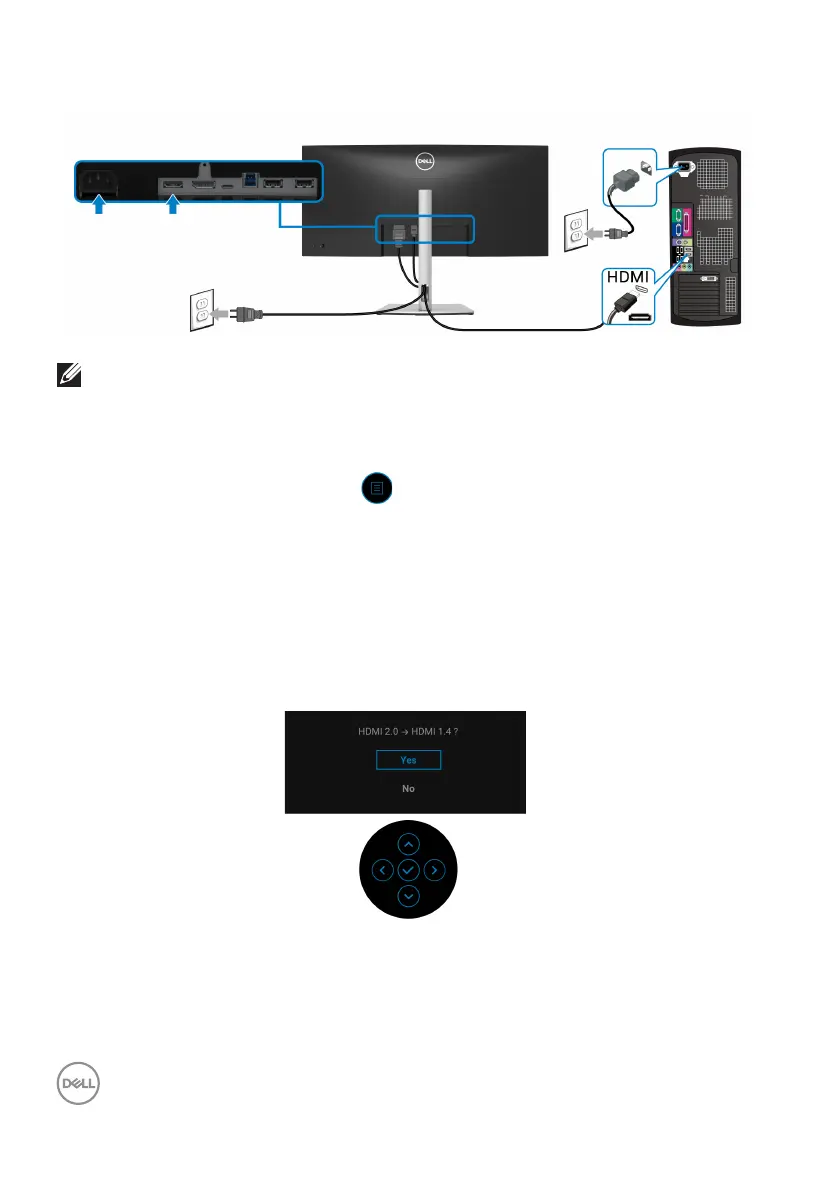
Connecting the HDMI cable
NOTE: The default out of factory setting is HDMI 2.0. If the monitor
fails to show any content after the HDMI cable is connected, follow the
procedures below to change the settings from HDMI 2.0 to HDMI 1.4:
• Press the joystick to launch the Menu Launcher.
• Move the joystick up to select
and activate the OSD main menu.
• Toggle the joystick to highlight Input Sour
ce, then press the joystick to enter
the submenu.
• Toggle the joystick to highlight HDMI.
• Press and hold the joystick for approximately 10 seconds, and the HDMI
con
figuration message appears.
• Toggle the joystick to select Ye
s and then press the joystick to save the
changes.
Repeat the above steps to change the HDMI format settings if necessary.


 To Next Page