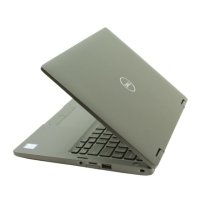
The Dell Inspiron 5480 is a laptop computer designed for general use, offering a balance of performance, portability, and features. It comes with either Windows 10 Home (64-bit), Windows 10 Professional (64-bit), or Ubuntu as its operating system.
Key Features and Specifications:
Design and Dimensions:
The Inspiron 5480 has a sleek design with dimensions of 324.3 mm (12.77 in.) in width and 232 mm (9.13 in.) in depth. Its height varies from 18.77 mm (0.74 in.) at the front to 19.10 mm (0.75 in.) at the rear. The maximum weight of the laptop is 1.63 kg (3.60 lb), though this can vary based on the specific configuration and manufacturing.
Processor Options:
The laptop offers a choice of 8th Generation Intel Core processors:
- Intel Core i3 (i3-8145U): 2.1 GHz speed, 2C/4T core/thread count, 256 KiB/core L2 cache, 4 MB L3 cache.
- Intel Core i5 (i5-8265U): 1.6 GHz speed, 4C/8T core/thread count, 256 KiB/core L2 cache, 6 MB L3 cache.
- Intel Core i7 (i7-8565U): 1.8 GHz speed, 4C/8T core/thread count, 256 KiB/core L2 cache, 8 MB L3 cache.
All processor options have a wattage of 15 W and include integrated Intel UHD Graphics 620.
Memory:
The Inspiron 5480 features two SODIMM slots, supporting dual-channel DDR4 memory at 2666 MHz. However, for 8th Generation Intel Core processors, the memory functions at 2400 MHz.
- Maximum memory: 32 GB
- Minimum memory: 8 GB
- Memory per slot: 4 GB, 8 GB, and 16 GB
- Supported configurations: 4 GB (1 x 4 GB), 8 GB (2 x 4 GB), 8 GB (1 x 8 GB), 12 GB (1 x 4 GB + 1 x 8 GB), 16 GB (2 x 8 GB), 16 GB (1 x 16 GB), and 32 GB (2 x 16 GB).
Storage:
Storage options include:
- One 2.5-inch hard drive (SATA 5400 RPM) with a capacity of up to 2 TB.
- One M.2 2230/2280 solid-state drive (PCIe Gen3 x4 NVMe, up to 32 Gbps) with a capacity of up to 512 GB.
- Intel Optane memory (optional): Functions as a storage accelerator, not as additional RAM. It requires a 7th Generation or higher Intel Core i3/i5/i7 processor, Windows 10 64-bit (Anniversary Update), and Intel Rapid Storage Technology driver version 15.9.1.1018 or higher. It uses a PCIe 3x2 NVMe 1.1 interface in an M.2 card slot (2230/2280).
Graphics:
- Integrated Graphics: Intel UHD Graphics 620, which uses shared system memory. It supports one HDMI port for external display.
- Discrete Graphics (optional): Nvidia GeForce MX130/MX150 with 2 GB GDDR5 memory. It also supports one HDMI port for external display.
Display:
The laptop features an FHD Anti-Glare display with an In-plane Switching (IPS) panel.
- Luminance (typical): 220 nits
- Active area dimensions: 173.99 mm (6.85 in.) height, 309.35 mm (12.18 in.) width, 355.60 mm (14 in.) diagonal.
- Native resolution: 1920 x 1080
- Megapixels: 2.07
- Pixels Per Inch (PPI): 157
- Contrast ratio (minimum): 600:1
- Response time (maximum): 35 msec rise/fall
- Refresh rate: 60 Hz
- Viewing angles: +/- 80 degrees horizontal and vertical.
- Pixel pitch: 0.161 mm
- Power consumption (maximum): 3.5 W
- Anti-glare vs glossy finish: Anti-glare
- Touch options: Not supported
Ports and Connectors:
- Right side: SD-card slot, USB 2.0 port, Network port (RJ45), Security-cable slot (for Noble locks).
- Left side: Power-adapter port, Power and battery-status light, USB 3.1 Gen 1 (Type-C) port/DisplayPort (requires a USB Type-C to DisplayPort adapter, sold separately), HDMI port, two USB 3.0 ports, Headset port (headphone and microphone combo).
- Internal: One M.2 slot for Wi-Fi and Bluetooth combo card, one M.2 2230/2280 slot for solid-state drive/Intel Optane memory.
- Other: Micro subscriber identity module (USIM) card (not supported), Docking port (not supported), Express card (not supported), Smart card reader (not supported), Legacy ports (not supported).
Audio:
- Controller: Realtek ALC3204 with Waves MaxxAudio Pro.
- Stereo conversion: 24-bit DAC (Digital-to-Analog) and ADC (Analog-to-Digital).
- Internal interface: Intel HDA (high-definition audio).
- External interface: 7.1 channel output via HDMI, digital microphone input on camera module, headset combo jack (stereo headphones/microphone-in).
- Speakers: Two, with an internal speaker amplifier integrated in ALC3204 (Class-D 2W).
- Speaker output: Average 2 W, Peak 2.5 W.
- Subwoofer output: Not supported.
- Microphone: Digital-array microphones.
Camera:
- Number of cameras: One
- Type: One HD fixed focus
- Location: Front (above the LCD screen)
- Sensor type: CMOS sensor technology
- Resolution: 1280 x 720 (HD) for still image and video at 30 fps.
- Diagonal viewing angle: 74.9 degrees.
- Infrared camera: Not supported.
- Camera-status light: Turns on when the camera is in use.
Keyboard and Touchpad:
- Keyboard: Standard non-backlit or optional backlit QWERTY keyboard. Number of keys varies by region (e.g., 80 for US/Canada, 81 for UK, 84 for Japan, 82 for Brazil). Key pitch is X = 19.05 mm (0.75 in.) and Y = 18.05 mm (0.71 in.). Shortcut keys allow for alternate characters or secondary functions using Shift or Fn keys. Function Key Behavior (F1-F12) can be customized in BIOS setup.
- Touchpad: Resolution of 1229 horizontal and 749 vertical. Dimensions are 105 mm (4.13 in.) horizontal and 65 mm (2.56 in.) vertical. Supports left-click, right-click, and mouse pointer movement with single-finger tap for left-click and two-finger tap for right-click.
Fingerprint Reader (optional):
- Sensor technology: Capacitive
- Sensor resolution: 500 PPI
- Sensor area: 5.5 mm x 4.4 mm (0.22 in. x 0.17 in.)
- Sensor pixel size: 108 pixels x 88 pixels
- Integrated with the power button for login.
Wireless Module:
Supports various Intel and Qualcomm wireless modules:
- Intel 9462: Up to 433 Mbps transfer rate, dual band 2.4 GHz/5 GHz, WiFi 802.11ac, WiFi 802.11b/g/n, Bluetooth 4.0/4.1/4.2/5.0.
- Intel 9560: Up to 867 Mbps transfer rate, dual band 2.4 GHz/5 GHz, WiFi 802.11ac, WiFi 802.11b/g/n, Bluetooth 4.0/4.1/4.2/5.0.
- Qualcomm QCA9377 (DW1810): Up to 433 Mbps transfer rate, dual band 2.4 GHz/5 GHz, WiFi 802.11ac, WiFi 802.11b/g/n, Bluetooth 4.0/4.1/4.2.
- Qualcomm QCA61x4A (DW1820): Up to 867 Mbps transfer rate, dual band 2.4 GHz/5 GHz, WiFi 802.11ac, WiFi 802.11b/g/n, Bluetooth 4.0/4.1/4.2.
All modules support 64-bit/128-bit WEP, AES-CCMP, and TKIP encryption.
Power Adapter:
Available in 45 W and 65 W options.
- Diameter (connector): 4.5 mm for both.
- Input voltage: 100 VAC-240 VAC.
- Input frequency: 50 Hz-60 Hz.
- Input current (maximum): 1.30 A (45 W), 1.70 A (65 W).
- Output current (continuous): 2.31 A (45 W), 3.34 A (65 W).
- Rated output voltage: 19.50 VDC for both.
Battery:
- Type: 3-cell "smart" lithium-ion (42 WHr).
- Voltage: 11.40 VDC.
- Weight (maximum): 0.2 kg (0.44 lb).
- Dimensions: 5.90 mm (0.23 in.) height, 97.15 mm (3.82 in.) width, 184.15 mm (7.25 in.) depth.
- Operating time: Varies depending on conditions.
- Charging time (approximate): 4 hours (when the computer is off). Charging time, duration, and start/end times can be controlled using the Dell Power Manager application.
- Life span (approximate): 300 discharge/charge cycles.
- Coin-cell battery: CR-2032.
Computer Environment:
- Airborne contaminant level: G1 as defined by ISA-S71.04-1985.
- Temperature range:
- Operating: 0°C to 40°C (32°F to 104°F).
- Storage: -40°C to 70°C (-40°F to 158°F).
- Relative humidity (maximum):
- Operating: 10% to 90% (non-condensing).
- Storage: 0% to 95% (non-condensing).
- Vibration (maximum):
- Operating: 0.66 GRMS.
- Storage: 1.30 GRMS.
- Shock (maximum):
- Operating: 110 G (measured using a 2 ms half-sine pulse when the hard drive is in use).
- Storage: 160 G (measured using a 2 ms half-sine pulse when the hard-drive head is in parked position).
- Altitude (maximum):
- Operating: -15.2 m to 3,048 m (-50 ft to 10,000 ft).
- Storage: -15.2 m to 10,668 m (-50 ft to 35,000 ft).
Usage and Maintenance Features:
- Setup: Connect the power adapter, press the power button, and follow on-screen instructions for OS setup (Ubuntu or Windows). Dell recommends connecting to a network for updates and signing in with a Microsoft account for Windows.
- Dell Apps: Includes My Dell (centralized hub for Dell applications, help articles, warranty status, and updates) and SupportAssist (proactively checks hardware/software health, troubleshoots OS issues, and allows warranty renewal/upgrade). Dell Update provides critical fixes and device drivers, while Dell Digital Delivery manages purchased software not pre-installed.
- Recovery Drive: It is recommended to create a USB recovery drive (minimum 16 GB) for Windows to troubleshoot and fix problems.
- Keyboard Shortcuts: A comprehensive list of Fn-key combinations for various functions like mute, volume control, media playback, display switching, search, keyboard backlight, brightness, wireless toggle, scroll lock, Fn-key lock, pause/break, sleep, system request, and battery/hard-drive activity light (hard-drive activity light supported only on computers shipped with a hard drive).
- Getting Help: Dell provides self-help resources through www.dell.com/support, including troubleshooting information, user manuals, product specifications, drivers, software updates, and knowledge base articles. Users can identify their product by detecting it, selecting from a list, or entering the Service Tag/Product ID. For direct contact, www.dell.com/contactdell is available, with contact information also found on purchase invoices or product catalogs if an internet connection is unavailable.

 Need help?

 To Next Page
 General