Need help?
Do you have a question about the Dell Pro KM5221W and is the answer not in the manual?
Guide for installing AA batteries into the wireless mouse.
Guide for installing AAA batteries into the wireless keyboard.
Instructions for connecting the USB receiver and powering on the keyboard and mouse.
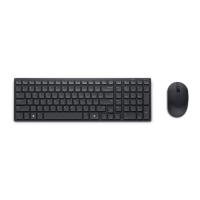
The Dell Pro Wireless Keyboard and Mouse KM5221W is a peripheral set designed for users seeking a reliable and efficient wireless input solution for their computing needs. This combo offers the convenience of wireless connectivity, reducing cable clutter and providing flexibility in workspace setup. The keyboard and mouse are engineered to work seamlessly together, offering a unified user experience.
The Dell Pro Wireless Keyboard KM5221W serves as the primary text input device, featuring a full-size layout that includes a numeric keypad, function keys, and dedicated media control keys. This comprehensive key set allows for efficient data entry, navigation, and quick access to common functions, enhancing productivity across various applications. The keyboard is designed for comfortable typing, with keys that provide a responsive and tactile feel, minimizing typing fatigue during extended use. Its wireless capability ensures that users can position the keyboard optimally without being constrained by cable length, making it suitable for diverse desk configurations or even for use from a short distance.
Complementing the keyboard, the Dell Pro Wireless Mouse KM5221W provides precise cursor control and navigation. It features a standard two-button design with a scroll wheel, enabling smooth scrolling through documents and web pages. The mouse is ergonomically shaped to fit comfortably in the hand, reducing strain during prolonged use. Its optical tracking technology ensures accurate movement on a variety of surfaces, offering reliable performance for both general computing tasks and more detailed work. Like the keyboard, the mouse's wireless connection contributes to a clutter-free workspace and offers freedom of movement.
Together, the keyboard and mouse form a cohesive wireless input system. They connect to a computer via a single USB receiver, which simplifies setup and minimizes the number of USB ports required. This plug-and-play functionality allows for quick and easy installation, enabling users to start working almost immediately after connecting the receiver. The wireless connection operates on a stable frequency, providing a consistent and uninterrupted experience, free from the interference often associated with wired connections.
The Dell Pro Wireless Keyboard and Mouse KM5221W are designed with user convenience at the forefront. The wireless nature of the devices is a significant feature, offering enhanced mobility and a cleaner desk environment. Users can enjoy the freedom to work from a comfortable distance, whether they are presenting content on a larger screen or simply prefer a more relaxed posture. The compact USB receiver is small enough to be left plugged into a laptop or desktop without obstruction, making it ideal for on-the-go use with portable devices.
The keyboard's full-size layout is a key usage feature, providing all the necessary keys for comprehensive input. The inclusion of a numeric keypad is particularly beneficial for tasks involving data entry, spreadsheets, and financial applications, where quick number input is essential. Dedicated function keys often provide shortcuts to system controls, such as volume adjustment, media playback, and screen brightness, further streamlining the user experience. The keycaps are typically well-spaced, reducing the likelihood of accidental key presses and contributing to a more accurate typing experience.
For the mouse, its ergonomic design is a crucial usage feature. The contoured shape is crafted to fit naturally in the palm, supporting the hand and wrist to prevent discomfort. The scroll wheel offers smooth and precise scrolling, which is invaluable for navigating long documents, web pages, and image galleries. The responsiveness of the mouse's optical sensor ensures that cursor movements are accurate and fluid, enhancing productivity in tasks that require fine motor control, such as graphic design or detailed document editing. The click feedback from the buttons is typically satisfying, providing clear confirmation of input.
The setup process for the KM5221W combo is straightforward. Users simply need to insert the batteries into both the keyboard and the mouse, and then plug the USB receiver into an available USB port on their computer. The devices are usually recognized automatically by the operating system, eliminating the need for complex driver installations. This plug-and-play functionality makes the combo accessible to users of all technical skill levels. The wireless connection is typically robust, maintaining a stable link between the devices and the receiver, even in environments with multiple wireless signals.
Maintaining the Dell Pro Wireless Keyboard and Mouse KM5221W is relatively simple, focusing primarily on battery management and general cleaning to ensure longevity and optimal performance. Both the keyboard and mouse operate on standard batteries, which are easy to replace when depleted. The keyboard typically uses AAA batteries, while the mouse often uses an AA battery. This reliance on readily available battery types ensures that users can easily find replacements, minimizing downtime. The devices are designed with energy efficiency in mind, providing a long battery life to reduce the frequency of replacements. Some models may include an on/off switch to conserve battery power when the devices are not in use, further extending their operational life.
Cleaning the keyboard involves routine dusting and wiping to remove debris and grime that can accumulate between the keys. The design of the keyboard often allows for easy access to the spaces between keycaps, making it simple to dislodge crumbs or dust. A soft, lint-free cloth can be used to wipe down the surface of the keys and the keyboard frame. For more stubborn dirt, a slightly damp cloth with a mild cleaning solution can be used, ensuring that no liquid seeps into the internal components. Regular cleaning helps maintain the tactile feel of the keys and prevents potential issues caused by debris interfering with key mechanisms.
For the mouse, maintenance primarily involves keeping the optical sensor clean and wiping down the exterior. The optical sensor, located on the underside of the mouse, should be kept free of dust and lint to ensure accurate tracking. A soft brush or a cotton swab can be used to gently clean the sensor area. The exterior of the mouse, including the buttons and scroll wheel, can be wiped with a soft, damp cloth to remove fingerprints and dirt. Regular cleaning of the mouse not only keeps it looking new but also ensures smooth and precise cursor control.
The durability of the Dell Pro Wireless Keyboard and Mouse KM5221W is also a maintenance consideration. These peripherals are typically built with robust materials to withstand daily use. The keycaps are designed to endure numerous presses, and the mouse buttons are engineered for a high number of clicks. While not explicitly a maintenance feature, the sturdy construction reduces the need for frequent repairs or replacements, contributing to the overall ease of ownership. The USB receiver is also designed to be durable, capable of being plugged and unplugged multiple times without damage.
In summary, the Dell Pro Wireless Keyboard and Mouse KM5221W offer a user-friendly and low-maintenance solution for wireless input. Their design prioritizes ease of use, comfort, and reliability, making them suitable for a wide range of users from home offices to professional environments. The simple battery replacement process and straightforward cleaning routines ensure that the devices remain functional and aesthetically pleasing over time.
 General
| Connectivity | Wireless |
|---|---|
| Interface | 2.4 GHz |
| Keyboard Layout | QWERTY |
| Color | Black |
| Pointing Device | Mouse |
| Buttons Qty | 3 |
| Battery Life | Up to 36 months |
| Battery Type | AA |
| Compatibility | Windows, Android, iOS |
| Keyboard Technology | Scissor |
| Key Type | Chiclet |


 To Next Page