8 | About your monitor
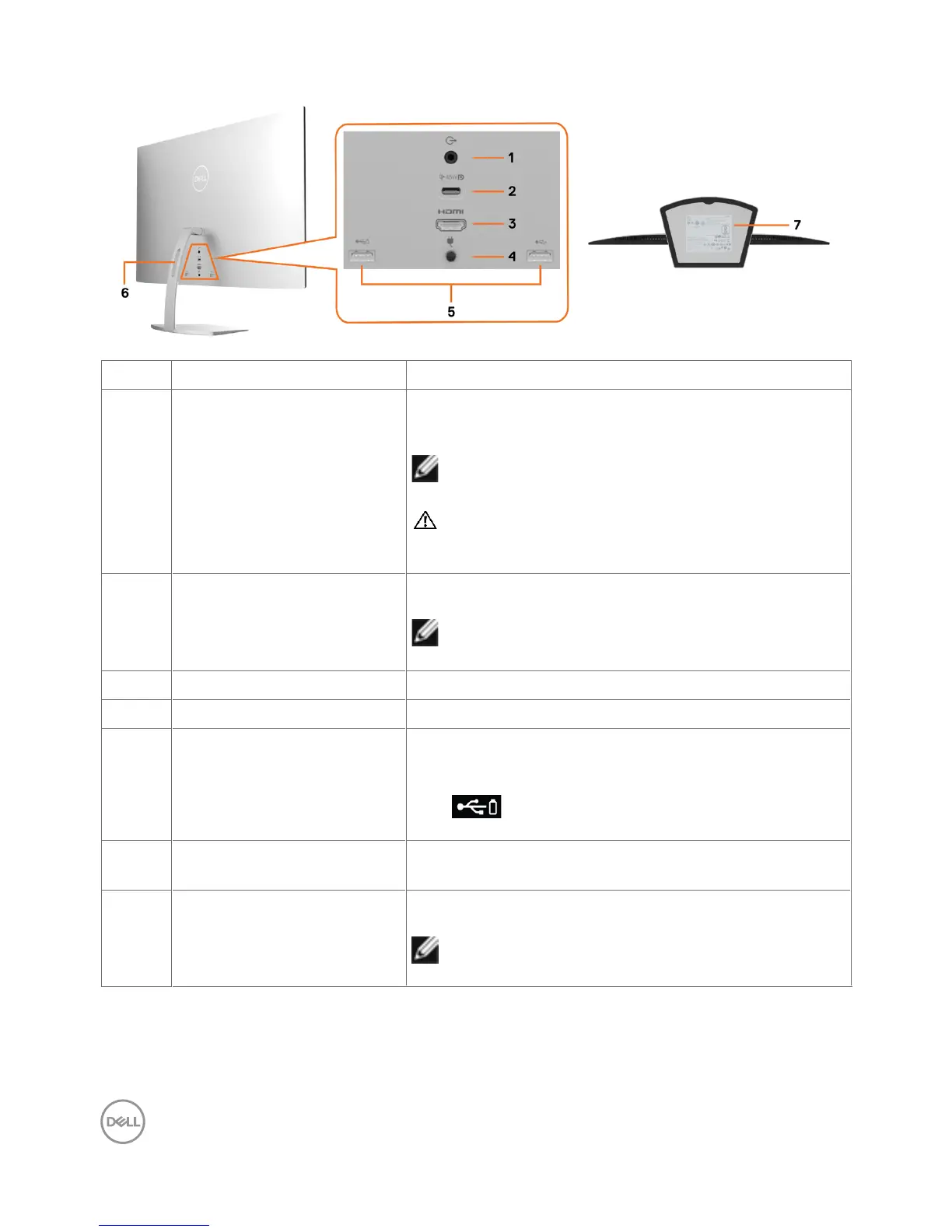
Back and bottom view
Label Description Use
1 Audio line-out port Connect speakers to playback audio coming through
HDMI audio channels.
Only supports 2-channel audio.
NOTE: The audio line-out port does not support
headphones.
WARNING: Excessive sound pressure from
earphones or headphones can cause hearing
damage or loss.
2 USB Type-C/DisplayPort Connect to your computer using the USB Type-C
cable. Also provides Power Delivery of up to 45 W.
NOTE: USB Type-C is not supported on Windows
versions that are prior to Windows 10.
3 HDMI port Connect your computer with an HDMI cable.
4 Power-adapter port Connect the power adapter to the monitor.
5 USB 3.0 downstream ports Connect your USB device. You can use these ports
only after you have connected the USB cable (Type-C
to Type-C) from the computer to the monitor. Port
with battery icon supports Battery Charging
Rev. 1.2.
6 Cable-management slot Use to organize cables by placing them through the
slot.
7 Regulatory label, barcode,
serial number, and Service
Tag label
Lists the regulatory approvals. Refer to this label if
you need to contact Dell for technical support.
NOTE: The rating label is located at the base of
the stand.


 To Next Page