EasyManua.ls Logo

Dell ST2010B - OSD Warning Messages

Dell ST2010B
29 pages
Print Icon
To Next Page IconTo Next Page
To Previous Page IconTo Previous Page
Loading...
Note: This monitor has a built-in diagnostics to automatically calibrate the brightness to compensate for CCFL aging.
OSD Warning Messages
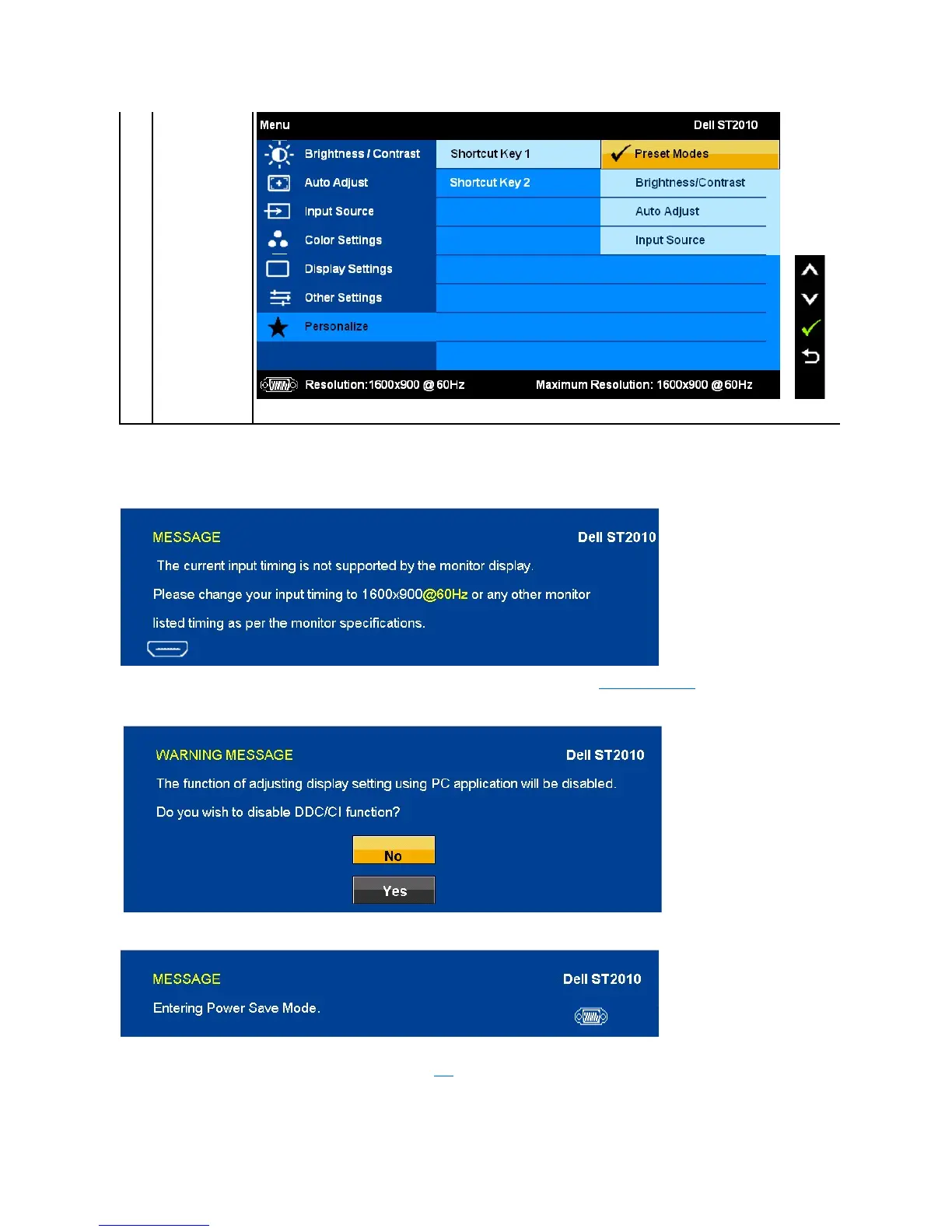
When the monitor does not support a particular resolution mode you will see the following message:
This means that the monitor cannot synchronize with the signal that it is receiving from the computer. See Monitor Specifications for the
HorizontalandVerticalfrequencyrangesaddressablebythismonitor.Recommendedmodeis1600 x 900.
YouwillseethefollowingmessagebeforetheDDC/CIfunctionisdisabled.
WhenmonitorentersPowerSavemode,thefollowingmessageappears:
Activate the computer and wake up the monitor to gain access to the OSD
If you press any button other than the power button one of the following messages will appear depending on the selected input:
VGA/HDMI input

Related product manuals