Quick Reference Guide 21
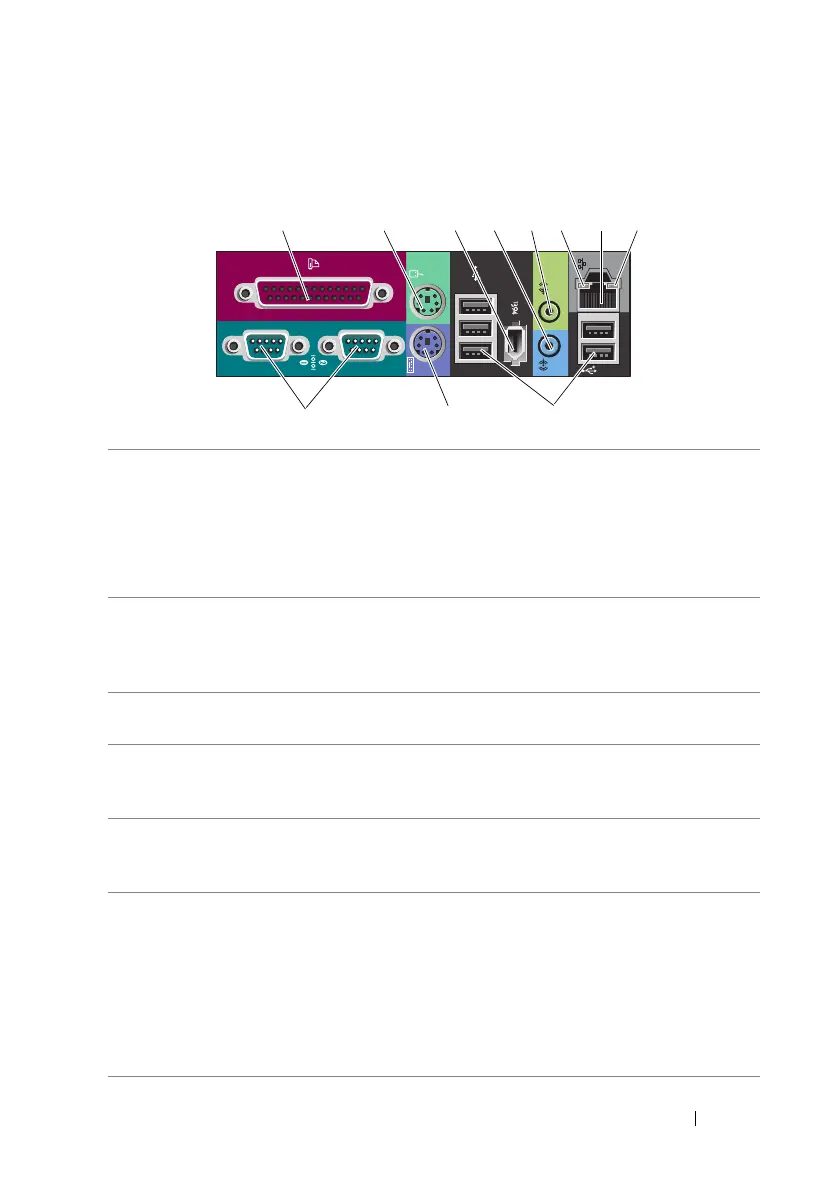
Back Panel Connectors
1 parallel connector Connect a parallel device, such as a printer, to the parallel
connector. If you have a USB printer, plug it into a USB connector.
NOTE: The integrated parallel connector is automatically
disabled if the computer detects an installed card containing
a parallel connector configured to the same address. For more
information, see "System Setup Options" in your User’s Guide.
2 mouse connector Plug a standard PS/2 mouse into the green mouse connector.
Turn off the computer and any attached devices before you
connect a mouse to the computer. If you have a USB mouse,
plug it into a USB connector.
3 IEEE 1394
connector
Use the IEEE 1394 connector for high-speed data devices such
as digital video cameras and external storage devices.
4 line-in connector Use the blue line-in connector to attach a playback device
such as an MP3 player, CD drive, or VCR. On computers with
a sound card, use the connector on the card.
5 line-out connector Use the green line-out connector to attach headphones and
most speakers with integrated amplifiers. On computers with
a sound card, use the connector on the card.
6 link integrity light Green — A good connection exists between a 10-Mbps
network and the computer.
Orange — A good connection exists between a 100-Mbps
network and the computer.
Yellow — A good connection exists between a 1000-Mbps
(or 1-Gbps) network and the computer.
Off — The computer is not detecting a physical connection to
the network.
12345678
11 10 9









 To Next Page