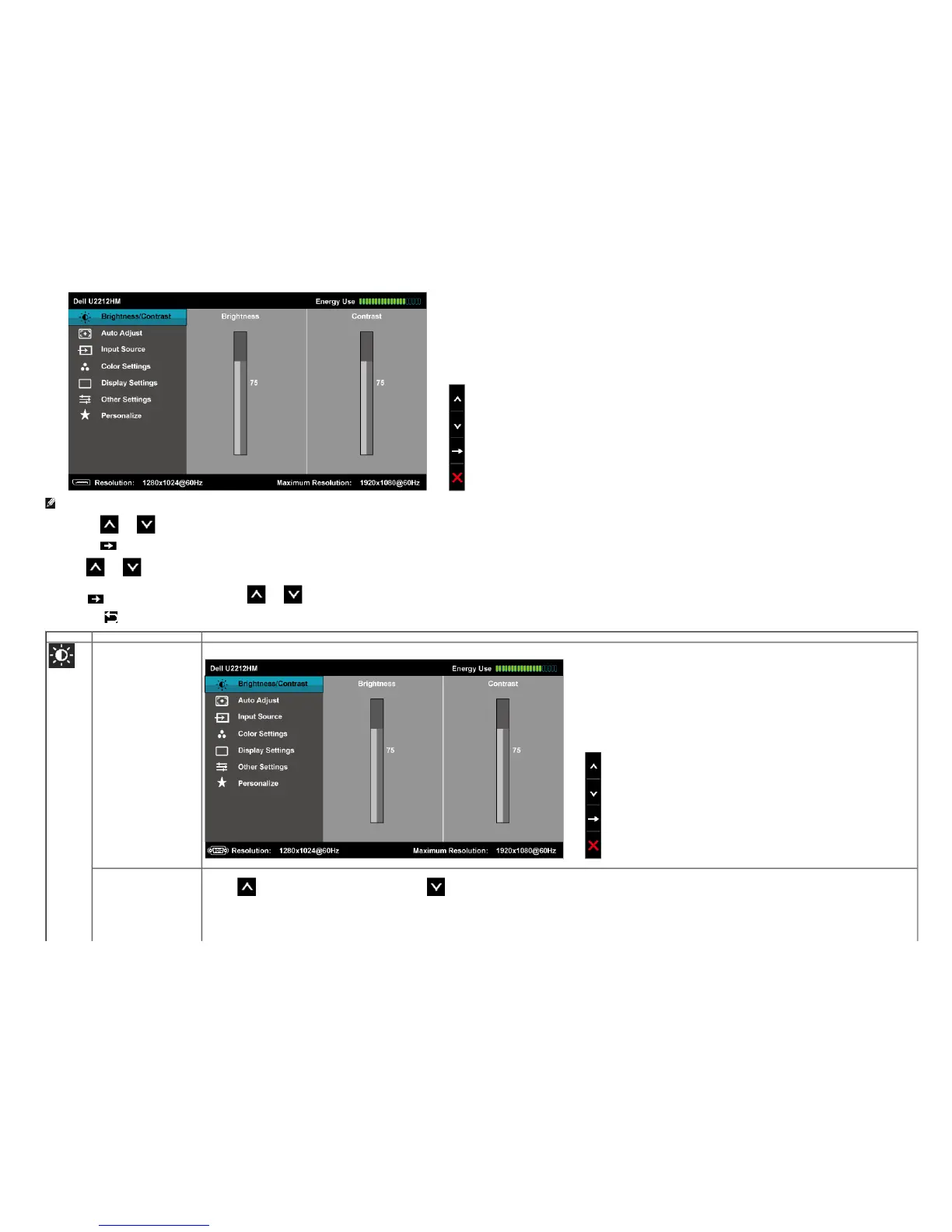
NOTE: Auto Adjust is only available when you use the analog (VGA) connector.
2.
Push the and buttons to move between the setting options. As you move from one icon to another, the option name is highlighted. See the following table for a complete list of all the options available for the monitor.
3.
Push the button once to activate the highlighted option.
4.
Push and button to select the desired parameter.
5. Push
to enter the slide bar and then use the and buttons, according to the indicators on the menu, to make your changes.
6.
Select the button to return to the main menu.
Icon Menu and Submenus Description
Brightness/Contrast Use this menu to activate the Brightness/Contrast adjustment.
Brightness Brightness adjusts the luminance of the backlight.
Push the
button to increase the brightness and push the button to decrease the brightness (min 0 / max 100).
NOTE: Manual adjustment of Brightness is disabled when Energy Smart or Dynamic Contrast is switched on.


 To Next Page