Back to Contents Page
Operating the Monitor
Dell™U2711FlatPanelMonitorUser'sGuide
Using the Front Panel Controls
Using the On-Scree Display (OSD) Menu
Setting the Maximum Resolution
Using the Dell Soundbar (Optional)
Using the Tilt, Swivel and Vertical Extension
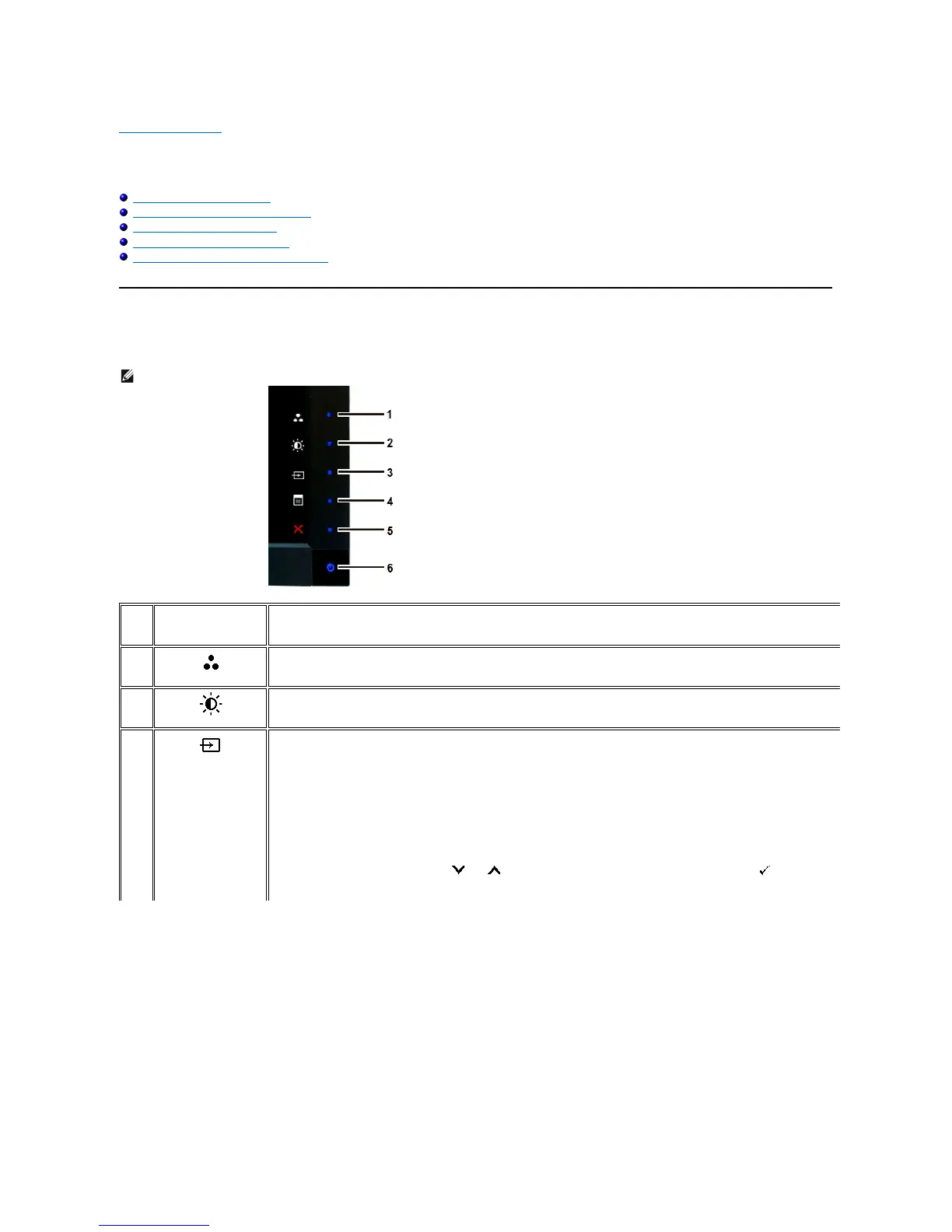
Using the Front Panel
Usethebuttonsonthefrontofthemonitortoadjusttheimagesettings.
NOTE: 1~5 are capacitive touch sensor keys, which are activated by placing your finger on the blue LED.
Use this key for direct access to the control menu that you define in the personalize menu.
*ThedefaultsettingsarePresetModesSelect,Brightness/ContrastSelectandInputSourceSelect.
Use this button for different displays modes on your monitor.
Use this button for direct access to the "Brightness/Contrast" control menu.
Use Input Source Select button to select between different video signals that may be connected to your monitor.
l VGA input
l DVI-D 1 input
l DVI-D 2 input
l DisplayPort input
l HDMI input
l Component video input
l Composite video input
Displays the source selection bar. Touch and buttons to move between the setting options and touch
to select the input source


 To Next Page