40 | Operating the Monitor
Icon Menu and
Submenus
Description
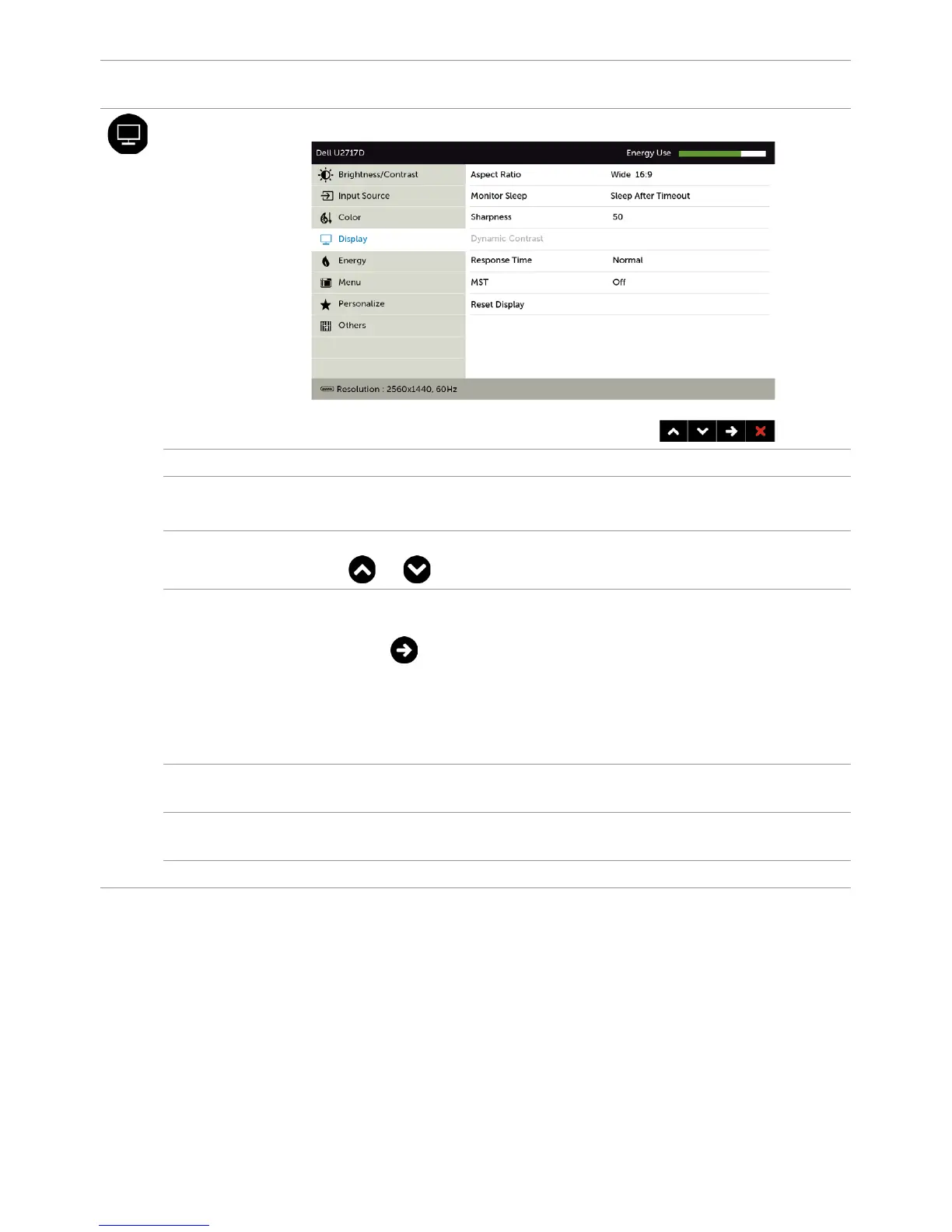
Display Use the Display menu to adjust image.
Aspect Ratio Adjust the image ratio to Wide 16:9, 4:3, or 5:4.
Monitor
Sleep
Sleep After Timeout: Monitor goes into sleep after timeout.
Never: Monitor never goes into sleep.
Sharpness Makes the image look sharper or softer.
Use or to adjust the sharpness from ‘0’ to ‘100’.
Dynamic
Contrast
Allows you to increase the level of contrast to provide sharper
and more detailed image quality.
Push the button to select the Dynamic Contrast “On”
or “Off”.
NOTE: For Game and Movie preset mode only.
NOTE: Dynamic Contrast provides higher contrast if you
select Game or Movie preset mode.
Response
Time
Allows you to set the Response Time to Normal or Fast.
MST DP Multi Stream Transport, Set to ON enables MST(DP out),
Set to OFF disables MST function.
Reset Display Restores the display settings to factory defaults.


 To Next Page