Operating the Monitor | 87
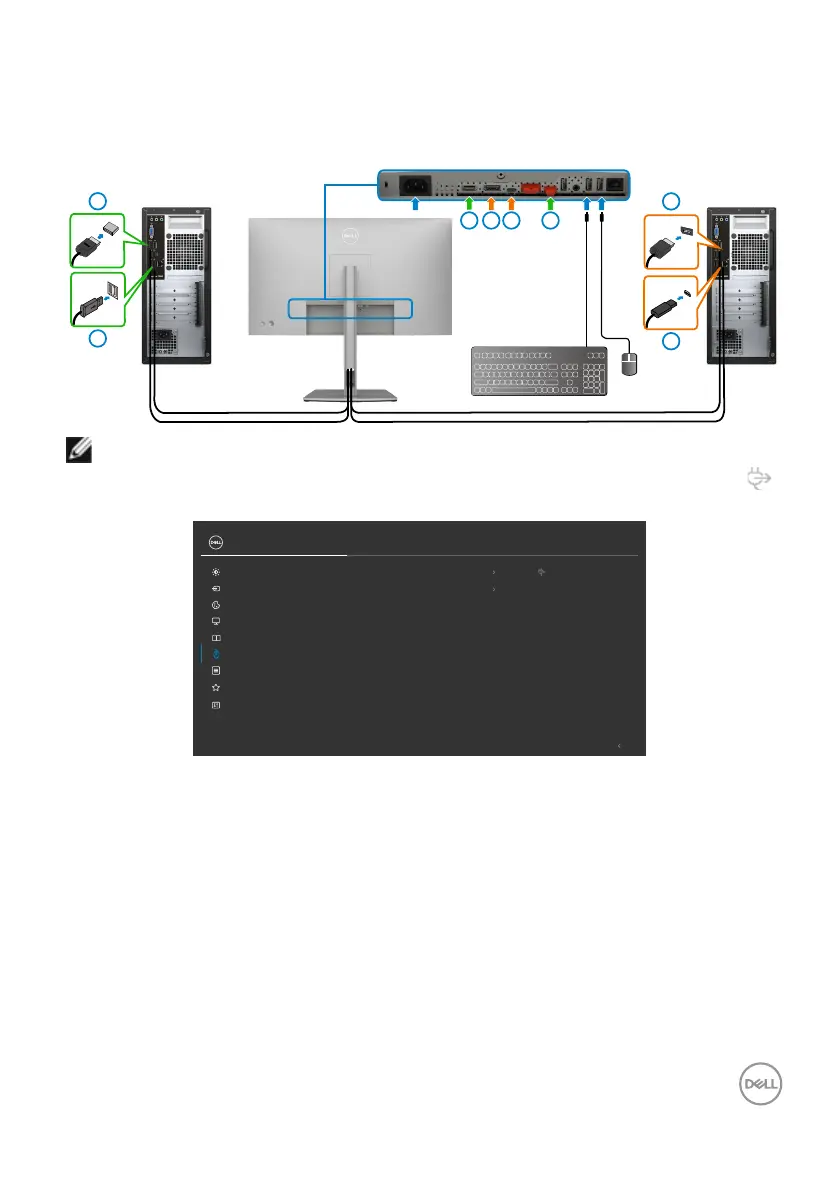
The following are illustrations of several connection scenarios and their USB Selection
menu settings, as illustrated in corresponding color frames.
1. When connecting HDMI + USB A to C to computer 1 and DP + USB A to C to
computer 2:
HDMI
1
1 3
2
2
4
4
3
USB-A
DP
USB A to C
NOTE: The USB-C connection currently supports only data transfer.
Ensure USB Selection for HDMI is set to USB-C 2 and DP is set to USB-C 1
90 W.
Exit
PIP/PBP
USB
UltraSharp 27 Monitor
USB-C 1 90W
USB-C 2
Personalize
Others
Menu
Input Source
Display
Color
Brightness/Contrast
DP assign to
HDMI assign to












 To Next Page