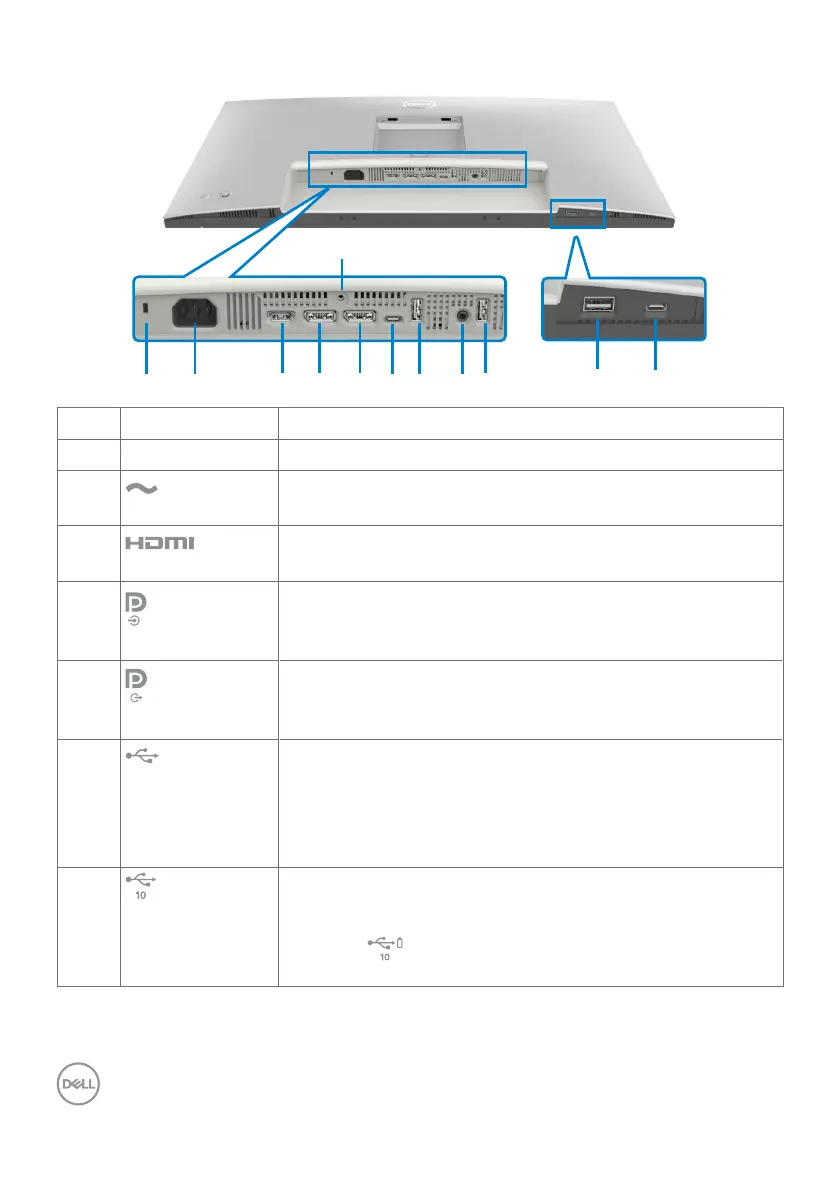
12 | About your monitor
Bottom view
11
12
10
Label Description Use
1 Security lock slot Secures monitor with security cable lock (sold separately).
2
Power connector
Connect the power cable.
3
HDMI port
Connect your computer with the HDMI cable.
4
DisplayPort (in)
Connect your computer with the DisplayPort cable.
5
DisplayPort (out)
DP output for MST (Multi-Stream Transport) capable
monitor. To enable MST, refer to instruction on section
Connecting the monitor for DP MST function.
6
USB-C
upstream port
Connect to your computer using the USB cable (A to C or
C to C). Once the USB cable is connected, you can use the
USB downstream connectors on the monitor.
NOTE: The USB-C port supports data only, not for video
input.
7,9,10
Super speed USB
10 Gbps (USB 3.2
Gen2) (3)
Connect your USB device. You can use these ports only
after you have connected the USB cable (A to C or C to C)
from the computer to the monitor.
Port with
battery icon supports Battery Charging Rev.
1.2.












 To Next Page