
 Need help?
Do you have a question about the Dell UltraSharp U4924DW and is the answer not in the manual?
Lists monitor package contents and details its key features and capabilities.
Identifies and describes the monitor's front, back, and bottom parts and controls.
Covers resolution, video modes, electrical, physical, environmental specs, and pin assignments.
Details USB and RJ45 connectors, interface specifications, and video/USB bandwidth.
Covers plug-and-play, pixel policy, and essential ergonomic guidelines for user comfort.
Step-by-step guide for attaching the monitor stand, including handling precautions.
Instructions for organizing cables and adjusting monitor position (tilt, swivel, extension, slant).
Guide for wall mounting and accessing the monitor's built-in USB hub.
Connecting the monitor via DisplayPort, HDMI, USB-C, RJ45, and USB 3.2 Gen2 cables.
Explains how to set up and use the monitor's power button to control PC power states.
Instructions for securing the monitor with a lock and safely removing the monitor stand.
How to power on the monitor and use the joystick for OSD menu navigation and basic adjustments.
Detailed guide to accessing and using OSD menus, including Brightness, Input Source, Color, Display, PIP/PBP, USB, Audio, Menu, Personalize, Others.
Setting maximum resolution, KVM switch, Auto KVM, and iMST for enhanced monitor functionality.
Running the monitor self-test and locking/unlocking control buttons to prevent access.
Addresses common issues like no picture, display problems, connectivity errors, and USB malfunctions.
Troubleshoots specific problems related to USB ports, Type-C charging, and audio output.
Provides information on FCC notices and links to EU product database for energy labels.
Information on how to contact Dell for sales, technical support, and customer service.
 General
| HD type | 5K Ultra HD |
|---|---|
| Color depth | 10 bit |
| Color gamut | 98 % |
| Pixel pitch | 0.234 x 0.234 mm |
| Pixel density | 109 ppi |
| Response time | 14 ms |
| Backlight type | LED |
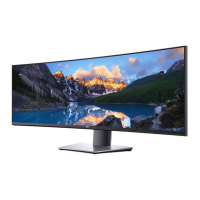
| Display diagonal | 49 \ |
| Surface hardness | 3H |
| Anti-glare screen | Yes |
| Display resolution | 5120 x 1440 pixels |
| Display technology | LCD |
| Native aspect ratio | 32:9 |
| Vertical scan range | 24 - 86 Hz |
| Maximum refresh rate | 60 Hz |
| Response time (fast) | 5 ms |
| Horizontal scan range | 25 - 115 kHz |
| Supported video modes | 480p, 576p, 720p, 1080i, 1080p |
| Viewable size diagonal | 1244.6 mm |
| Screen curvature rating | 3800R |
| Viewable size, vertical | 336.96 mm |
| sRGB coverage (typical) | 100 % |
| Contrast ratio (typical) | 2000:1 |
| Display number of colors | 1.07 billion colors |
| Display diagonal (metric) | 124.46 cm |
| Viewable size, horizontal | 1198.08 mm |
| Display brightness (typical) | 350 cd/m² |
| Supported graphics resolutions | 640 x 400, 640 x 480 (VGA), 720 x 400, 800 x 600 (SVGA), 1024 x 768 (XGA), 1152 x 864 (XGA+), 1280 x 1024 (SXGA), 1600 x 900, 1920 x 1080 (HD 1080), 2560 x 1080, 2560 x 1440, 3840 x 1080, 5120 x 1440 |
| Tilt angle range | -5 - 21 ° |
| Cable lock slot type | Kensington |
| Panel mounting interface | 100 x 100, 200 x 100 mm |
| HDCP version | 2.2 |
| USB hub version | 3.2 Gen 2 (3.1 Gen 2) |
| DisplayPort version | 1.4 |
| USB upstream port type | USB Type-C |
| USB Power Delivery up to | 90 W |
| USB Type-A downstream ports quantity | 5 |
| RMS rated power | 18 W |
| Input current | 3.6 A |
| AC input voltage | 100 - 240 V |
| Power supply type | Internal |
| AC input frequency | 50 - 60 Hz |
| Energy efficiency scale | A to G |
| Power consumption (max) | 290 W |
| Power consumption (standby) | 0.3 W |
| Power consumption (typical) | 45 W |
| Package weight | 27730 g |
| Doesn't contain | PVC/BFR |
| Sustainability certificates | ENERGY STAR, RoHS, TCO |
| Feet color | Silver |
| Product color | Black, Silver |
| Front bezel color | Black |
| Heavy metals free | Hg (mercury) |
| Market positioning | Office |
| Operating altitude | 0 - 5000 m |
| Non-operating altitude | 5000 - 12192 m |
| Storage temperature (T-T) | -20 - 60 °C |
| Operating temperature (T-T) | 0 - 40 °C |
| Storage relative humidity (H-H) | 5 - 90 % |
| Operating relative humidity (H-H) | 10 - 80 % |
| Cables included | AC, DisplayPort, HDMI, USB Type-A to USB Type-C, USB Type-C |
| DisplayPort cable length | 1.8 m |
 Weight and Dimensions
| Bezel width (top) | 12.09 mm |
|---|---|
| Bezel width (side) | 11 mm |
| Depth (with stand) | 269.14 mm |
| Width (with stand) | 1214.9 mm |
| Height (with stand) | 520.57 mm |
| Weight (with stand) | 15850 g |
| Bezel width (bottom) | 16.9 mm |
| Depth (without stand) | 112.09 mm |
| Height (without stand) | 365.95 mm |
| Weight (without stand) | 12150 g |








 To Next Page